

Testing is essential part of writing good piece of software. Writing unit tests and integration test are good way to test the application easily. It is recommended to run those tests before every commit during the development. However in practice it might be forgotten and eventually one might notice that some of the tests have been broken at “some point”.
This is where Continuous integration (CI) comes to the aid! CI aims to make developing easier and avoiding conflicts by integrating regularly and often, even after every commit. This involves compiling and building application as well as quality assurance by running tests.
There are a lot of CI tools out there. Especially Open Source projects can use many tools for free! One of the newest tools is Github Actions. It allows building workflows to run builds, tests and other stuff automatically based on the predefined rules straight out of a Github repository without any additional dependencies. For example it is possible to run the workflows after every commit to certain branches or pull requests targeting those branches. All this can be done with one or more simple .yml or .yaml files. We started looking how easy it would be to build a workflow to run tests automatically for our upcoming QAAVA QGIS plugin.
How to build a suitable environment for QGIS plugins
Many people familiar with QGIS plugin development have probably noticed that quite a lot of dependencies are needed to build a working development environment. Even the most simple unit tests might require initializing QGIS applications programmatically. Additionally some of the integration tests in plugins might require working PostGIS database connection. Is it possible to set up a similar environment using building blocks of Github Actions? Yes it is!
Familiar operating systems, such as Ubuntu can be used within workflows. One could in theory install all needed dependencies directly using package manager within OS. Luckily we don’t have to do that because docker and docker-compose can be utilized inside workflow! QGIS itself alongside with needed development dependencies can be found from QGIS docker image. With QGIS container, it is possible to mount the plugin code inside it and run commands with it. There are many ways to start PostgreSQL with PostGIS in a workflow. One alternative is to use custom made postgis-action. In our case we wanted to start PostGIS using docker-compose because we wanted to initialize fixtures to the database and use the same docker-compose.yml file to start PostGIS for local tests using pytest-docker.
With QGIS and PostGIS handled the last (but not the least) step was to actually get the tests running inside the environment. QGIS image does not have pytest installed but it can be installed with pip. After mounting the development directory inside QGIS container and stariting the tests the result was: … nothing. After quite a bit of debugging we found that when tests are initializing QGIS application, some kind of display is expected to be found. Otherwise the initialization and eventually the tests fail (without any message obviously). How on earth can a display be used within a virtual environment where CI workflow is running? Of course by mocking it. The command to run test with mocked display was xvfb-run -s ‘+extension GLX -screen 0 1024x768x24’ pytest.
Below is the whole tests.yml file that was needed to configure automatic tests. All that was required was to put the file inside .github/workflows directory in the root of the repository.
# workflow name
name: Tests

# Controls when the action will run. Triggers the workflow on push or pull request
# events but only for the wanted branches
on:
  push:
    branches:
      - master
  pull_request:
    branches:
      - master

# A workflow run is made up of one or more jobs that can run sequentially or in parallel
jobs:
  test:
    # The type of runner that the job will run on
    runs-on: ubuntu-latest

    # Steps represent a sequence of tasks that will be executed as part of the job
    steps:
      # Checks-out your repository under $GITHUB_WORKSPACE, so your job can access it
      - uses: actions/checkout@v2

      - name: Pull qgis image
        run: docker pull qgis/qgis:final-3_12_3

      - name: Pull PostGIS image
        run: docker pull kartoza/postgis:12.0

      - name: Set up PostGIS databases
        run: docker-compose -f Qaava/test/docker-compose.yml up -d

      # Runs all tests
      - name: Run tests
        run: docker run --rm --net=host --volume `pwd`/Qaava:/app -w=/app qgis/qgis:final-3_12_3 sh -c "pip3 install -q pytest && xvfb-run -s '+extension GLX -screen 0 1024x768x24' pytest -v"
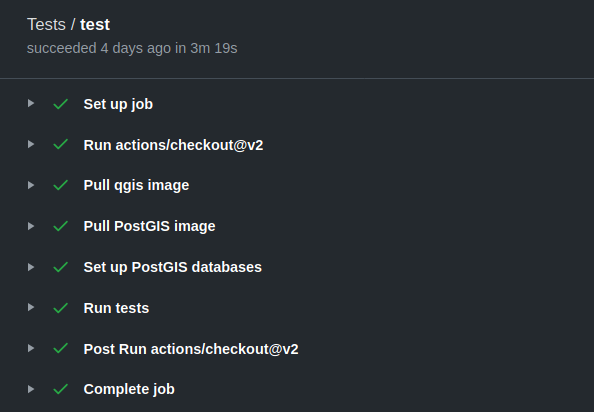
After commits and pull requests to the master branch, the workflow is automatically started and the result can be seen from the actions page or from little green (or red) tick next to the commit. You can also integrate little badge on README.md to show to users that test are passing.
What about building, translating and deploying to QGIS Plugin repository?
Many other kinds of workflows can be configured to achieve specific goals. These can be written by hand with the help of CI tools or you can utilize great python library qgis-plugin-ci designed to handle building, translating, deploying and releasing for you! It can be even integrated to other CI environments such as Github Actions to support custom workflows.
Extra tip!
Did you know you can use the same QGIS docker image to run QGIS using docker? This is useful for example when testing compatibility of the plugin with multiple QGIS versions. In Ubuntu this would work with following command that starts QGIS and mounts QGIS python plugin folder and home folder to be used in QGIS:
xhost +
docker run --rm --name qgis_final-3_12_3 \
        -it \
        -e DISPLAY=unix$DISPLAY \
        -v /tmp/.X11-unix:/tmp/.X11-unix \
        -v ${HOME}/.local/share/QGIS/QGIS3/profiles/default/python:/root/.local/share/QGIS/QGIS3/profiles/default/python \
        -v ${HOME}:/home/${USER} \
        qgis/qgis:final-3_12_3
If you’re new to PostGIS and want to try it out, one of the first things you’ll want to do is to import some data into your database. I want to provide an overview of how to accomplish this. The post provides an introduction to some common data import terminology, details on where to find spatial data and tools for importing data to PostGIS, and specific instructions for how to use each tool to perform the import.
For an introduction to PostGIS, see my previous blog post here.
Introduction
If you’ve worked with other data types before, then most of the process for importing spatial data will be self-explanatory. However, for someone working with spatial data, acronyms like CRS and SRID might be confusing.
For data import, you should know the coordinate reference system (CRS) your data is in and which spatial reference identifier (SRID) number is used to reference that specific CRS. The SRID defines all the parameters of a data set’s geographic coordinate system and projection. Using an SRID is convenient because it packs all the information about a map projection into a single number. When creating spatial objects for insertion into the database, the SRID is required.
Where to find spatial data?
Before you can load any data to your database, you need to acquire it. I think that one of the most underrated skills for GIS experts is to know where to find suitable data. If you are using PostGIS to manage the data that you have in your organization already, you don’t have to start your process by searching new data, but rather working with your own. I have added here a few data sources that you can try out:
- OpenStreetMap: OpenStreetMap (OSM) is a collaborative project to create a free editable map of the world. Many people refer to OSM as the Wikipedia of maps. If you seek easy ways to get an extract of the data, you can check for GeoFabrik for Shapefiles or osmdata.xyz for GeoPackages.
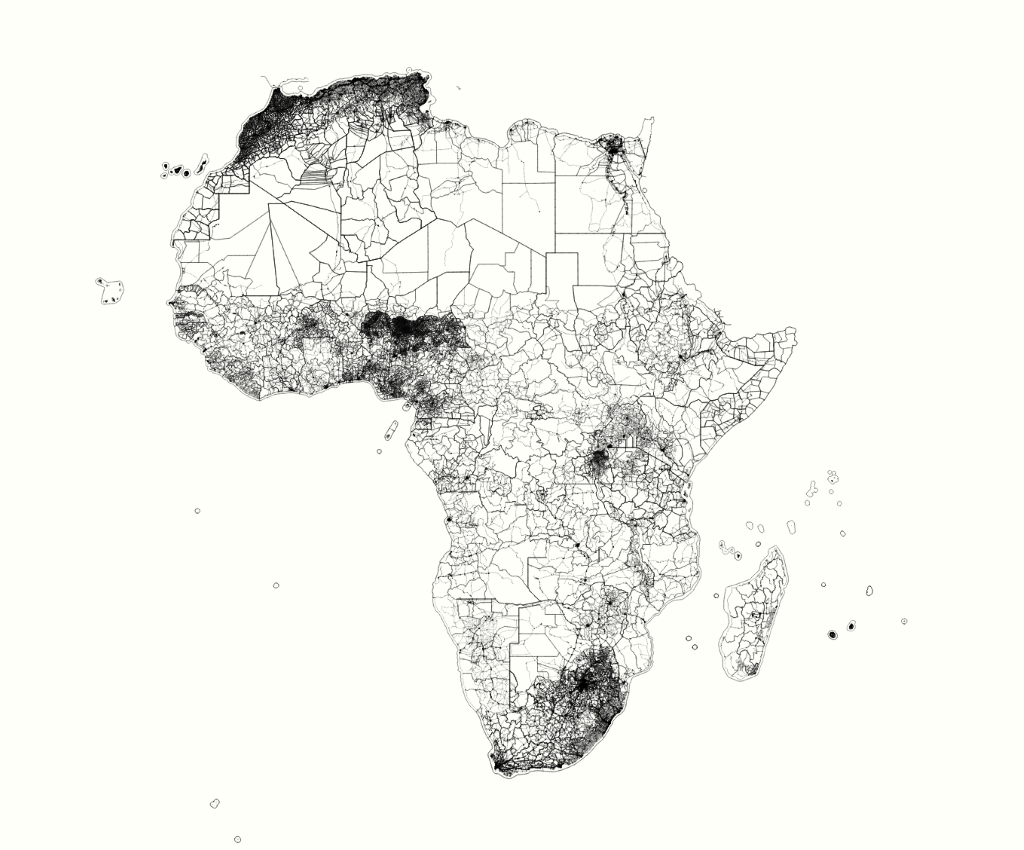
- Natural Earth Data: Natural Earth is a public domain map dataset available at 1:10m, 1:50m, and 1:110 million scales. Featuring tightly integrated vector and raster data, with Natural Earth you can make a variety of visually pleasing, well-crafted maps with cartography or GIS software. So, if you need country boundaries, states or railroads in the world on a very general level, this is your data of choice.
- Free GIS Data: The page contains a categorised list of links to over 500 sites providing freely available geographic datasets.
So, after you have loaded some files to your local disk, you can start looking at different ways on how to import them to PostGIS.
Tools for importing data to PostGIS
Although the official documentation states that there are two ways to get data into a PostGIS/PostgreSQL database, the ways to achieve this are much more diverse. The two recognized by the documentation are formatted SQL statements or using the Shape file loader/dumper (shp2pgsql), so we can start with those.
Formatted SQL
So loading with plain SQL is not recommended and nobody probably does it, but going through this method first, gives you a good idea of what is happening behind the scenes. It’s important to know how PostGIS handles spatial data types and the content of the geometry column, which can’t store strings or integers.
For example, a valid insert statement to create and insert an OGC spatial object would be:
INSERT INTO data.islands(geom, the_name )
  VALUES ( ST_GeomFromText(‘POINT(0 0)’, 4326), ‘NULL ISLAND’);
Another example is a method where you already have latitude and longitude data as text or numbers in your table and you want to build a valid geometry object from those.
First you need to add a geometry column for your data:
SELECT AddGeometryColumn (‘data’,’islands’,’geom’,4326,’POINT’,2);
Next you could update the content of the geometry column based on the columns from the data
UPDATE data.islandsset geom = ST_SetSRID(ST_MakePoint(longitude, latitude),4326);
In a nutshell: a simple insert works, but remember to build your geometry in a valid way!
For better performance, you should use COPY statements instead of INSERT, as it results to much better performance.
shp2pgsql
The most common data format for spatial data has traditionally been the ESRI shapefile. shp2pgsql is a command line tool to import ESRI shapefiles to the database. Under Unix, you can use the following command for importing a new PostGIS table:
shp2pgsql -s <SRID> -c -D -I <path_to_shapefile> <schema>.<table> | \
  psql -d <databasename> -h <hostname> -U <username>
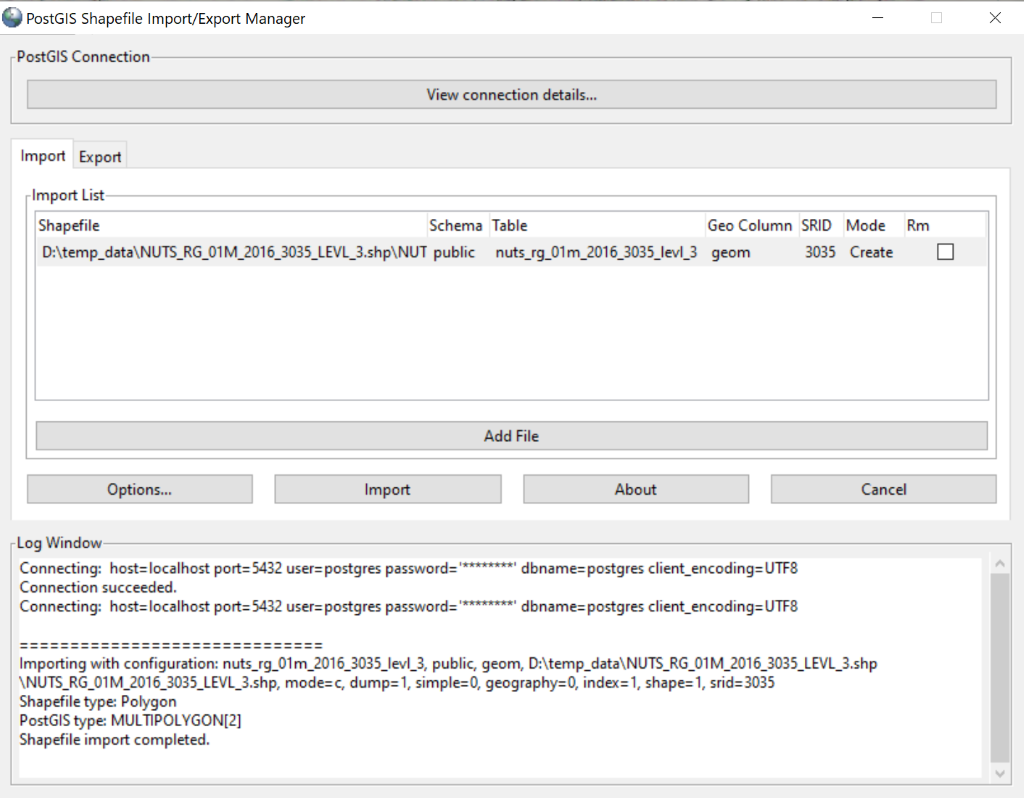
On Windows the process is also simple. Additionally there’s also the shp2pgsql-utility which is a small GUI to import shapefiles to PostGIS.
ogr2ogr
The tool I use most often for loading data to PostGIS is probably ogr2ogr. It is a very powerful tool to convert data into and from PostGIS to almost all possible vector data formats. GDAL/OGR is a software package that powers a great variety of different geospatial software tools and it comes with QGIS already installed on the server computer. Conveniently ogr2ogr comes with the QGIS installation and Windows users can access the commands directly through OSGeo4W Shell. So for a single import of a shapefile, you would run the following command:
ogr2ogr -f “PostgreSQL” PG:”host=<hostname> dbname=<dbname> user=<yourusername> password=<yourpassword>” <dir>\yourdatafile.shp -lco SCHEMA=foo
The parameters used to run the ogr2ogr-command here are:
-f output file format name
-lco layer creation option
Combining ogr2ogr commands with simple bash allow you to load a folder full of shapefiles!
for %i in (*.shp) do ogr2ogr -update -append -f PostgreSQL PG:”host=port=5432 dbname= user= password= schemas=myshapefiles” %i
This small and simple script has been useful many times. This will create you a table automatically and append all the files to the correct tables.
Loading data with QGIS
QGIS allows a few different approaches when it comes to loading spatial data to PostGIS. In my previous blog post you can find some basic information about QGIS and how to connect to PostGIS. Inside QGIS you can do data import through DB Manager, but I recommend using Export to PostgreSQL, as it is using COPY statements in the background rather than INSERTS and performance is much better. You can load data layers from the project or from disk. Below you see a screenshot from the main dialog.
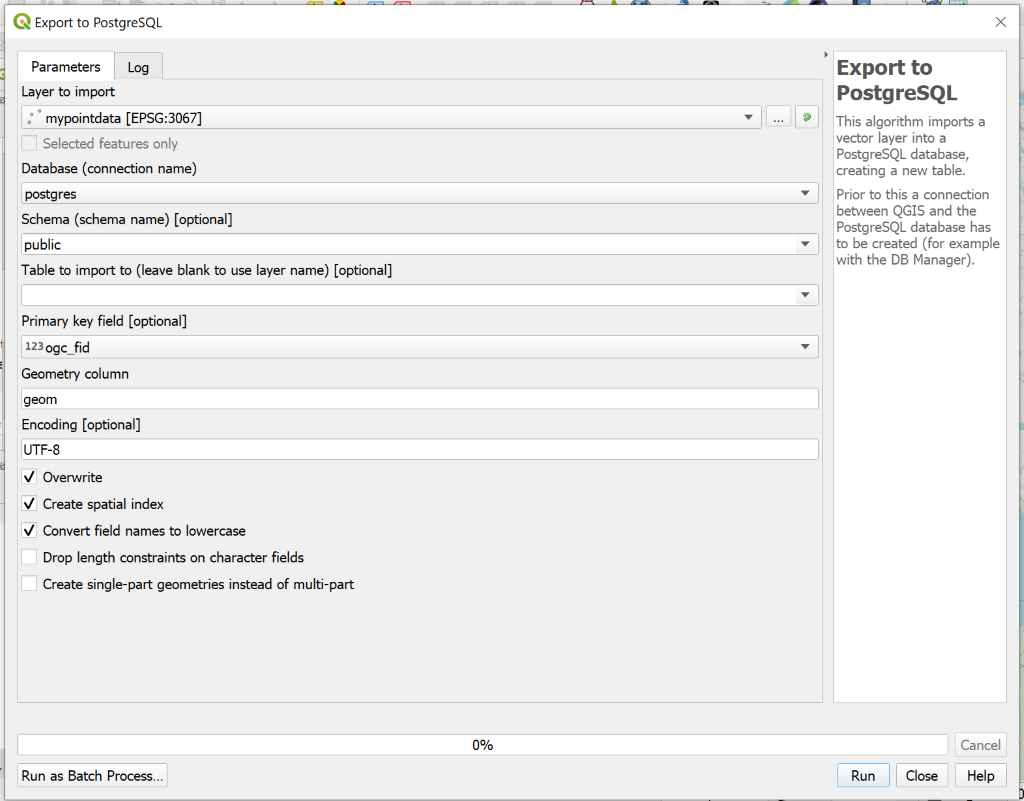
Besides ogr2ogr this is another tool for data imports that I use very often, as most of my workflows are strongly QGIS related.
Loading data with Python & psycopg2 or GeoPandas
If you are integrating PostGIS into an application and want to automate things, GUI-workflows are not viable options. Instead you might want to look into loading data with Python. The most obvious choice for making a connection from Python to PostGIS is psycopg2. The most important thing to understand when working with psycopg2 are the data types for geometries that were already mentioned earlier. Inserting latitude and longitude values as such to a geometry column will not work, but instead you have to build your insert value with the lat and long parameters as follows:
ST_SetSRID(ST_MakePoint(%s, %s), 4326)
Other aspects of psycopg2 workflows won’t differ much from normal Python-PostgreSQLdata pipelines.
If you are using Pandas library with your data, you might be also interested in knowing that there is a GeoPandas library especially for geospatial data. Just recently there was an addition to GeoPandas to import a GeoDataFrame to PostGIS! It supports the same functionalities as Pandas, so you can also use “replace” and “append” when pushing the GeoDataFrame to PostGIS.
raster2pgsql
If you are working with raster data, the benefits of moving your data from a file to a database are not nearly as obvious as with vector data. However PostGIS offers functionalities to store and analyze raster data and a wide range of raster functions. Check for example this blog post about working with raster in PostGIS. For loading raster to PostGIS, two main options are raster2pgsql tool or GDAL with Python. Just like shp2pgqsl, raster2pgsql comes packaged with a PostGIS bundle installation.
Basic structure of a raster2pgsql command is as follows:
raster2pgsql raster_options_go_here raster_file yourtable > out.sql
Just like shp2pgsql, this outputs a SQL file that you can then run in PostGIS.
Tools for OpenStreetMap data
OpenStreetMap is a slightly specific case, but worth going through here separately, as it is widely used. The OpenStreetMap data structure in a database is by default divided into lines, roads, points and polygons. Depending on the application, you might want to change the style the data is loaded. However, the default structure works well with many tools and services. Most Linux distributions include osm2pgsql, which is a good generic tool in importing a small piece of OSM data to PostGIS. osm2pgsql is actively maintained and widely used.
A basic way to load the data into PostGIS for rendering would be
osm2pgsql –create –database postgres data.osm.pbf
This will load the data from data.osm.pbf into the planet_osm_point, planet_osm_line, planet_osm_roads, and planet_osm_polygon tables.
A thorough walkthrough on the osm2pgsql import process can be found at this blog.
Imposm3, written in Go, is designed to create databases that are optimized for rendering. You need a json mapping to define the data schema. For a simple import with imposm you could try the following command:
imposm import -connection postgis://user:password@host/database \
  -mapping mapping.json -read /path/to/osm.pbf -write
Conclusions
Now you might be overwhelmed with the number of tools available to achieve the same goal. But what is the best way of loading data to PostGIS?
It depends. Are you loading static files or something through a live API? Do you have PostGIS installed on your own server or do you have a hosted service? How will you be using the data? For example, with OpenStreetMap data, you must consider whether you’re updating the data or performing a one-time load. Note that also ETL tools such as FME and Deegree allow data loading, if those fit your purpose better than any of the tools I’ve presented here.
As a bonus, if you don’t want to load data at all, I should also mention the ogr_fdw. If you are familiar with traditional PostgreSQL foreign data wrappers, this is basically the same thing but for spatial data. Basically, the data can be in a ESRI shapefile or a shapefile, and stored to PostGIS as a foreign table.
Hopefully, this gives you a good overview about the different ways to get spatial data into your PostgreSQL tables. Happy exploring!
My colleague Topi crafted a beautiful map for the #30DayMapChallenge showing the ecoregions of the world in a globe-like map with round halo. I was amazed when he told me that he had done it using nothing but QGIS. This made me wonder what if this could be scripted and even make it as a plugin? I decided to practice my PyQGIS skills and try to develop my first QGIS 3 Plugin.
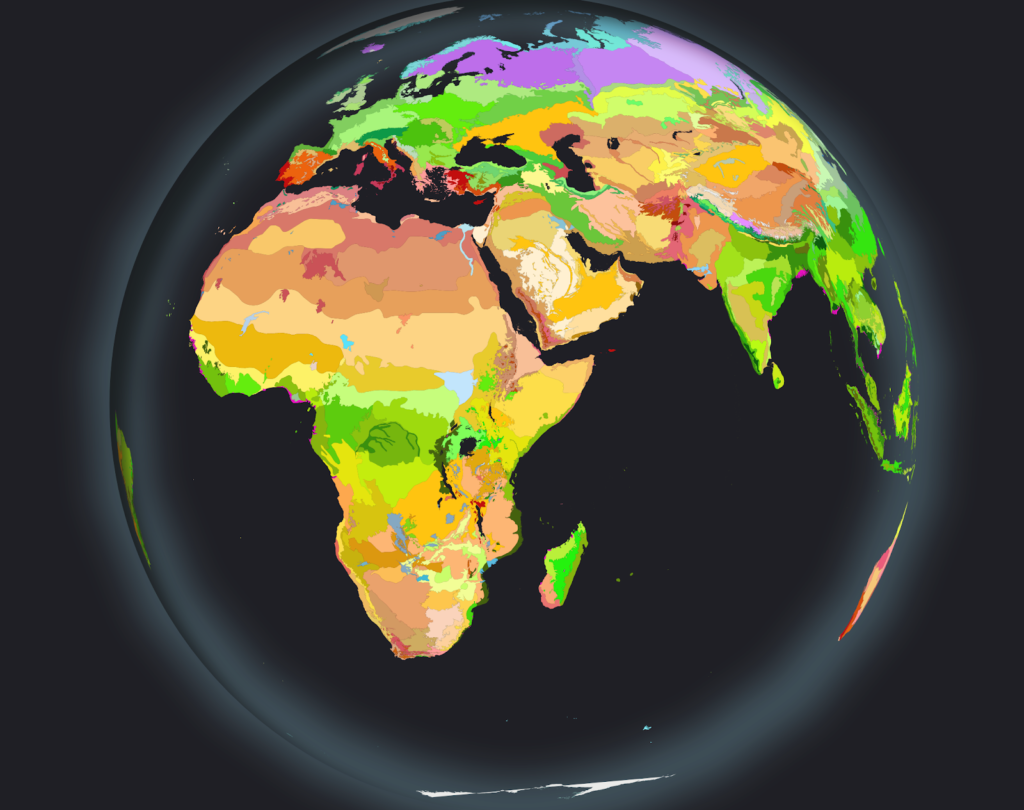
Experimenting with Python console
Before creating a draft of the plugin I started experimenting with integrated QGIS Python Console and its editor to see whether I could recreate the process programmatically. Changing the project projection to Azimuthal Orthographic “world from space” projection was fairly easy using instructions provided Alasdair Rae especially since the clipping method described here is no longer needed since QGIS 3.2. To populate the map I just used 1:110 Million scale countries provided by Natural Earth. The most difficult part in the process actually was creating the halo with shadow effects. First I tried creating the halo layer using Natural Earth’s 1 degree graticule line layer converted into a polygon layer. This resulted in some rendering artefacts and slow rendering.

Second attempt was to use a point located in the origin of interest and to use Geometry Generator style to buffer it with the radius of the earth. Here the key finding was to change the coordinate system of the layer to match the previously set word from space projection of the QGIS project to avoid some unwanted behaviour.
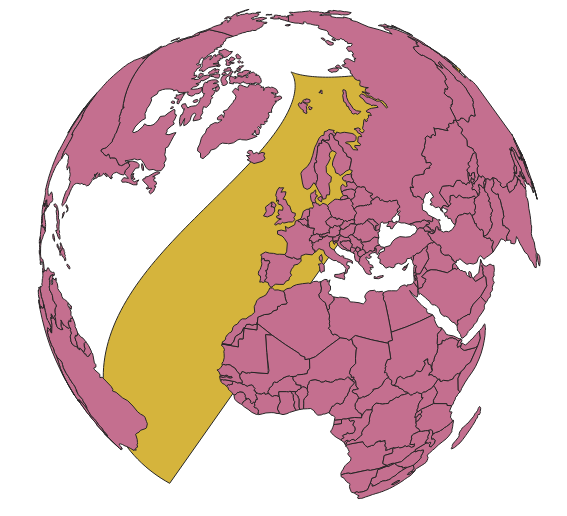
This was a lightweight solution but unfortunately the number of segments in the circle was not satisfactory and for some reason the halo disappeared when zoomed in.
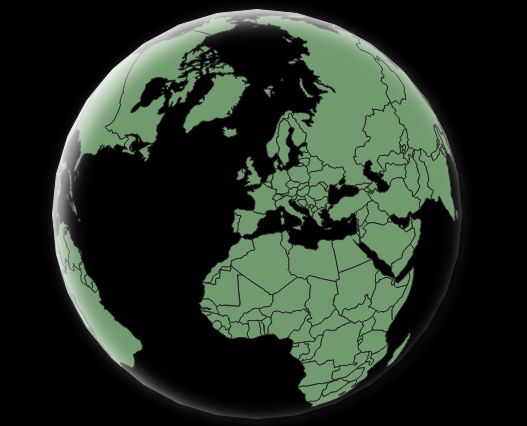
Third attempt was to use a point located in the origin of the projection buffered with radius of the earth to compose a polygon. This seems like a best solution for this time. The shadow effects were achieved using Inner Shadow and Drop Shadow Draw effects (which was quite difficult to get it working with PyQGIS at first).
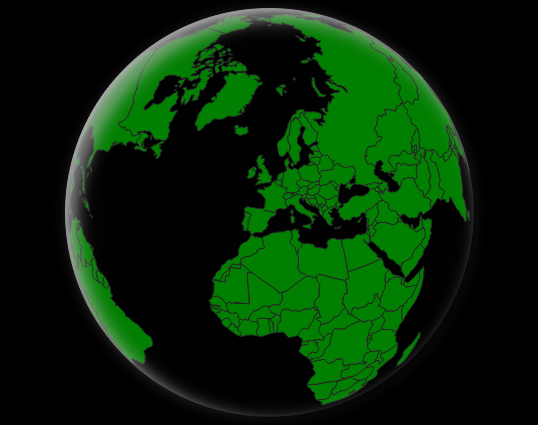
Plugin Builder and onwards
After having the initial logic ready in the form of a snippet I decided to build an actual plugin for it. As recommended I started with a Plugin Builder and made the first release fairly quickly. As anticipated, the most time consuming task was the user interface design and implementation. After initial release the open source community showed its power and people started to report bugs and feature enchantment ideas for the plugin. Fairly quickly a simple project grew to have additional features such as geocoding, visualization customization, Sentinel-2 cloudless data source and ability to add globe to the layout.
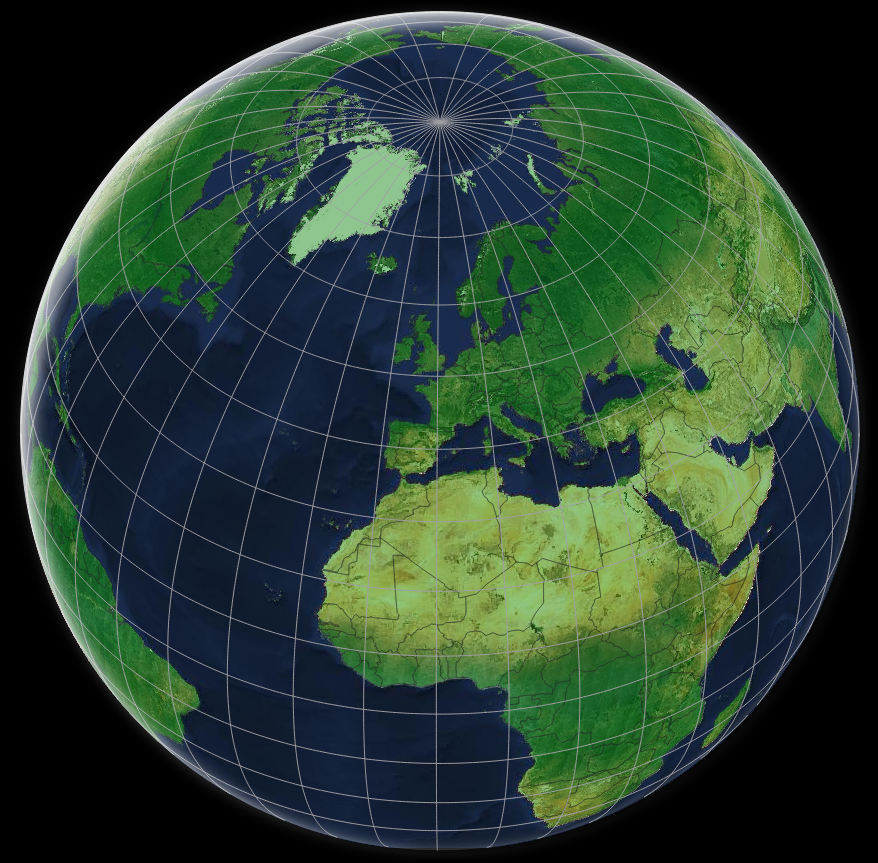
Go ahead and test the plugin on your QGIS! Globe Builder can be downloaded from the QGIS Plugins Repository or from Github. And of course, if you find any bugs or have improvement ideas, do not hesitate to report them!
Lessons learned during the development
Here are a few tips that I found helpful during the development of the plugin:
- Experiment everything in the Python console of QGIS with the help of internal editor first and only then apply the logic to the plugin code
- Having a proper Makefile helps automating the repeating tasks in the development
- Using relative imports inside plugin code makes things lot easier
- Use either GNU GPL-2.0 or GPL-3.0 license in your project
New year has started, but it is still nice to reflect how I accidentally managed to reduce the productivity of the GIS global industry by a few percentage in November. This happened when 30DayMapChallenge went viral on Twitter and hundreds of people started making and publishing beautiful maps about different themes.
How things got started. And out of hands.
Like most days, I was browsing Twitter on my way to the office on the bus one morning late October. My feed had several beautiful #Inktober posts and I started thinking if a similar challenge could be done with maps. I asked for initial interest towards this kind of challenge and it got really positive response. The hashtag #mapvember was already used, so I chose #30DayMapChallenge.
So about a week later I spent roughly 15 minutes coming up with the categories. The vague rules in the tweet were invented on the fly while publishing the tweet. Looking back, I found it somewhat amusing how some participants started referring to these as the official rules of the challenge, although my initial idea was to keep everything as open as possible: anyone can join the challenge, anyone can leave the challenge and nothing is compulsory.

Soon after publishing the tweet with the categories, it was clear that people are really into the challenge. During the first day it got already dozens of retweets and there was no turning back. On the first day of November I was stunned when opening Twitter as people around the world were doing the challenge. This continued for several days and latest when I saw a tweet about the challenge being mentioned on Mexican TV, the challenge had really gone viral.
Global reach, stunning maps and amazing stats
The statistics were amazing and exact numbers vary slightly depending how things are counted. According to Tweepsmap the hashtag got more than 22 000 tweets in total with a reach up to 19 million (!) Twitter users. Huge credit for collecting stats aboutthe challenge goes to David Friggens, who created a whole website dedicated for the maps and stats around 30DayMapChallenge. To make it even better, he has published also the code for his site.
According to David at least 631 people had been tweeting using the hashtag and almost 3 500 maps were published by more than 400 people. Five countries with most activity were USA, Mexico, UK, Chile and France. There were 25 people who managed the massive task of creating all 30 maps! Even I could not do it myself and ended up publishing some of my older maps on many days.
One really surprising aspect of the statistics and the whole challenge was the variety of tools that was used. Biggest surprises to me were popularity of R, difference between ArcGIS and QGIS and also the lack of Python based visualizations.
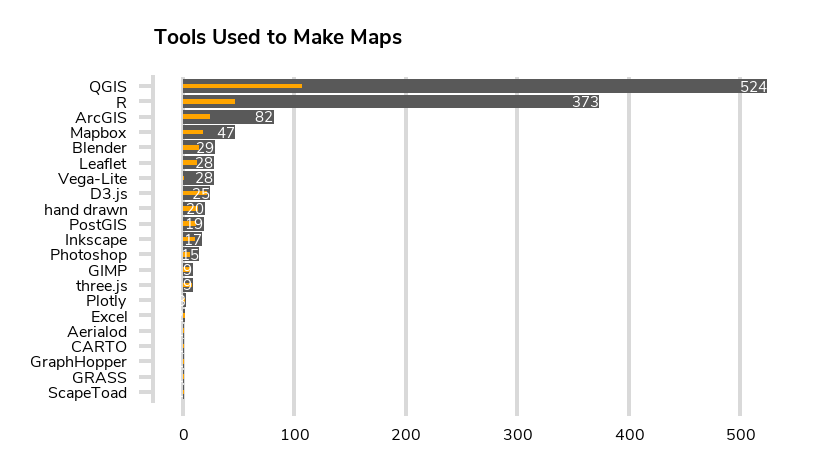
After the challenge I was about to make a collection with some of my favorite maps, but soon realised that it would be almost impossible to put the entries in some kind of an order for a few reasons. Some people spent hours on each map, whereas others posted a few maps in 15 minutes. Others focused very much on the visual aspect of the maps, whereas others were more on the data-analysis side. Additionally some people were professionals in the field and some published their very first maps. I think everyone who published even a single map should deserve a mention.
If you want to browse the maps, you can search for the hashtag on Twitter. David Friggens has a gallery about the maps on his site, but another one worth mentioning is the Tableau collection by Aurelien Chaumet. One really stunning set of maps was produced by Jo Wood, Professor of Visual Analytic who also published a GitHub repo of all of his maps with code!

Bigger and better in 2020
As the popularity of the challenge went above all expectations, I am planning to organize the challenge in November 2020. Few improvements will be made, of course, but one thing won’t change: doing 30 maps in one month is a very tough task, but I aim to keep it that way.
I will be moving the materials from a single tweet to GitHub and have it organized in a similar fashion to Tidy Tuesday data challenge. I have already set up a repository and now I am inviting all of you to contribute to building the challenge, for example by suggesting categories or datasets that could be used. My aim is to have the repository ready with categories 1st of October 2020.
The #30DayMapChallenge really showed the power of the global mapping community. Thank you for participating and let’s do it bigger and better in 2020!
So, mapping agencies are going full-steam on PostGIS, the geospatial database choice of modern times. Recently, we at Gispo studied briefly the utilization of PostGIS within national mapping agencies. As one of the concluding remarks, we could say that the majority of the mapping agencies we looked into leverage PostGIS for storing and editing or analyzing and deriving insights out of geospatial data.
For the readers that aren’t familiar with PostGIS; it is a geospatial database extension for the open source Relational Database Management System PostgreSQL. It’s a robust, well-known and stable database environment for storing and analyzing geospatial data.
Institut Géographique National, the French mapping agency, together with Ordnance Survey seem to hold the first place on the complexity and volume of the usage on PostGIS. In France, they’ve been using PostGIS since 2002! The processes seem very interesting and go beyond the common. For example, the unmet goal of efficiently managing and analyzing 3D geospatial data is something where the French institute has advanced quite a bit (read more here).
But let’s not announce any winners, since somebody (you!?) reading this blog post might actually represent a mapping agency that has the best geospatial IT setup on PostGIS ever made.
Software that’s easy to deploy
It seems that PostGIS is widely used across the European mapping agencies. Among the agencies PostGIS seems to cover geospatial solutions from small to big: if PostGIS is not backing up some mission-critical process, it’s some process with smaller geospatial requirements. For these mapping agencies PostGIS seems to be an easy-to-implement low-risk geospatial software tool.
For example, in Germany, within the Federal Agency for Cartography and Geodesy, PostGIS seems to be the backbone of some INSPIRE related services. In Norway it seems to back up the open geo-data portal with providing data in PostGIS format (read more here). In many agencies PostGIS seems to be part of the stack, although the legacy systems undoubtedly are firmly placed in many European agencies as the core infrastructure components.
Back here in Finland, National Land Survey of Finland utilizes PostGIS for example to serve the geospatial data APIs (WFS, WMTS) for the topographic and other databases, as we can see from the presentation their Director General Arvo Kokkonen gave at Smart Land Administration 2018.
Here’s a point to make: PostGIS seems to be a risk-free, easy-to-implement software package from small to big geospatial data processes. You would suppose that this is the way mapping agencies go from testing PostGIS to implementing some smaller processes, eventually getting closer to resolving mission-critical processes with it.
Data, a lot of it
Denmark and the Netherlands seem to lead the way when it comes to opening for the public high-quality geospatial datasets on buildings or other huge datasets. For example, Denmark serves geospatial datasets with an open source stack of PostGIS + MapServer that receives on yearly basis close to 7 billion server queries.
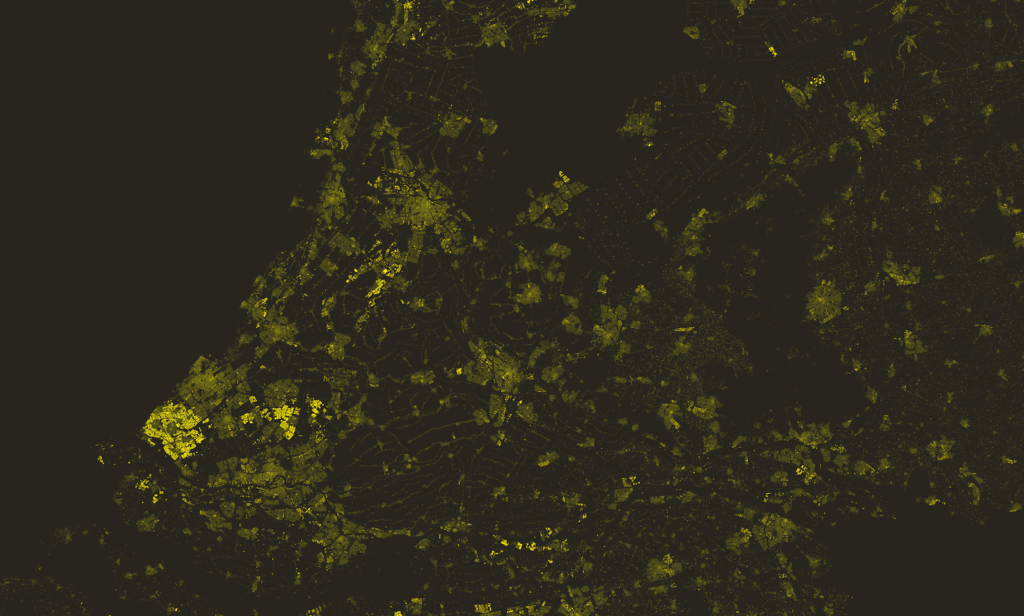
Meanwhile in the Netherlands, PostGIS is also used (read more from this slidedeck) within the PDOK project that is the leading geodata platform in the Netherlands (check out the factsheet on PDOK from here and see also their Github account).
Then there was the Basisregistratie Adressen en Gebouwen (BAG) project that held info on basic registers including buildings and addresses. Interestingly the topographic data on buildings was augmented with buildings height and other data through a research project at the Delft University of Technology. The project was implemented by a research group called 3D Geoinformation who built a data pipeline for augmenting, updating and sharing the data as open data through their website and – what’s best in PostGIS – in GeoPackage formats. So, here the data went from the mapping agency to a research group who augmented it to cover height and other attributes derived from lidar datasets.
Additionally, it’s worth mentioning that the data quality and the straightforward method they deploy for sharing it is gaining attention as the standard way to use the data in the Netherlands. Just go and download the dataset on ~10 million buildings in PostGIS format and use it in whatever client-side software of preference (QGIS!?). You can access the building datasets here: http://3dbag.bk.tudelft.nl/downloads
As we know, PostGIS delivers great on big data. While big data is a problem to crack among some European countries, what about middle-income economies, such as Mexico and Colombia, or low-income countries such as Uganda?
PostGIS fueling the spatial data infrastructures in low- and middle-income countries
For countries such as Finland the legacy systems (commercial “off-the-shelf” proprietary solutions) in the mapping agency have been there for many, many years. These systems are fundamentally part of the basic registers on population and other societal matters and for a variety of reasons are difficult to change or modify. In countries where it has been possible to start without any historic IT burdens, it seems that PostGIS is more widely used.
Additionally for low- and middle-income countries it’s even more important to mitigate risk by investing in IT systems based on open source software that can be fully managed locally by themselves. This is how they get to take the decisions independently and build and leverage IT capacities for managing the systems locally.
In Uganda, the land information system is built on a hybrid web-based cadaster data management system based on open source software and commercial of-the-shelf (COTS) software (read more here). In this example the base registers, including the cadastre database, is built on PostGIS. Meanwhile, some pieces of this modular IT development use COTS software.
Besides the high cost of using purely COTS solutions, in land administration often the clients want to have access to the source code of the IT system so that they could:
- Make fixes and enhancements on demand,
- Tailor the system for every countries’ custom regulatory framework,
- Mitigate risk against vendor lock-in.
In Colombia the work towards data compatibility and interoperability of systems for the land administration sector has advanced further quickly during the last years. Within the Multipurpose cadastre project the use of open standards (LADM) has advanced extensively and the project quite clearly has emphasized the value on data compatibility. The system has been built mainly on open source software, including PostGIS as the backbone for the whole cadastre system (read more here).
Meanwhile in Mexico, INEGI, the National Institute of Statistics and Geography, use extensively COTS solutions for different internal geospatial processes. They have built an integrated platform for web-based maps based on PostGIS and other stable open source projects (e.g. MapServer). Read more about the platform from here.
PostGIS, a commonality for mapping agencies?
PostGIS is widely used among the mapping agencies, so what? Is it just another software solution? No, it’s not. It’s based on open source, and while resolving your problems it can resolve the geospatial requirements of any other person or organization with a similar problem without any further production costs.
António Guterres, the Secretary-General of the United Nations, declared for the audience in the United Nations World Geospatial Information Congress 2018 “Your dedication, expertise and guidance – in geospatial data, methods, frameworks, tools, and platforms – is urgently needed”. So is also urgently needed a culture to share those methods, frameworks, tools and platforms among the member states and the mapping agencies. This is how we’ll reach better systems and more effective processes. So, could the mapping agencies share a lot of this? Yes, they could.
Finally, while we’re are talking about generating unprecedented amounts of value out of geospatial information by using open source geospatial software and sharing the production costs at global scale, we should not think that the sharing and the great software happens from nowhere, free of charge. We can conclude with words from Paul Ramsey (2013) on the virtuous circle around investing in open source software: “You get what you pay for, everyone gets what you pay for, and you get what everyone pays for.”
To many “open source” seems quite alien and abstract – what “open source” really even means?
First let’s take a look at the term “source”. Every single software consists of code which contains the appearance and the different functionalities of the software. This is called the software’s source code – it is the source where the software originates from. Pekka Sarkola once said that source code is like a cake recipe that is used to bake a certain kind of cake (software). I will hold on to this parable.
Now let’s zoom into the term “open”. If the “source” is referring to the recipe of the cake (software), open means that you can freely get the recipe to yourself, spread it and edit it to fit your own needs. To sum up, “open source” means that you get the software’s source code and the software itself, you can freely use it, spread it and edit the source code as you like. Not scary at all right? Sounds even kind of neat.
Next I will answer some frequently asked questions about open source and confront some prejudice towards open source software.
If I use open source software, do I have to know how to code?
Absolutely not – you don’t have to know how to code even one bit to use open source software. If you’re not interested in messing with the source code, you just use the software with its original source code. You can also utilize the other benefits of open source: the software is free to use and you can freely spread it to those who need it. The openness of the source code and its editing possibilities are just one perk among others. And if you later decide that you want to mess with the source code and develop it, you can do so. You have it.
Is open source software TRULY reliable?
Open and especially free software often raise some suspicions – which is justifiable. One of the most notable worries is the reliability of the software. Can you trust to a software which you have paid nothing for and therefore have no rights to demand basically anything from the software? First you should remember that when you download a free open source software, you get the recipe: the source code with the software. Therefore you will always have the recipe for the cake and no one will take that away from you. If the baker, who has developed the recipe, quits or gets bankrupt, you have your copy of the recipe. You can use the recipe as it is, develop it yourself or you can take the recipe to another baker to be developed. This is the silverlining you will always have, even if the developers disappeared into thin air.
The dystopian scenario described above can be evaluated beforehand by zooming into the software community. Open source software’s community consist of users, developers, contributors, organisations and so on – basically the people that have something to do with the software. The community can be regarded as one of the key “reliability indicators”: if the software has strong and vast community, it enhances the reliability of the software and the future of the software looks bright. Sanna Jokela also reminded that you can examine GitHub repository and the software’s own homepage for the community attributes, such as the amount of developers and recent contributions. It is at least as likely that a proprietary software with a sealed source code stop developing their software as it is for open source software with strong community. Here you should also remember the previously mentioned silverlining: open source community will always have the recipe for the cake – proprietary software are left with nothing.
The open source software that Gispo supports (QGIS, PostGIS, GeoServer…) have strong communities and these software are very reliable all in all.
Free software = free labour?
Open source software are also called free software (FOSS: Free and Open Source Software) – that is what they are, but as a term “free” can be a little misleading. Free software for the user doesn’t mean that the developers of the software aren’t getting paid for their work. The previously mentioned community (like users, organisations…) support the software development financially – for example the development can be supported through crowd funding or buying the development work straight from the competent developers. In many cases the developers are employed by the organisations giving the funding. And of course there are users, developers and anything in between who are motivated to develop the software for free and for their own enjoyment.
Remember that many open source software have also support services!
Indulge yourself further:
https://www.osgeo.org/community/welcome/
https://www.qgis.org/fi/site/getinvolved/index.html
For some reason, tutorials related to spatial SQL seem to focus on finding and analyzing the locations of bars. This tutorial goes in the line and helps the learners in analyzing those datasets on bars in their preferred locations with some spatial SQL in QGIS. QGIS is a great tool for this!
So, what we want to do is calculate the number of bars per neighborhood in the city of Leon, Mexico. With quite a few service points (INEGI: dataset on services DENUE) and big set of neighborhoods (Iplaneg) in the whole state of Guanajuato (where Leon is located), the best way to resolve this puzzle was with spatial SQL. It’s to say with a query based on Structured Query Language (SQL), that would serve us in building a code-based, reproducible and transparent (ie. readable) workflow towards analyzing our spatial data.
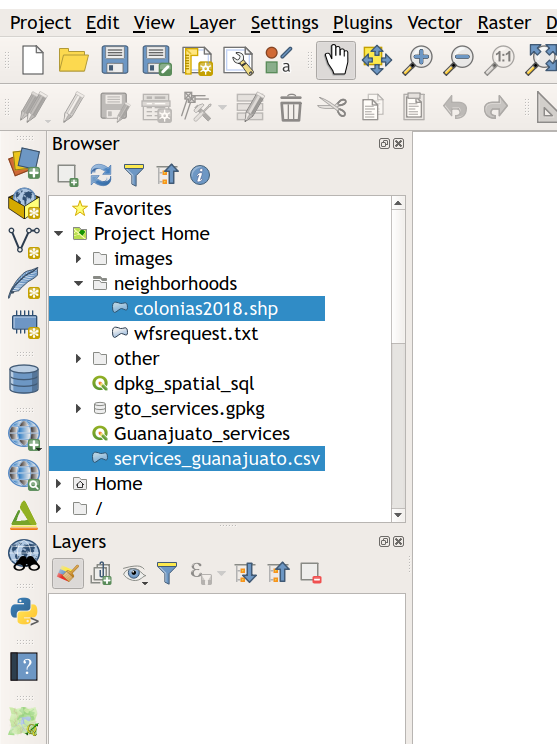
Data formats matter. With Geopackage we have the possibility to work with our data in a file-based database environment that supports SQL with a variety of spatial functions. Let’s take the data in then. In QGIS it happens basically by drag and drop, and that’s it: you’ll get rid of those shapefiles.
The neighborhoods data (colonias2018.shp) was converted to GeoPackage format by ‘drag and drop’ using the Layers- and Browser-panels in QGIS, whereas the data on services was originally in .csv-format. I had it imported to QGIS and then exported (Save Vector Layer as…) with a CRS-conversion to our GeoPackage-file.

As GeoPackage is a database, we need to understand the layers in it as tables that have just a set of rows and columns like a spreadsheet. Usually, each row or record of a table contains information about geometry just like the “attribute tables” with the traditional geospatial data formats like shapefiles. What’s the difference then? The information on geometries is stored in a column and all the data is stored very efficiently making your work faster.
Before starting with those powerful SQL queries we just need to ensure that our GeoPackage layers are indexed. The indexes are hugely important for the databases; index makes the database to work the data in an ordered matter and makes your analysis a lot faster.
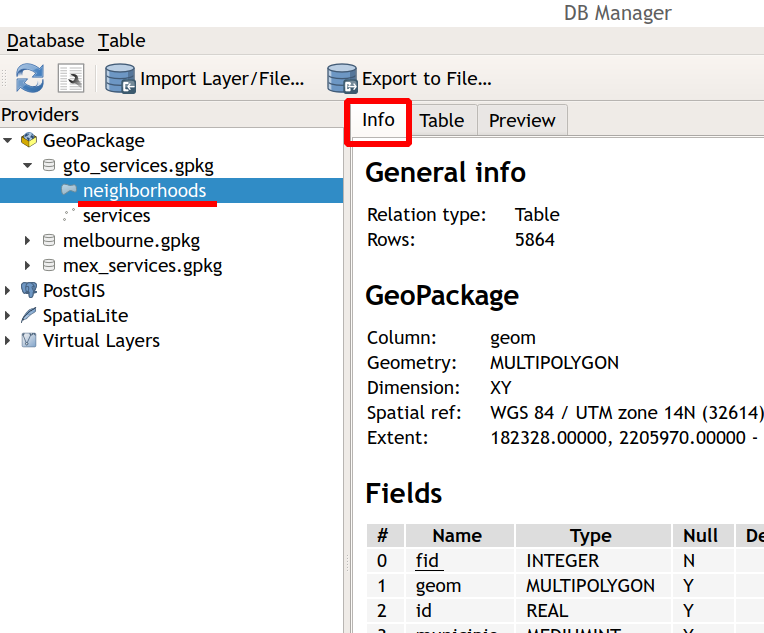
Next we open the DB Manager in QGIS and preview the info for the data layers. Scrolling down we’ll see that there are no indexes just yet. To create the indexes we should open from the upper menu “Table” and the “edit table” option.
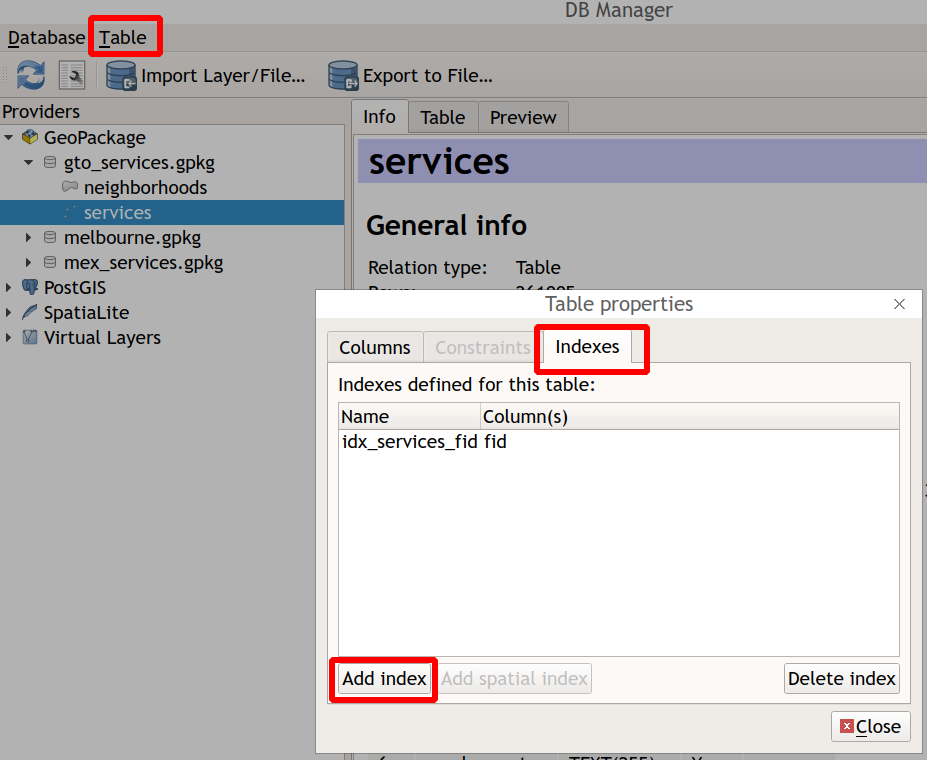
Now we can add indexes and we should do this layer by layer.
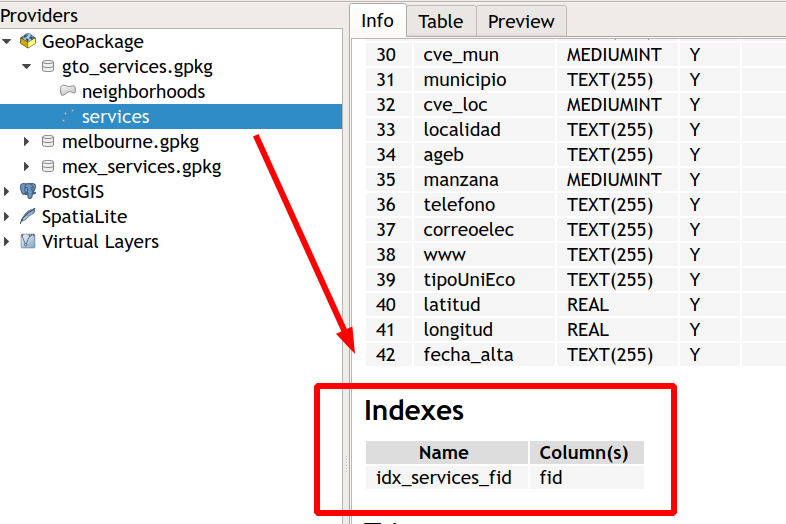
Now we can browse our data and see how many features we will work actually. Above, we can see the data in action, as we can see that, especially, the services table is quite numerous.
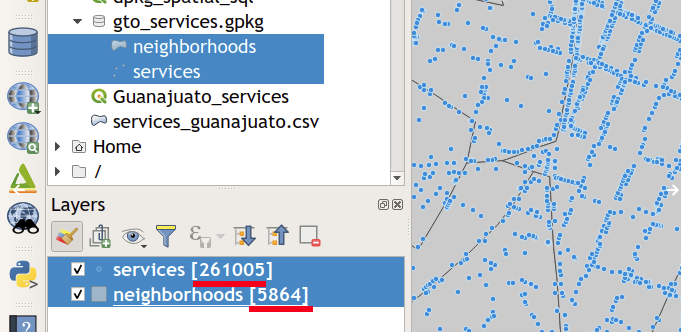
Then we’re off to make those SQL queries. First, we have to pass along a somewhat strange-looking command to the SQL query editor of the DB manager :
select EnableGpkgAmphibiousMode()
This enables QGIS to work optimally with Geopackage spatial functions and makes “SpatiaLite to work natively with GeoPackage geometry, removing the need to explicitly call the appropriate format conversion functions such as GeomFromGPB() or CastAutomagic()”, as Bryan McBride from Spatial Networks defines it in the company blog on the subject.
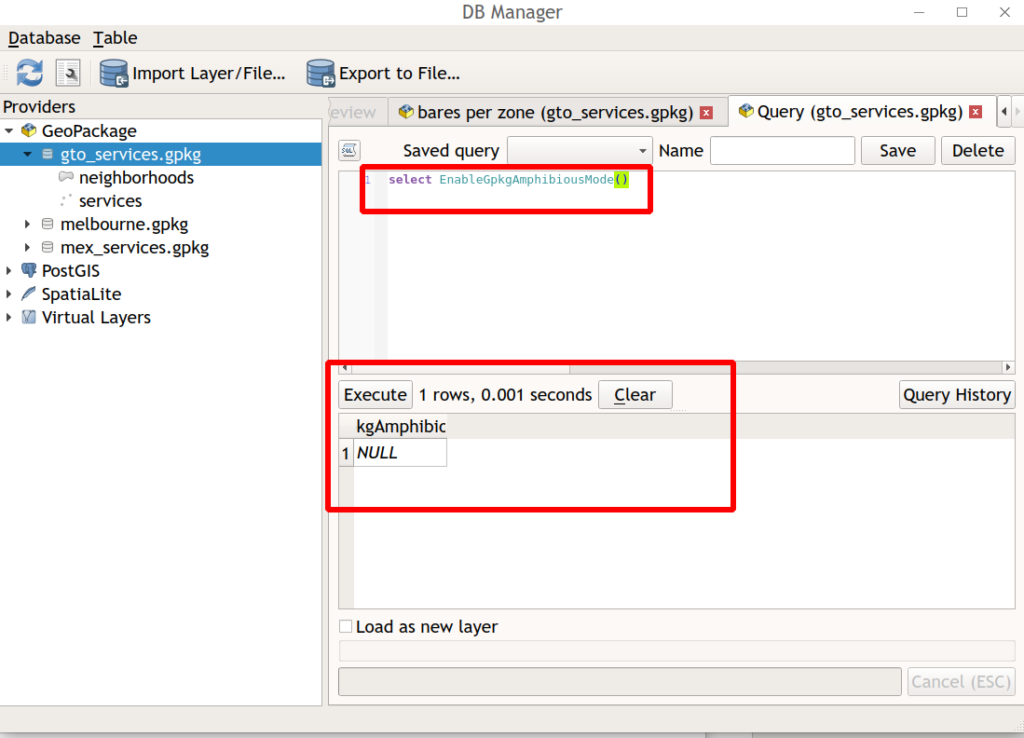
We can start with some basic queries and move towards our initial goal, to quantify the bars in the different neighborhoods of León.
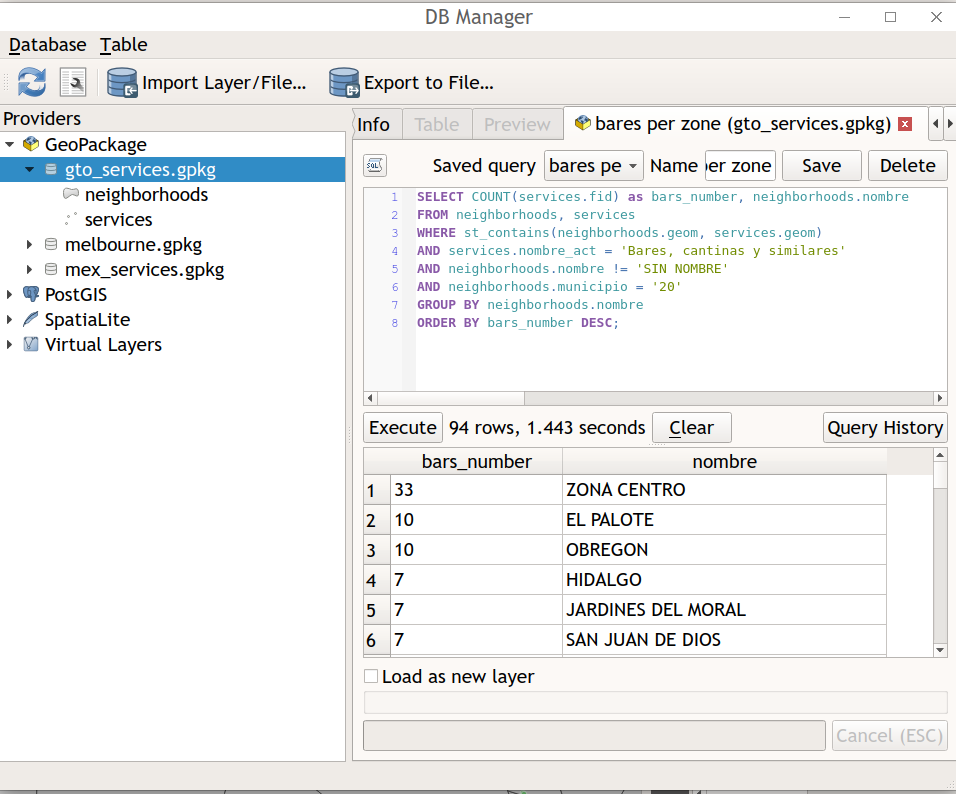
As we can see besides Execute button, 1.443 seconds is quite fast, right? Imagine leaving behind those multi-step button clicking GIS processes and moving towards the utilization of commands to produce effective and reproducible GIS workflows of minimum length in time.
So, what did we actually do? We did a query on the data. As we can recall, a query is a request for data from a database table or combination of tables.
SELECT COUNT(services.fid) as bars_number, neighborhoods.nombre
FROM neighborhoods, services
WHERE st_contains(neighborhoods.geom, services.geom)
AND services.nombre_act = ‘Bares, cantinas y similares’
AND neighborhoods.nombre != ‘SIN NOMBRE’
AND neighborhoods.municipio = ‘20’
GROUP BY neighborhoods.nombre
ORDER BY bars_number DESC;
Don’t let the Spanish words fool you! It ain’t that hard!
— first, we’ll use the count-function to help us counting the requested data
SELECT COUNT(services.fid) as bars_number, neighborhoods.nombre
— then we’ll define the tables
FROM neighborhoods, services
— and the where-clauses that include the spatial intersection between the two tables
WHERE st_contains(neighborhoods.geom, services.geom)
AND services.nombre_act = ‘Bares, cantinas y similares’
AND neighborhoods.nombre != ‘SIN NOMBRE’
AND neighborhoods.municipio = ‘20’
— and here we’ll group the requested data by the neighborhood
GROUP BY neighborhoods.nombre
— besides of ordering the results in a descending order
ORDER BY bars_number DESC;
Nice! Finally, we’re glad to point out to you that QGIS is moving rapidly towards using GeoPackage as the number one file-based spatial data format. Besides, it’s important to remark how well databases fit the future workflows of GIS data analyst or GIS technician: the datasets are getting bigger and there’s just no room and time to use inefficient data formats and archaic GIS workflows.
And if we’ll talk about next steps, say no more: PostGIS handled this query approximately 18 times faster.

As we can appreciate QGIS as a modern GIS platform that’s integrated with the best spatial algorithms and the most appropriate data formats to you to process your data in no-time. The part that falls behind in this equation is knowledge for understanding and utilizing geospatial data. This is why we at Gispo want to share with you the possibility to level-up your geospatial knowledge and software know-how in our online learning platform for open source geospatial knowledge building.
If you’re interested in the use of GeoPackage to gain productivity for your GIS processes, you’ll probably be interested also in learning how to do your other GIS tasks with the latest version of QGIS. If that’s the case, send us an e-mail at info@gispo.fi
It’s all about saving time, right? QGIS’s graphical modeler can definitely help you out here if you’re a GIS expert wanting to speed up your routinary, personal or collective GIS processes. Without any programming knowledge required, graphical modeler really can help you go through some painless automation and optimization on your GIS processes. Now let’s go through a use case application for using graphical modeler in QGIS for those who are not familiar with this great toolset.
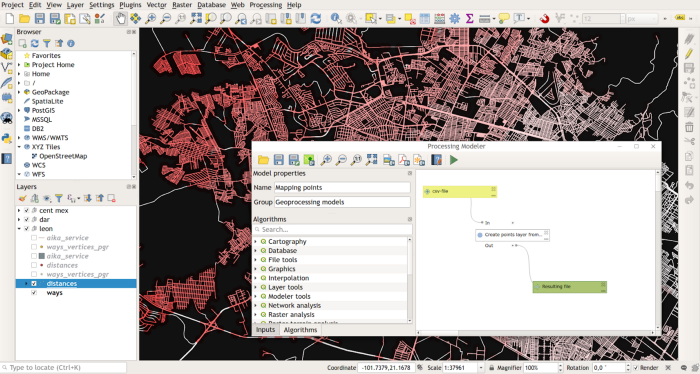
So imagine there’s an expert who needs to calculate the following:
What is the surface area corresponding the extent of the urban tree canopy per administrative units (postcodes) in Melbourne, Australia?
So, first the GIS expert goes on thinking that they have to
1) calculate the actual tree canopy extent area for every tree with Field calculator and then
2) make an intersection and sum-up with the Join attributes by location (summary) -tool and finally
3) divide the aggregated tree canopy area with the administrative units surface area information.

So, the expert goes and implements the plan and finally gets the data out. Nice! Wait a minute, while observing the results, the expert discovers that the tree canopy data ain’t actually the most updated version. No worries, let’s do the process all over again. After the analysis the expert shares the results with colleagues. They ask how the analysis was done and the expert goes through the whole process in detail.
During the following quarter city organization requires the information to be updated with newly captured data. So, here we go again, the expert starts working while feeling confident doing it properly and in time. Nevertheless, the expert forgets what was the tool’s name to get the results on the intersection of the datasets and struggles during a few attempts but finally gets the information altogether, to share the updated results with the persons of interest.
This is common for a lot of GIS experts, right? Well, it just shouldn’t be. If we’d bypass all the previous hassling with a tool called graphical modeler in QGIS, we could implement our GIS processes
1) with fewer quality flaws and
2) without the necessity to remember all the tools
3) while providing reproducible tools for our repetitive GIS processes.
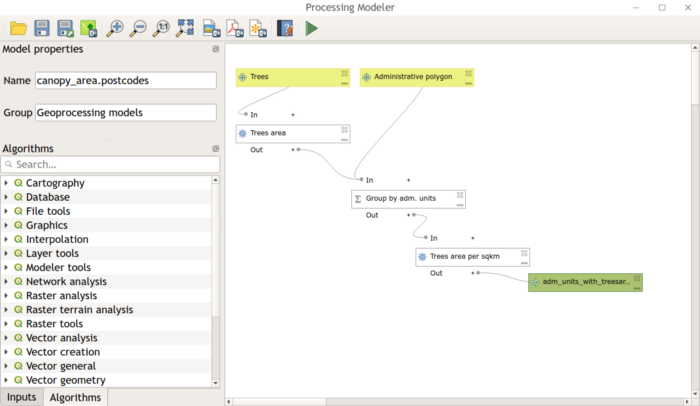
And this is how the expert could leverage the model file for her/his own processes, or pass it on to someone else, and get some great maps on the aggregated canopy extent area per administrative units from here on.
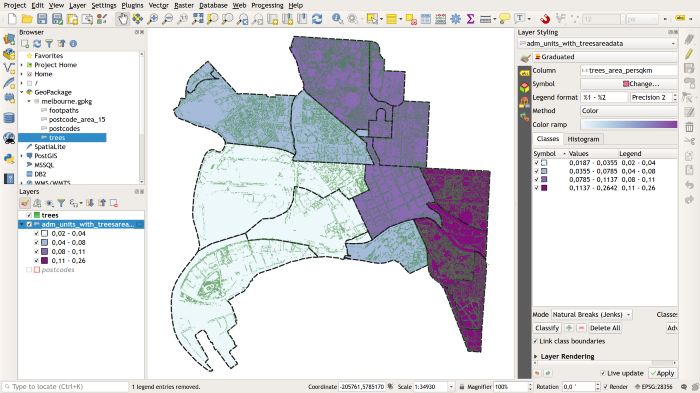
Of course, you could implement the same use case and a lot more with spatial SQL / Python (/PyQGIS) / R, but I guess that’s another story for another time. But it’s important to mention it since eventually, our aim should be to build fully reproducible and automated GIS processes.
If you learned something from this blog post, please share. And if you want to get an in-depth understanding on leveraging graphical modeler in QGIS for you or your team, send us an e-mail at info@gispo.fi
he National Land Survey of Finland (NLS), Aalto University, Finnish Location Information Cluster and the World Bank organized a two-day event titled as Smart Land Administration at Helsinki on 3th and 4th of December 2018. Finland is nowadays a major hub for technological outbreaks boosted by one of the world’s biggest tech-startup events Slush. The Smart Land Administration was a pre-Slush-event that sought to leverage the clustered tech-knowledge of the Finnish tech-community to fulfill the needs Land Administration sector demands in the modern days.
The main message derived from the event was that there’s a flagrant need for new and modern technological solutions for the sector’s needs. Land administration ain’t just technology, as we all know, it’s about regulation, community, and politics, but technology can certainly level-up efficiency and at best, disrupt the sector.
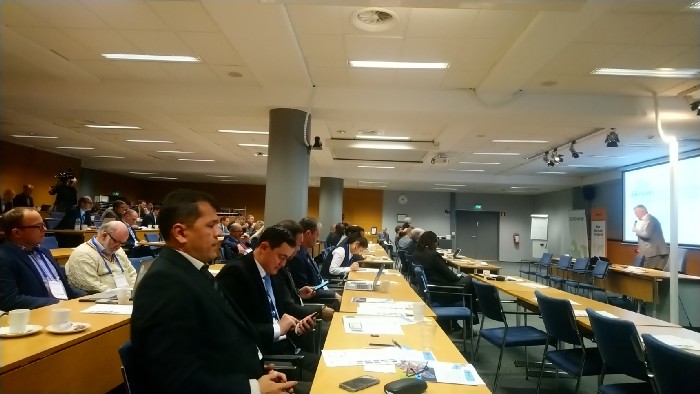
To point out some ideas from the presenters, we can start with the importance of standards. In his presentation Brent Jones’ (ESRI) showed that the OGC based standards have a crucial role for the Smart Land Administration solutions. As an example and in essence, the LADM standard (Land Administration Domain Model) is a very important standard, especially for the developing world.
As Bernd Eversman from (NIRAS) put it, over 70 % of the world’s population have no access to formal land administration services. This needs to be changed.
What we at Gispo wanted to lay out for the sector is the importance of the investment in the expert knowledge. The geospatial and general IT knowledge certainly has a key element in the building of modern land administration expert teams. Inaccessible software isn’t a bottleneck anymore, neither is data or hardware that are getting cheaper day to day. In essence, it’s the knowledge that lacks behind. We don’t have the experts that can leverage the appropriate software and the data out there. Experts just aren’t capable of building solutions that the technological improvements have enabled.
The event was visited from all around the world. Finnpartnership, funded by the Ministry for Foreign Affair of Finland, and their financial support brought experts from Ethiopia to Mongolia to hear and learn about the modern solutions these experts gathered to discuss in Helsinki. Finnish companies including Gispo and members of the Finnish Location Information Cluster, were part of sponsoring the event.
If anything, we brought from Tanzania’s FOSS4G 2018 (Free and Open Source Geospatial Software -conference) a clear view of the wide scope and depth of the FOSS4G technology. These technologies solve some major issues in the world from the geospatial standing point. Besides that we felt the strong community that fuels this powerful ecosystem: its people.
Few moments from FOSS4G.
This year there was an emphasis on the user side of the ecosystem. World Bank’s Understanding risk event (with the generally strong UN presence), the HotOSM Summit and other eventualities were held in a shared manner with the FOSS4G 2018. The organizers also succeeded to highlight and push forward the local essence of the conference by enabling and inviting a lot of people from different African countries representing governmental offices, private sector companies and universities. This really showed the crowd quite explicitly how important open source geospatial software is for the world community.

While these organizations and individuals use significantly open source geospatial software to advance their objectives, the challenges come when they want to expand the usage of these powerful software tools. There’s just so much to learn and so little time to process.
At Gispo, we got to learn for example about the widespread use of GeoNode for geoportals, the great geoprocessing tool for point clouds PDAL besides the colossal AWS fueling away with autoscaling GeoServer. These – and much more! – are all great advances for the global geospatial industry.
We’re happy to be part of this community and we’ll send our appreciations for all the people that made FOSS4G 2018 Dar es Salaam possible, and specially for making it possible for the people that never couldn’t even imagine attending a FOSS4G conference.