

Children in all parts of the world should have the right to education, and many do. But in order for children to be able to actually use this right, there also needs to be a school within a reasonable distance. Here the schools’ physical locations play a pivotal role, and governments also have an obligation to place schools in locations where pupils can reach them in travel times adapted to their age, while at the same time ensuring safe and direct school routes. However, the lack of tools for analysing school accessibility has often proven to be a bottleneck.
Gispo has worked together with The International Institute for Educational Planning (IIEP), that is an arm of UNESCO, to improve the methodologies used for analysing school placement and accessibility. The final result of the collaboration project with UNESCO is a QGIS plugin called “the Catchment” developed and published by Gispo.
In order to make the needed analysis, ministries of education and local authorities can now use catchment areas. A traditional bird’s-eye view is not enough to estimate the reachability of a point due to its incapability to take enough terrain-related factors into account. For instance, a large hill or lack of roads between a home and a school would greatly affect the time needed to make the journey. Physical proximity requires the use of isochrones to determine the catchment areas, i.e. defining the area which is actually reachable from a single point within a given time. By using georeferenced data of population and school locations, it is possible to estimate and analyse whether or not a potential learner can be serviced by the education system within reasonable distance and how the situation could be improved where needed.
The Catchment plugin calculates isochrone-based geographical catchment areas and relies on a GraphHopper backend and OpenStreetMap data to perform the calculations. The user can select the parameters for calculation such as a desired point or a whole point layer, travel mode (walking, cycling, driving) and travel distance. The customisation of the plugin allows the user to choose how the results are presented. For example, the resulting isochrones will be individual units for each school by default but it is also possible to merge all the distance polygons. It is also possible for users to add indoor walking distances like the time spent walking from the school entrance to the classroom since it can be a factor in big schools that have buildings in different locations for different classes.
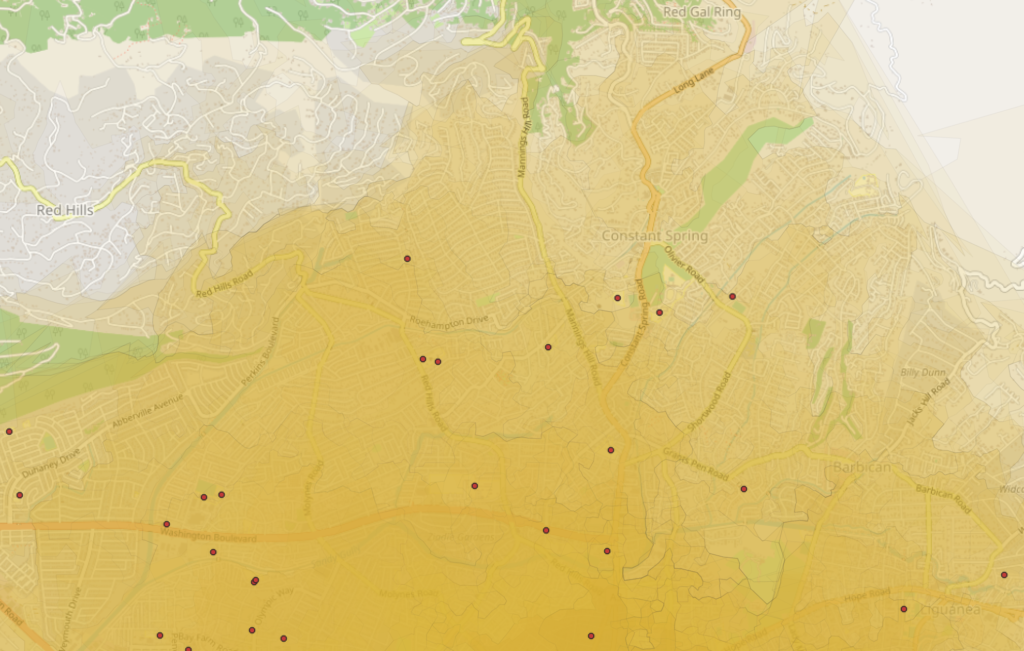
The published IIEP paper includes case study examples, such as analyses done with school data provided by the Jamaican Ministry of Education, Youth, and Information. One analysis resulted in the following visualisation (Figure 1) that describes the travel times around Central Branch Infant School in Kingston, Jamaica. Given how topographically diverse Jamaica is, its characteristics served as an excellent example for a scenario where this analysis is useful.
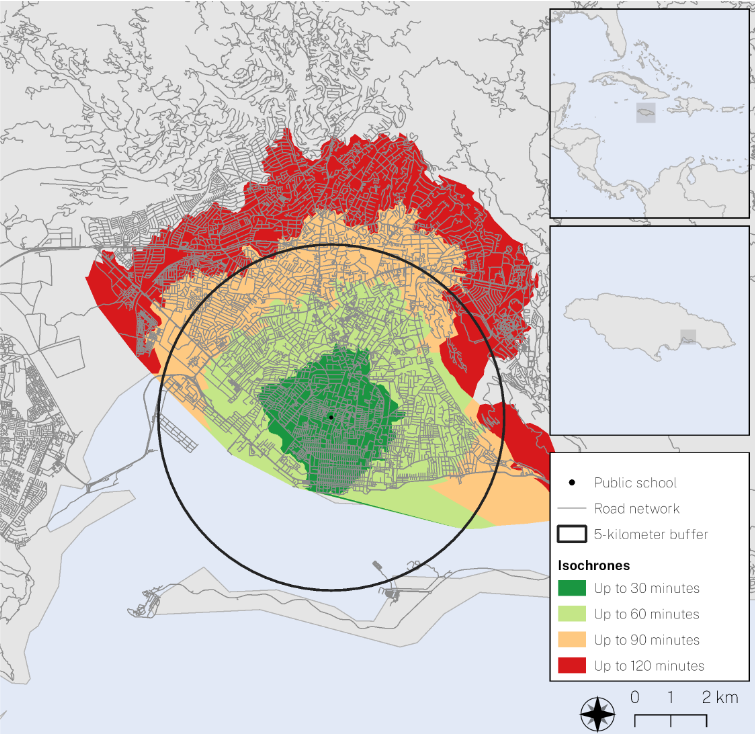
The different colours in Figure 1 represent different ranges of time spent by a potential learner travelling between their home and the school whilst the black circle delineates the 5-km straight-line buffer around the school. The analysis shows that it is possible for a student to live within the 5-km radius even though some areas within the buffer might make it topographically, or in terms of road connectivity, impossible to travel to the desired school within a reasonable amount of time. In other words, there can be an illusion of services.
Going to school is still a daily challenge for many people and for that purpose the isochrone methodology can provide insightful and useful results that can be used for further analysis and planning. Thus, the Catchment plugin can be used especially to improve access to education, but also to estimate the potential number of students in schools, to optimise delivery routes or to calculate school inspection routes.
The source of the content in this post and the full UNESCO-IIEP and GISPO paper is available here.
More in depth take on the plugin and how it works can be found here.
Plugin is available in the QGIS plugins repository.
The QGIS plugin source code can be found on GitHub.
This article is written by Anna Saarinen
We at Gispo are always looking for different ways to publish and visualize spatial data. Sometimes we get projects where the best way to accomplish this is to provide an interactive map that the end user can digest in the way they please.
In this article we’ll be looking at the possibilities of Kepler, a browser-based platform for visualizing geospatial data.
Why Kepler?
What are the reasons one should use Kepler? Why should anyone be interested?
A simple use case could be that you have a spatial dataset you want to publish or just check out yourself, but have no or little prior experience on working with GIS software. If you don’t know where to start your journey with latitudes and longitudes or don’t want to set up QGIS, Kepler can offer you a very useful shortcut.
In many cases Kepler can come in handy for professionals, too. Even though the amount of other tools for creating and publishing interactive maps is vast, Kepler achieves quite a delightful balance of simplicity and features. The map creation is as straightforward as drag-and-dropping your data and letting the automations take care of most of the manual work, but, once the data is loaded, you are free to customize the map ad infinitum. This makes Kepler a great tool for quickly demonstrating and exploring datasets as well as producing polished visualizations.
Getting started with Kepler
The best way to learn is by doing, and Kepler’s demo website encourages exactly that. Once on the page, the first thing that pops at your face is the add data window. Kepler eats CSV, Json and GeoJSON as input, but you can also use pre-existing Kepler map configuration files that specify the data and its styling in json format.
For now, let’s add some data. In this post I’ll use a dataset of superb parrot sightings in New South Wales, Australia (© State Government of NSW and Department of Planning and Environment 2010). If you want to experiment yourself you can bring your own data, or use the same dataset – it’s openly available!
Basic visualization
After adding your data, Kepler will happily provide you with the most crucial means for map-making: a few basemaps of the globe, different palettes for categorizing your data and some ready-made analysis tools that lie just behind a few clicks. Heatmaps, grids, clusters – you name it.


Temporal maps and animations
Truth be told, it’s the animations where Kepler really shines. Throw in any data with temporal values and the platform creates beautiful interactive maps that show how ships sail across the bond or how trains traverse through rail networks.
Our dataset contains a temporal aspect too: each parrot sighting has a specified date. Note that, with this particular dataset, a bit of tinkering with the data is needed to enable temporal animations: Kepler needs a column that it can recognize as time information. In our case we need to add “ 00:00” after every date in the eventdate column so that it is recognized as time, not just date information.
Once your data has a properly formatted time column, making a temporal visualization is as easy as setting a filter on the field that contains the time information.

Making your own basemap
The demo version itself should keep the casual user fiddling around for quite a while. But, of course, the boundaries can be moved even further: a logical next step to make your data visualizations even prettier is to make your own basemaps in Mapbox studio and use them in your Kepler projects.
Making a base map from scratch can be intimidating, but Mapbox studio has some helpful tools for this. For example, the map features are grouped thematically, and each group can be customized separately. This makes it easy to pick which types of features you want your base map to focus on.
When it comes to map styling, the sky’s the limit really. If you are looking for some inspiration, Mapbox has quite good documentation for this.
Once you have your new fancy style, using it is quite simple: add a new base map in the base map section and paste the URL of your style. For example, here’s the style used in this post: mapbox://styles/eemilhaa/cl484bx2m000d14pl7z1cjyse
As a side note, you can use your own custom-made maps through a WMTS as well, for example in QGIS!

Exporting your maps
Once you have your finished map, the next thing in line is usually sharing it. Luckily, with Kepler this is as easy as it gets. From the share tray select export, and then pick either html or json as the output file format. What you choose here matters a bit: json means your map gets saved as a Kepler configuration file that you can load with Kepler, while selecting html produces a stand-alone html file that you can open with a web browser to access your map. All data and styling is included in the output file regardless of filetype!
Even more use cases
In addition to the demo version that can be used in a web browser, Kepler maps can be brought to many different environments based on the use case. For example, one such case could be using Kepler as a means for producing quick explorative visualizations when doing data analysis in a Python environment.

Of course, Kepler also provides a chance for developers to dig much, much deeper. Kepler maps can be embedded into other applications, and, being an open source project, Kepler itself can be built, customized and run locally. This enables expanding its limits and interface even further to truly take control of every detail. One such example could be the Northern growth zone information service implemented by Gispo a couple of years ago.
If all this sounds very interesting, but you think you need help, or maybe some professionals to do the dirty work for you, you can send us a message!
Kartdagarna is a popular get-together within the Swedish GIS and mapping community. Pauliina and Sanna decided to check what is happening in our neighbouring country. There were some things we found interesting: what drove us to go there in the first place was a rumour that the Swedish dance a lot in their GIS events. Of course we had to go and see for ourselves!
First of all, it was so nice to see people. It had been two years of Covid and practically no live events, so the main best thing was that you could chat and see similar minded people. So for all people arranging GIS events at the moment: leave a good chunk of time for coffee breaks and discussion, they are the best part. Kartdagarna delivered this, so thank you! (During the coffee breaks Sanna learned e.g. that mosquitoes are a huge problem in some parts of Sweden, even bigger than in Finland.)
So how open Sweden is?
Open data and open source GIS tools are the core elements of Gispo. Usually they go hand in hand and we wanted to know where Sweden stands at the moment in the openness scale.
We were very happy to meet many FOSS4G users at the conference. Many organisations had hybrid models – so also proprietary GIS software was used together with open source, which is quite common in Finland, too.
Quite a few GIS companies in Sweden were also using open source somewhere there in the background. They did not necessarily market that as an asset, rather just as one of the toolsets they use. Thus many of the Swedish GIS companies are part of QGIS User Group which is great – hope they also contribute! We should really start creating our own user group in Finland, too.
One of the most peculiar things for us was that open data culture was still evolving in Sweden. From the Nordic countries Finland and Norway boast a vast amount of open data sources, but in Sweden there are organisations like municipalities who still very much rely on revenue on data sold to their users. This might be one of the reasons that there weren’t many visualisation examples or GIS analysis examples showcased in the presentations. But there was a lot of enthusiasm around open data, so it might be a matter of time that data will flow fluently in Sweden also.
State of GIS?
But what about the presentations and state of GIS in Sweden overall? In the session there was quite a lot of discussion about metadata issues, INSPIRE, land use planning data models, efforts to correct the property borders, field data collection, point clouds etc. so pretty much the same things as we are discussing in Finland. And Pauliina got really interested in using R for GIS, so maybe we shall have a R course pretty soon in Gispo.
By far the coolest (literally) example was the keynote by Martin Jakobbson from the University of Stockholm, describing their icy travels to map the fjords of Greenland. GIS and mapping have a lot to offer for climate change detection and also prevention.
And dancing? Yes! We got to dance!
Stor tack till Kartografiska Sällskapet!

Introduction
Spatial data about cities is vast, both in terms of volume and variety. However, any single dataset by itself is usually insufficient to give much of an idea of the dynamics that make up an urban area. This is why combining data not only from multiple sources but also of multiple subject areas is most likely required when analysing a city. The hardest part of an analysis process, thus, can become the search for these datasets, not to mention the challenge of combining them in a meaningful way.
Gispo’s urban analytics tool aims to ease the process of acquiring and analysing urban geospatial data. The basic idea behind the tool is simple: The user selects an area to analyse and what datasets to import, then the tool imports, analyses and combines all of the data producing a map of the analysis area as an end result. What the resulting map depicts of course depends entirely on what component datasets were selected.
In this blog post I explain the functionality of the tool – what datasets are available to use, how they are used and how the end results are presented. While I focus on Helsinki here, a key design principle of the tool is scalability regardless of place. So, whether you’re analysing Tokyo or Reykjavik, the data sources and the functionality of the tool remain the same.
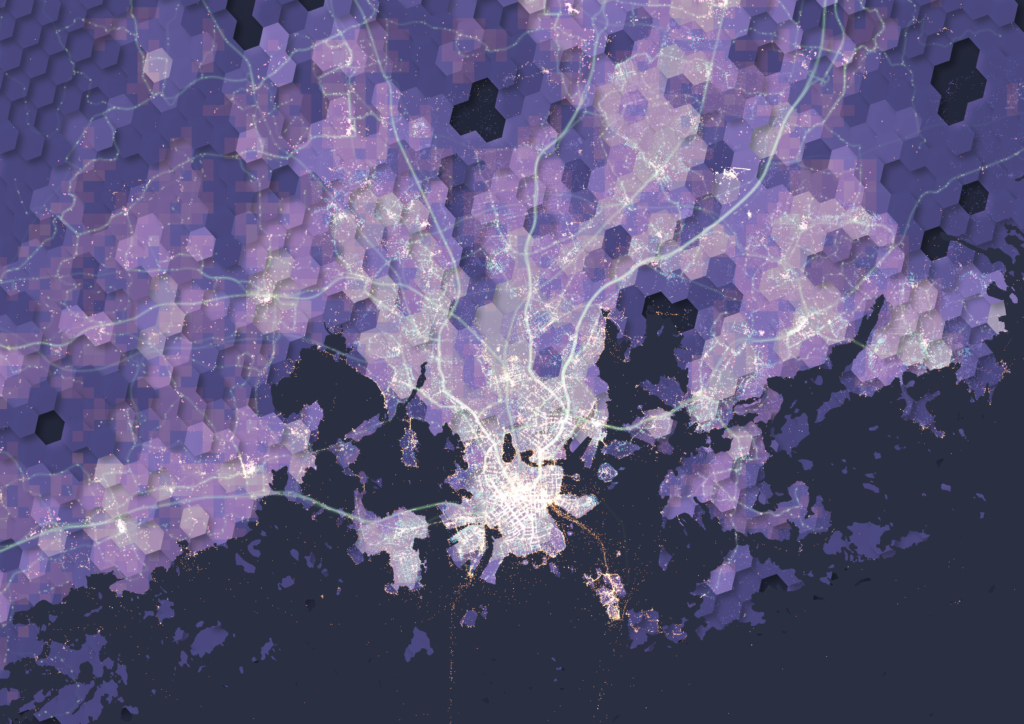
The input datasets and their roles
When developing the tool, three different data themes were selected: urban activity, accessibility and demographics. We then picked the data sources with these themes in mind while also prioritising the goal of all data being available globally and openly. Below is a rundown of the datasets used, supplemented with some exploratory visualizations done in QGIS.
Theme 1: Urban activity
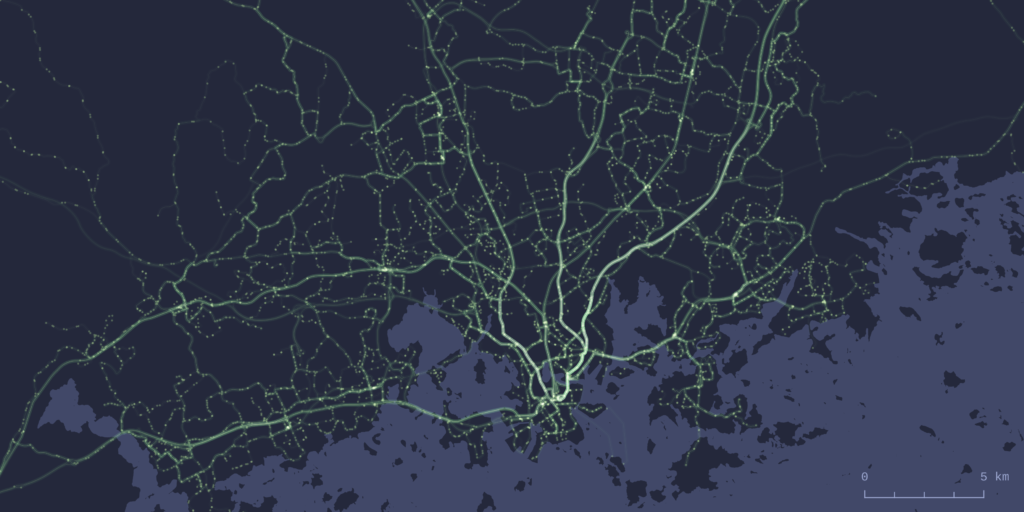
Data sources: OpenStreetMap, Flickr
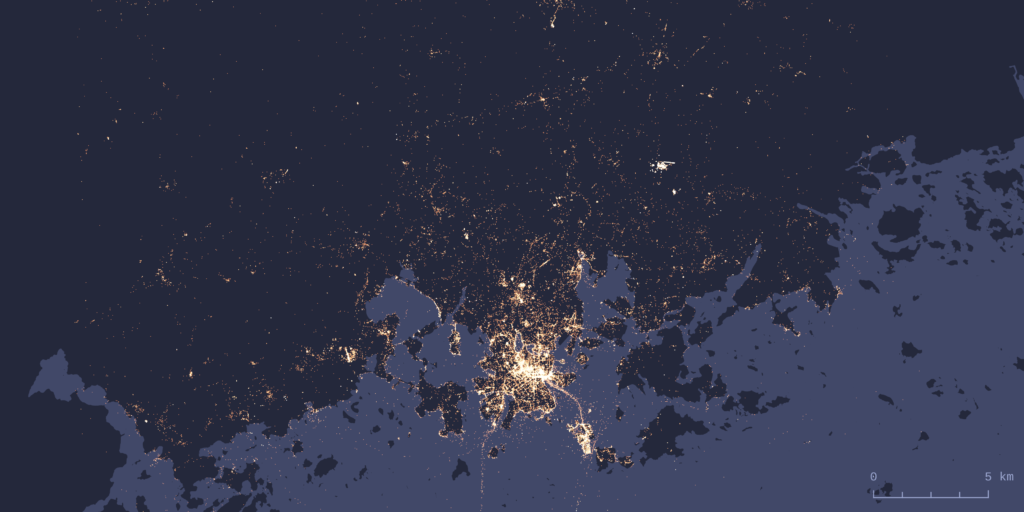
Out of the three themes, urban activity is probably the hardest one to define. We ended up selecting two datasets here: OpenStreetMap (shortened to OSM from now on) and Flickr. Using OSM as a data source is quite self-explanatory considering the aforementioned data requirements. However, a lot less self-explanatory is the question of what exactly are the OSM features that indicate urban activity. The types of features we decided to use are based on examples from scientific literature, with supplementing feature types added based on our own validation of the tool. The resulting selection of feature types focuses mainly on amenities, shops and leisure-oriented features.
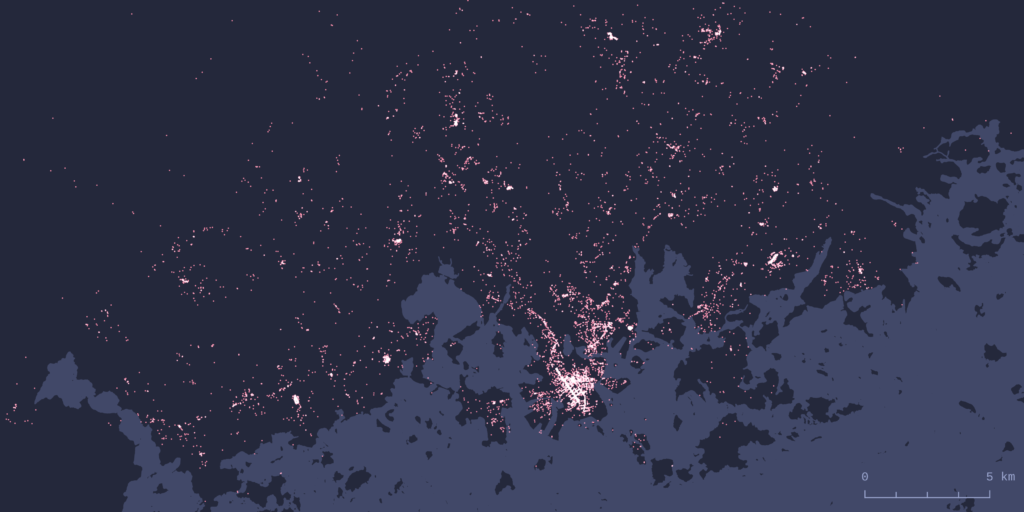
To get a different view of activity, we used Flickr image metadata. Flickr photo locations have been used widely in urban research, for example to detect spatiotemporal patterns and areas of activity. Flickr also offers an open API for accessing their data, which makes it possible to download these image locations.
Theme 2: Accessibility
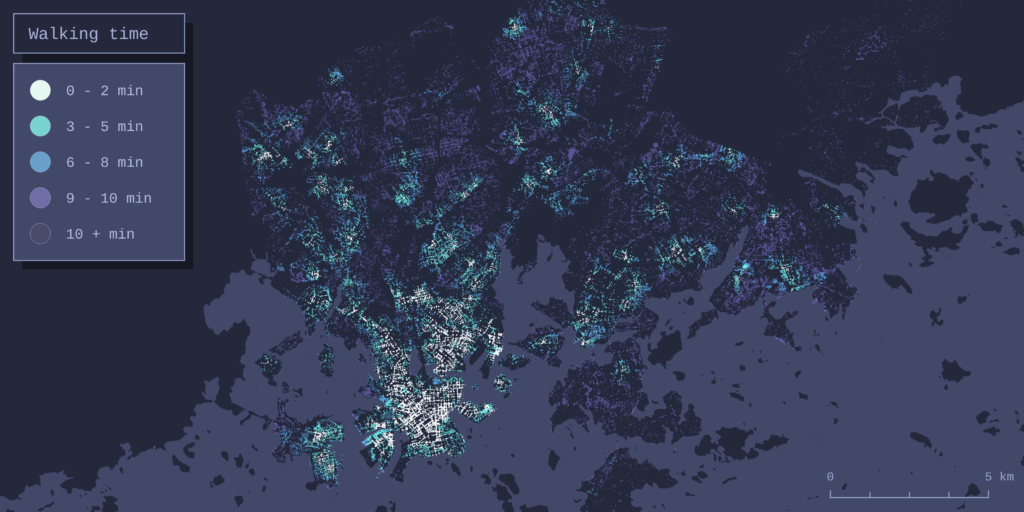
We included two different methods of transportation for modelling accessibility: public transit and walkability. For public transit analysis the choice was to use GTFS (General Transit Feed Specification) data. This makes sense as GTFS is a widely used standard format for sharing public transportation schedules and associated geographic information.
To model walkability the tool performs a network-wide routing analysis on the walkable OSM street network of the area being analysed. In practice this means calculating walking times from every node in the street network to the OSM features described earlier in the activity section. For a deeper dive into analytical methods the tool uses for routing analysis, see this earlier blog post.
Theme 3: Demographics
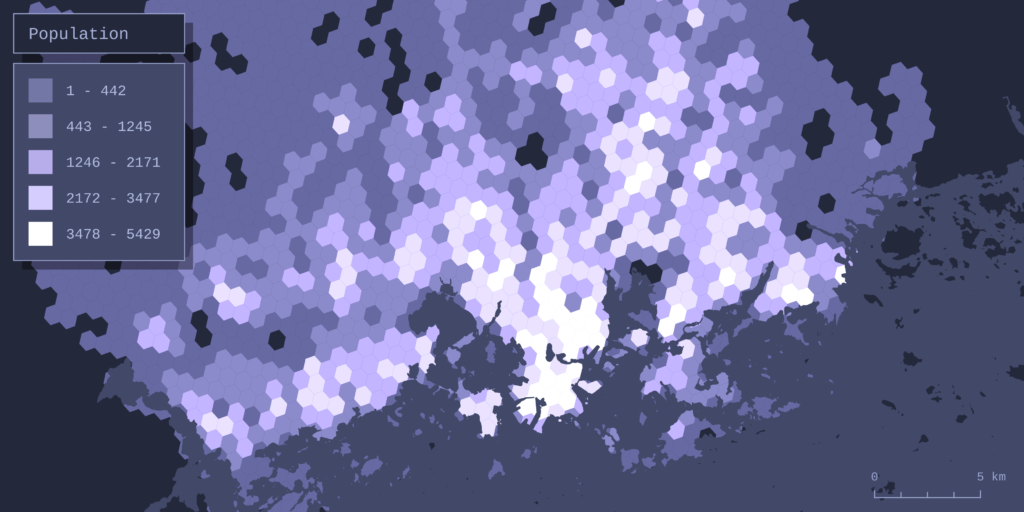
The datasets of choice for analysing population were the Kontur population grid and Ookla’s global Network performance dataset. The more conventional population dataset of the two, Kontur’s population grid, is an openly available dataset with global coverage and a spatial resolution that is fine enough for analysis even on a sub-city scale.
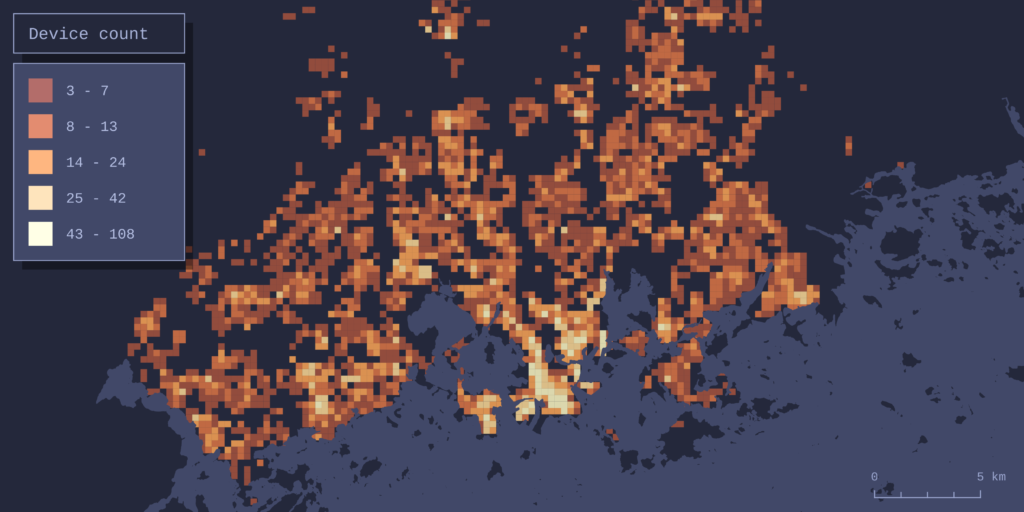
Ookla offers worldwide datasets of local broadband internet speeds and device counts gathered from the usage of their Speedtest service. The datasets cover the entire globe in a sub-kilometer resolution grid, thus giving a great measure of recent web infrastructure and internet user numbers.
The output – combining data and forming the result map
The h3 hexagonal grid system works as the basis for both combining and visualizing the datasets. All data is collected into the grid cells (hexagons), and each cell receives one value per one dataset. How this value is defined depends on the data: For some datasets the value is simply the sum of features within the cell – this is the case with OSM features, for example. Obviously this doesn’t work for every dataset. For example, the cells get their walkability value from the average walking time of all the network nodes in the cell, and the public transport value is determined by total daily departures, not the amount of stops, in the cell.
To make combining different datasets possible, the dataset-specific values are normalized to be in the range of 0-1. Here 0 means the worst value (for example longest walking times or the least OSM amenities) and 1 the best value (best accessibility, most amenities). The normalized values are then summed for each cell. If we’re importing all 6 datasets, the highest combined value a cell could theoretically receive is 6 (1 for each dataset).
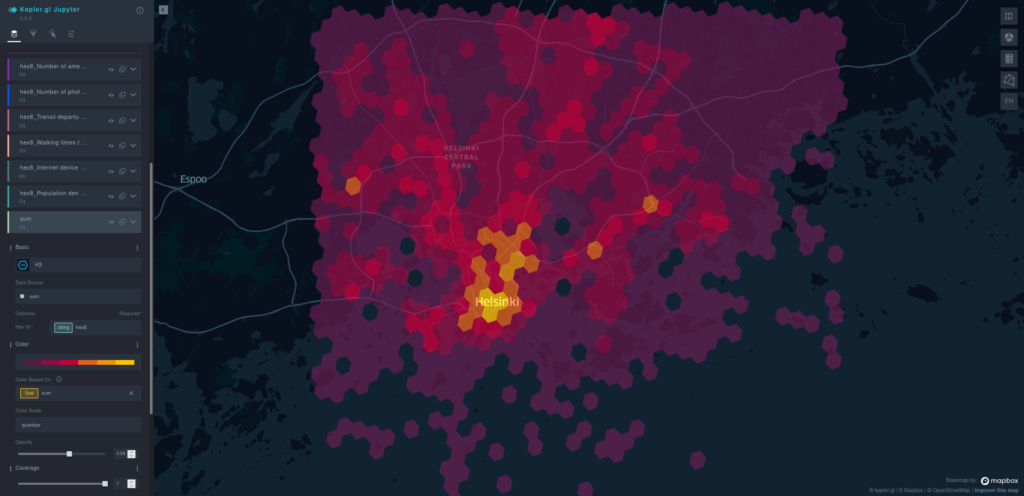
This combined value is the variable that is visualized by default on the map the tool produces as a result. The result map is interactive, and it’s presented in a web browser using kepler.gl.

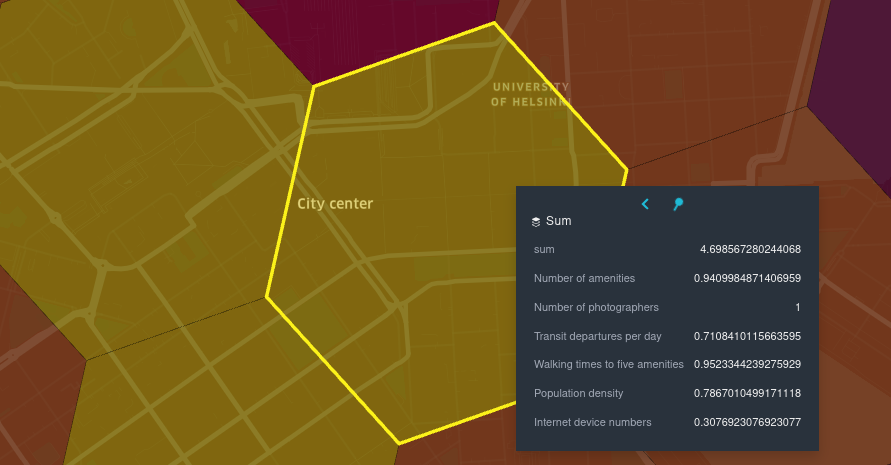
So what exactly does the combined value mean then? Since the combination of input data is user-defined, so is the meaning of the resulting map. For example, if all datasets are included in the analysis, the result can be thought of as an urbanity index of sorts, built considering all of the aforementioned aspects of urban space. But, any other combination of data is possible as well: If the user wants to, for example, form an accessibility-focused map, combining only the walkability and public transit datasets is entirely possible. After the analysis all datasets are also available to view separately in kepler, so comparing them as independent layers is possible.
Conclusion
Gispo’s spatial analytics tool enables easily importing, analysing and visualizing urban geospatial data from anywhere in the world. All data is collected from sources that stay the same no matter where you run the analysis, resulting in a high level of interoperability and comparability of the datasets and analysis results between different locations.
Of course, this tool is not an all-encompassing be-all end-all solution to analysing cities. It excels at quickly getting an overview of any urban area by combining and simplifying a massive amount of data into an understandable, visually clear representation. Still, this representation is ultimately a simplification of something much more complex – whether this is a strength or a weakness depends entirely on the analysis case.
See for yourself!
Instructions on the setup and usage of the tool, along with all of the code, can be found in the project’s open github repository.
If you’re interested in taking a deeper look into the opportunities there are for processing, analyzing and visualizing different spatial datasets and you’re looking for a partner for the ride, consider reaching out (info@gispo.fi).
The Helsinki metropolitan area is, in global comparison, very well served by public transport. The means of public transport in the region include
- trams, which mostly serve the downtown area
- buses, which mostly serve more sparsely populated areas and suburbs
- metro, which serves the downtown and the coastal suburbs on both sides in west-east-direction
- commuter rail, which connects downtown to inland suburbs, the airport and all the small town centers built along the railway to the north and west of Helsinki.
Several light rail routes are also being built at the moment, but currently the tram network does not extend far from downtown.
A central question, then, is, which areas do these modes of transport serve, and how many people have access to transit? One way to study this would be to look at actual transit lines, their timetables, schedules etc. and calculate the accessibility of various areas with transit. However, this process is very complex and the resulting accessibility is dependent on changing timetables, the time (morning, day, afternoon, evening, night) under study and many other factors.
What do we want to know?
A necessary first step to do that, however, is to first consider the more static physical accessibility of transit stops, and how many people are served e.g. within 500 meters or 5 minutes of a transit platform. Obviously, the distance needed to travel to a bus stop, tram stop, or an underground station is not the same as the distance from the origin to the station point on the map. We need to take into account the walking network in the neighborhood, the locations of entrances to the stations and, if the station is underground or over the ground, the time taken to walk from the entrances to the actual train platforms.
HSY, the Helsinki Region Environmental Services alliance, is the instance responsible for managing environmental data for the whole of the metropolitan region, not limited to a single city or municipality. Therefore, regional access to transit is one of their datasets that sees heavy usage when doing e.g. regional or local planning decisions and reports. The general aim in the Helsinki region is to only zone homes, businesses and services within easy reach of public transit.
Bus stops are scattered all around the region, and they do not really tell much about the quality of service, as a stop may be served from anything from one to hundreds or thousands of departures per day. Tram stops are at the moment only the concern of the City of Helsinki, used in downtown planning. Then, the most important modes of transit on the regional level at the moment are the metro and commuter rail.
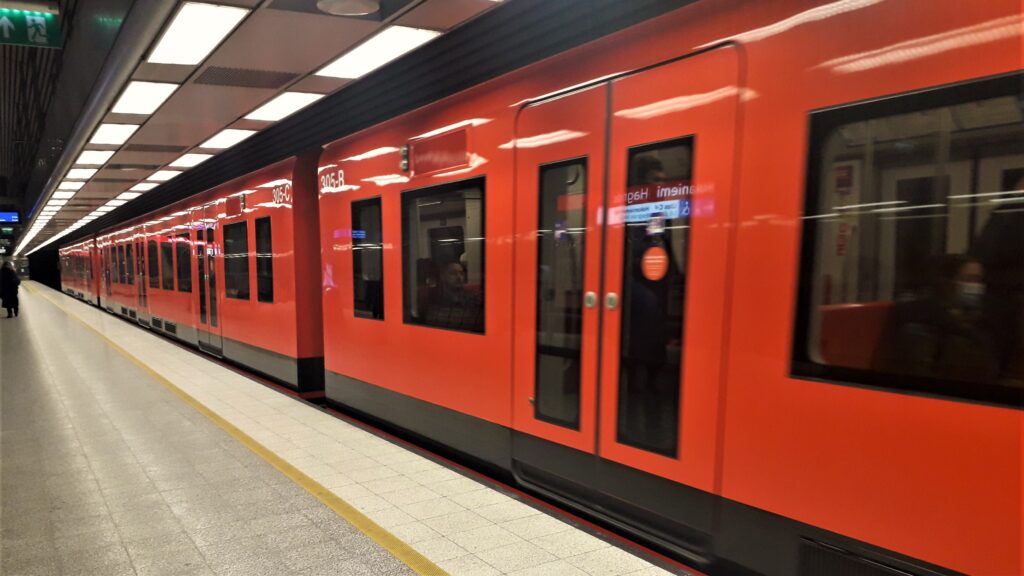
In Helsinki, they can be used almost interchangeably; the Helsinki Metro is built on the same wide gauge as the Finnish railway network. The metro stops are in general closer to each other than the railway stations, and thus the average metro speed is low (and limited to 80 km/h at any rate), but the metro and commuter rail offer similar capacity. The level of service of trunk commuter rail routes is the same as the metro routes, although commuter rail stations further from the city are served much less frequently. Still, metro and railway stations represent the existing infrastructure that can be used to focus local planning around transit hubs. (In the future, light rail routes will definitely warrant a similar analysis, though.)
How will we do the routing?
If our task is to find out the walking distances to all the metro and train platforms in the region, this is once again the good old isochrone calculation problem tackled recently in the case of schools around the world. That blog post is recommended reading; it details how isochrones, i.e. polygons of constant time, can be calculated around a point with QGIS, when the network around the point is known. Here, we will use the same calculation method and our QGIS plugin already employed for school accessibility, and perhaps tweak it for a whole new purpose!
Therefore, the data needed to do the calculation are 1) the locations of all the transit platforms and 2) all the walking routes to all these platforms, i.e. the whole walking network of the metropolitan area. In addition, metro and rail stations are often reached by bike. Therefore, we will also need all the bike routes to all these platforms.
Here, again, we are in luck! The good people of HSL, Helsinki Region Transport, have their excellent Journey Planner service right at their front page (and their excellent mobile app) that does exactly that. The whole Helsinki region Journey Planner is based on OpenStreetMap (shortened OSM) data, and the OSM data in the area has been studiously updated and improved on for years by HSL support staff. Therefore, we have all the data we could ever dream of having, ready in OpenStreetMap. They keep all the station entrances, stairs etc. in OSM up do date, and offer foot and bike routing from any point A to B in the Helsinki region.
HSL do offer a routing GraphQL API to the data, as well as lots of other open datasets, but as we want to calculate isochrones ourselves, we may just download the OpenStreetMap extract for Finland (e.g. from GeoFabrik) and start up our GraphHopper like done in the school case. (Of course, there are a few technical details on how to do this, which you may read in our step-to-step instructions.)
There were, of course, some issues with the OSM data. Some station platforms were not properly connected to the OSM walking network. In addition, some squares around major stations (Rautatientori, Kamppi, Itäkeskus, Kivistö, Sörnäinen) did not have walking routes marked through them; they had to be added in OpenStreetMap for routing to succeed in all directions. Details on these problems are found in our instructions too.
How will we find the platform points?
The best thing with OpenStreetMap is that we may extirpate two avians with the same stone, so to speak. In addition to all the walking routes and biking routes, we will get all the platforms we want to route to with a single clever query to the OpenStreetMap Overpass API. The Overpass API is meant for fetching a limited number of interesting features within a bounding box, as opposed to downloading the whole extract.
Since HSL uses OSM for routing, all the train platforms are found in OSM, and in most cases they were connected to nodes making up the walking network. This includes cases such as underground station platforms, i.e. most of the metro and the railway airport branch. In some cases, connections had to be added or fixed.
Platform polygons are located in the right location underground, and the walkways, elevators and escalators underground across different levels, all the way to the building exits, are similarly found and routable. All we need to find are the final points themselves (underground or above the ground, it does not matter) we want to reach.
OpenStreetMap offers a separate tag "railway"="platform" that we will use. With a bit of Overpass Query Language, detailed in our instructions, we may take 1) points at platform edges, 2) points at walkways, escalators, elevators, steps etc. and 3) find those points that are both platform edge points and connect to a walkway, elevator, steps, etc. This gives us a surefire way of finding all the ways a platform can be accessed from the outside. You can run the ready-made query yourself at the excellent Overpass Turbo web service.
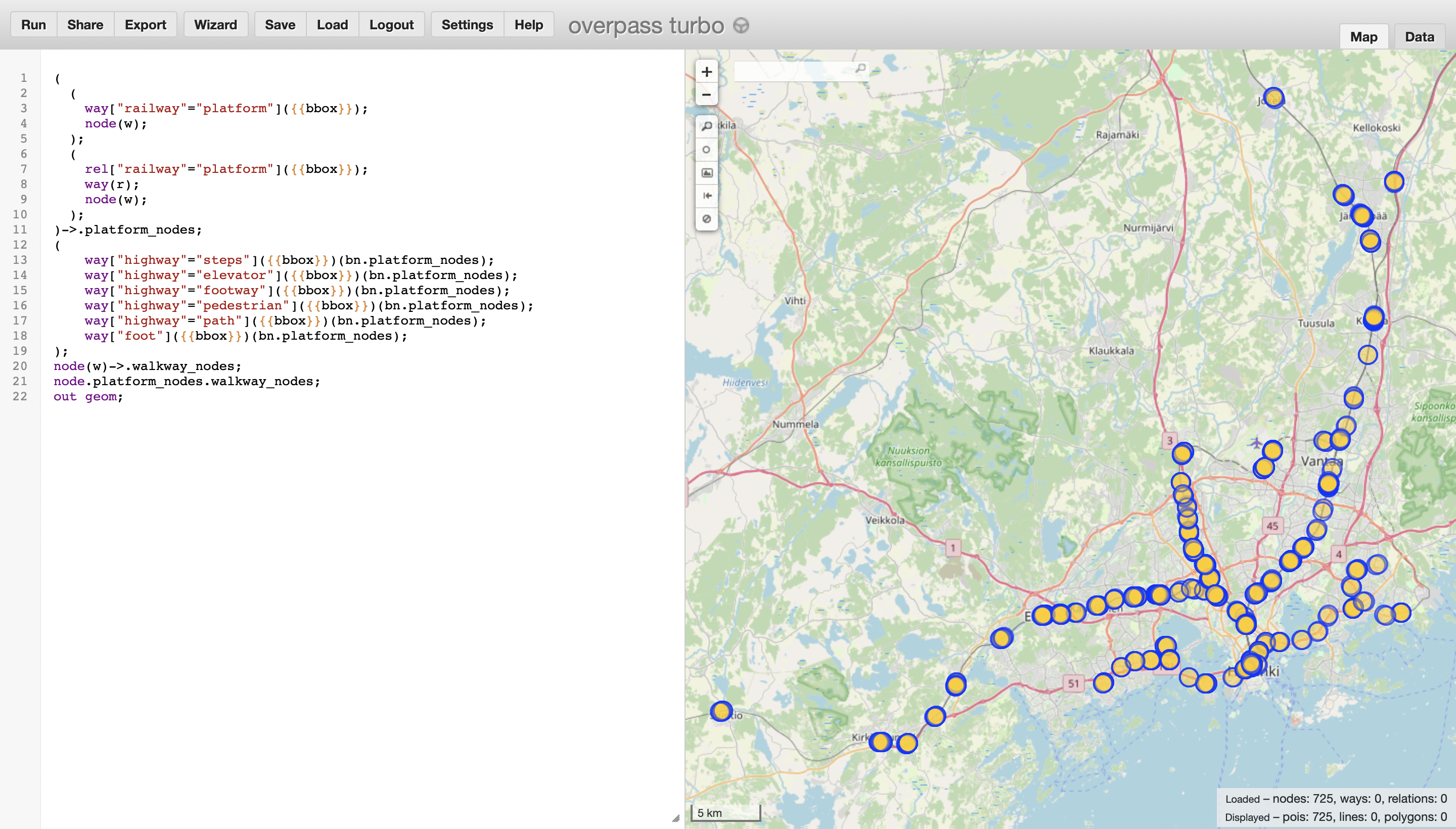
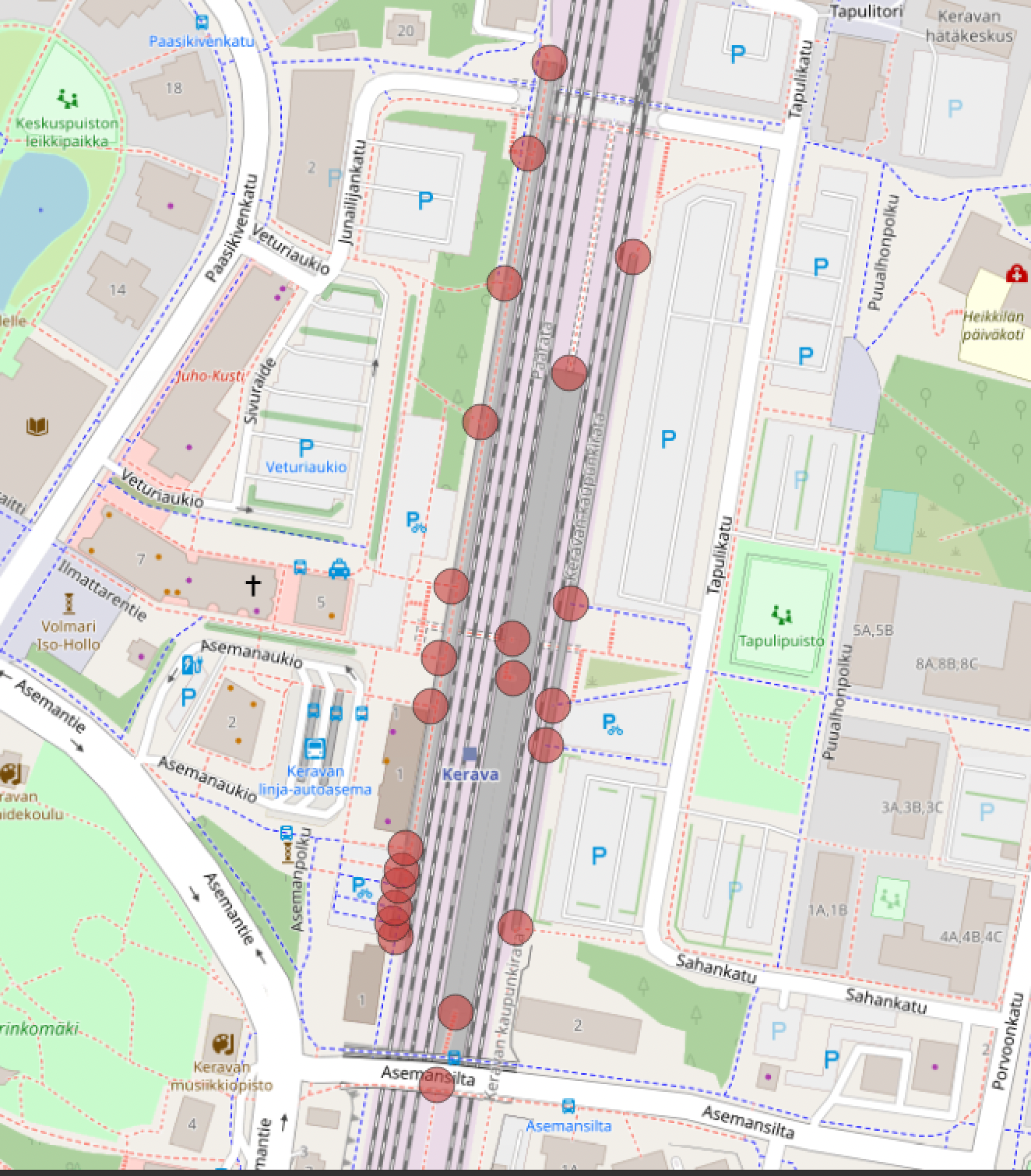
Let’s put this together
Then, like in the school case before, we just run GraphHopper that contains Finnish data with our QGIS Catchment Plugin, using as a point layer all the points from above. A few features were added to the newest version of the Catchment plugin to make this use case easier:
- the user may combine multiple isochrones into one. This is done so that a single isochrone is obtained for all the dozens of entrances to the same station. In essence, then, the isochrone tells us how long it takes to reach *any* platform at the specified station. This is not necessarily the specific platform the transit user may need to reach at the moment, though. To group isochrones, we need to know which points belong to which station, details on how to find out the station name for each entrance are found in instructions.
- the user may add a specified distance of meters to the isochrone. This is needed for an edge case not mentioned before: also approximate distances to the future Länsimetro Metro western extension, due to open in 2023, were needed. This is of course impossible with only OpenStreetMap data, as the walkways do not exist yet. Approximate underground walking distances and approximate future entrance points were obtained from Länsimetro documents and plotted manually in QGIS. Instructions detail how this was done.
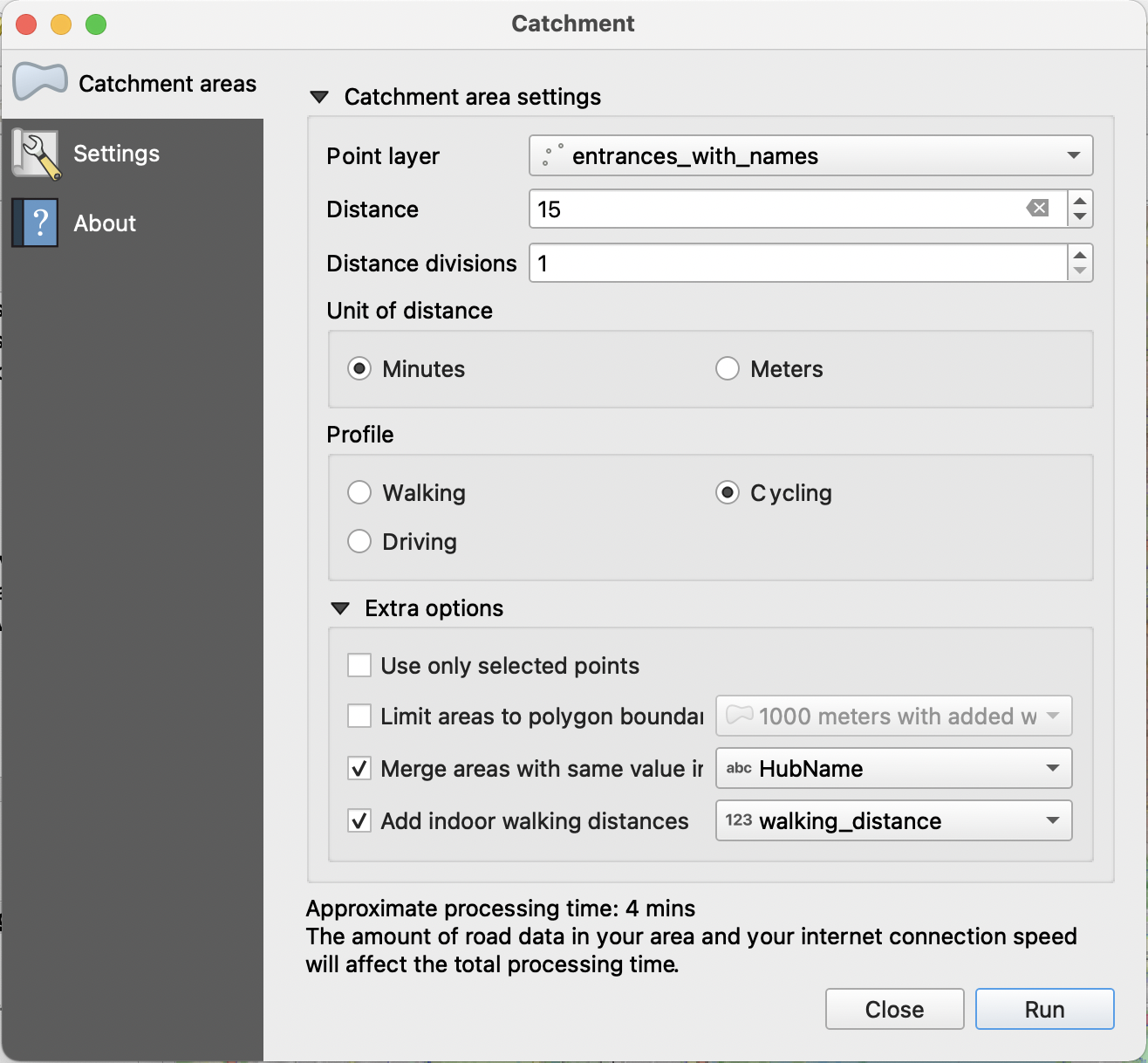
What do we get?
We get a lot. As an example, let’s check the 15 minute biking distance to a representative suburban railway station, Pukinmäki:
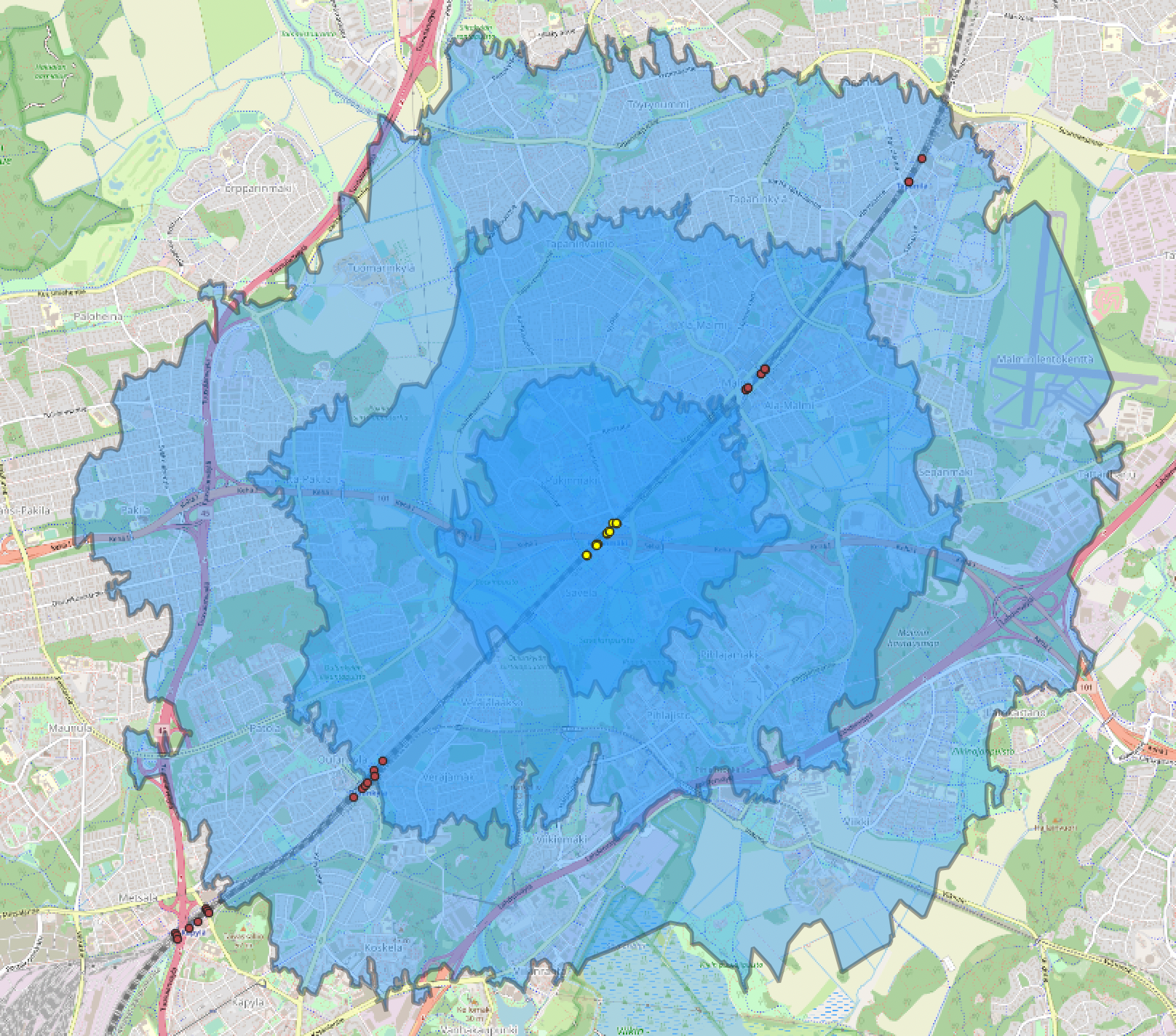
The fun thing about the bike routing is that in Graphhopper, it is rather advanced. While walking routing assumes a constant walking speed, bike routing depends on the quality of the route, surface material and lots of other factors. Highest speed is reached on dedicated bike lanes. To get results similar to old HSY defaults, a maximum bike speed of 15 km/h was set in graphhopper; the details of the settings are found, again, in the instructions. The minimum speed will be 5, 4 or even 3 km/h, because the bike is pushed on stations, on stairs, paths etc.
The underground stations will result in some quite funny looking isochrones at small distances. This is because in some cases, the transit user will have to walk over 200 meters to even get above the ground in the first place. Also, with very small isochrones, there are not a lot of roads to go by, so we might just get a triangular sliver around a single path. Cases in point are some future Länsimetro stations (Finnoo), Airport as well as downtown stations (Sörnäinen):
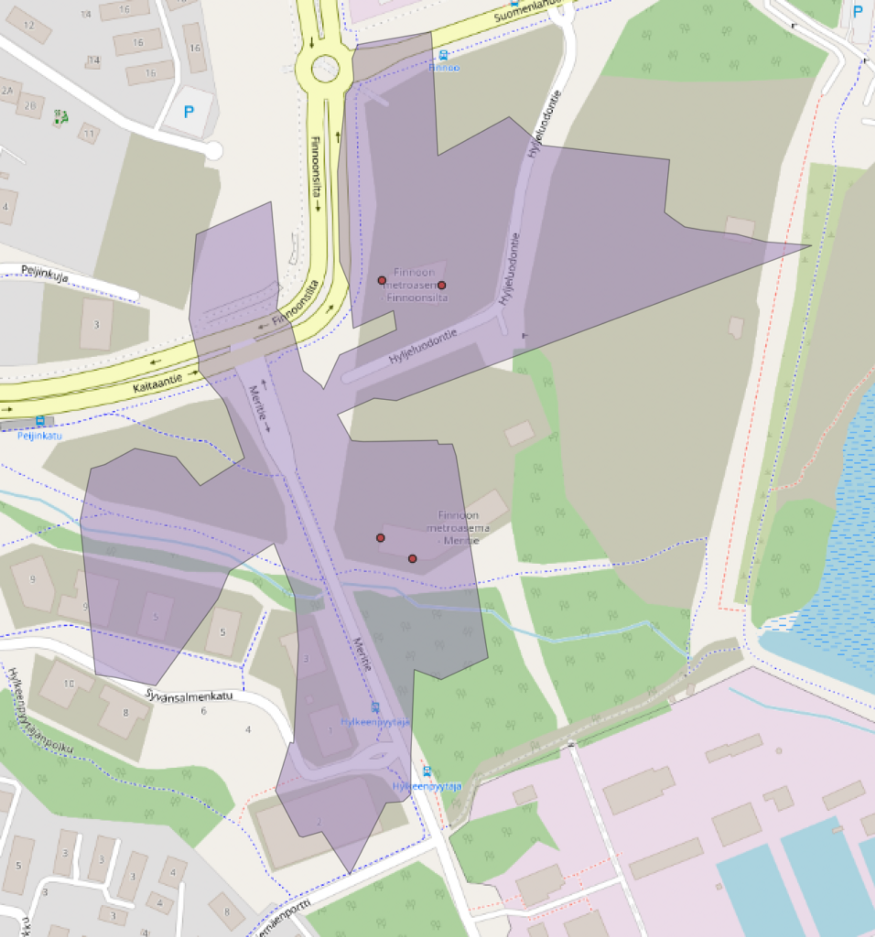
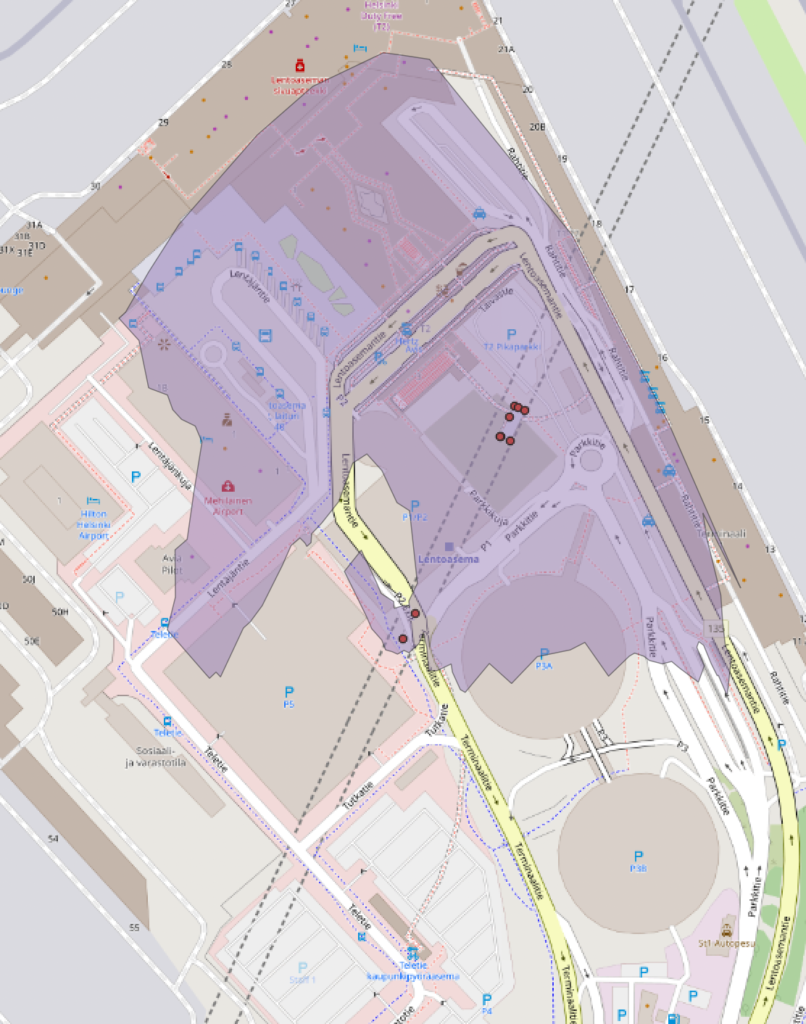

What does “isochrone” mean? What are the use cases for the polygon?
The main problem, as in the previous school isochrone study, are areas where there is no road network. In the case of schools, this meant unmapped countryside, which will get funny results. In the case of Helsinki, the road network is very well mapped.
Therefore, the only areas with spurious polygons are those which have *no* network and access. The most obvious example of these, of course, are the sea and bays Helsinki is known for. Essentially, we would need extra layers (where are the seas? where are other unaccessible areas?) to cut the resulting isochrones with to get results that look more sensible. The airport, similarly, is out of bounds, but the polygons may extend there due to lack of data. The instructions contain more details on this behavior; essentially, GraphHopper triangulates the whole surface based on the path network.
Unlike some methods that are based on the walked paths and assume areas outside the networks may not be accessed, GraphHopper assumes the area between the paths can be accessed. Which assumption is more correct really depends on the case.
This is really a question of what an isochrone polygon means, i.e. what does it mean to have access to a place next to a path? How far from the path can be accessed? The only results an isochrone calculation ever returns are the graph edges that have been reached. Building the surrounding polygon from those points is always pure guesswork, based on what is required from the results. Some cases might require a path be within 50 meters; in this case, larger blocks may contain population that is outside the isochrone. Some cases might require a path to be much closer or much farther away, and still should be contained within the isochrone.
It all depends on how dense the path network is, which are the areas outside the path network we want to be able to access, and which areas outside the path network we don’t want access to. That will have to be defined first, to get isochrones with the desired properties. No single isochrone calculation method is ever the absolute truth, because physical reality is not a graph of paths. More data may always be added to improve the accuracy for each desired purpose.
The future
Personally, the most interesting study for me would be to extend this methodology to all existing and future tram and light rail platforms in the Helsinki region. The data is already there for the taking.
Such a study would nicely complement the heavy rail platforms considered here; the regional and also City of Helsinki goal is to zone next to light or heavy rail as much as possible, so the heavy rail access detailed here is only a part of the equation. Even large areas of downtown, including many of the most populated neighborhoods in the city, lie outside the heavy rail network, and the light rail network in Helsinki is rapidly extending to meet the demands of the growing city.

During Autumn 2021 Gispo was one of the companies co-operating with University of Turku in organizing a “Get to know worklife” type of course for future applied mathematicians and statisticians. The idea of the course was that each of the involved companies present one problem they have faced, but have not yet been able to solve (typically because of limited time resources). However, the company has to offer guidance to the students throughout the course so the company has to have on idea on how to solve the problem. The students, in turn, will act as “borrowed employees” and start to investigate the presented real life problem with the help of co-operation company’s contact person. Each student group of 2-4 persons will have an assigned professor in the team too, just to make sure that each team has enough “academic muscle” to survive the challenge.
Problem definition
We at Gispo wanted to utilize this change for emerging the team into the problem UNESCO International Institute for Educational Planning (IIEP) had presented for us in one of our previous collaboration projects. In other words, we wanted to figure out which would be the most optimal way to arrange school inspections. In practice, we have a bunch of school inspectors living at certain locations and a much greater number of schools whose actions need to be inspected. We at Gispo utilized PostGIS and pgrouting for transforming the actual road network of the study area into routable graph. Since mathematical optimization and GIS data do not really speak the same language, we also created files containing the lengths of each road with its start and end node id. For each graph node we stored the information about their location. We also attached each of the studied schools / school inspectors’ home points into the closest road network node id.

In order to say that we have a solution for the school inspection problem, only one universal requirement has to be met: each school has to get inspected once and only once. But if we look at the problem from a perspective of single school inspector, more requirements emerge:
- The school inspector has to know which schools he should inspect
- The school inspector has to know which of the schools allocated to him he should inspect during the same work day
- Note that a number of work days school inspectors can use for school inspections is limited.
- The school inspector has to know the order he should visit each school planned to be inspected during one work day
- In this project, we assumed that
- the length of a work day is 8 hours
- it takes an hour to complete the school inspection
- The school inspector has to know which routes to take when driving from the first school planned to be inspected during one work day to the second one etc. until he reaches the last school planned to be inspected during that particular work day
In addition to these, each of the school inspector & work day specific school inspection routes should begin and end at the particular school inspector’s home address. In other words, we do not allow overnight trips.
If we wish to talk about the optimal solution, we need to have some way to measure the goodness of each solution. It is not enough to find just some solution which satisfies all the requirements listed above.
The objective: to minimize the distance driven by school inspectors in order to visit & inspect all the schools in the study area.
The roadmap to the solution

Who solves the problem?
- Allocation problem (for the interested: the idea is to create an initial solution and iteratively improve it with the help of nearest neighbor algorithm and simulated annealing): Python program developed specifically for this purpose
- Route optimisation problem (for the interested, the more accurate type of the problem is Time-Window Multi-Depot Vehicle Routing Problem): GAMS
Note that GAMS system creates optimization problems from your models and data, and retrieves results for analysis and processing, but it does not solve the optimization problem. Instead, it uses solvers that have been connected to GAMS and are included in the GAMS system.
It is important to recognize that other, open-source, options for solving phase 2 exist, e.g. NEOS Server or Google OR-Tools. The students chose to use GAMS system mainly because they had a licence for it (offered by the University).
How to understand the solution?
It is not trivial to understand the solution of the route optimization problem. This follows from the fact that we need to convert our demands (requirements) and wishes (objective) into the language of math; in this case into a GAMS-model. No need to go further into the process of creating it. The necessary part is to understand that the construction of the GAMS-model representing the school inspection problem has been automated in this project, and it can be done via executing one command. Likewise, the process of converting the integer solution GAMS produces into standard GIS format has been automatized. As a result, we get out a bunch of GeoJSON files. Each of these files represents a route planned for the particular school inspector to be driven during one of his work days.
The solution for the case study

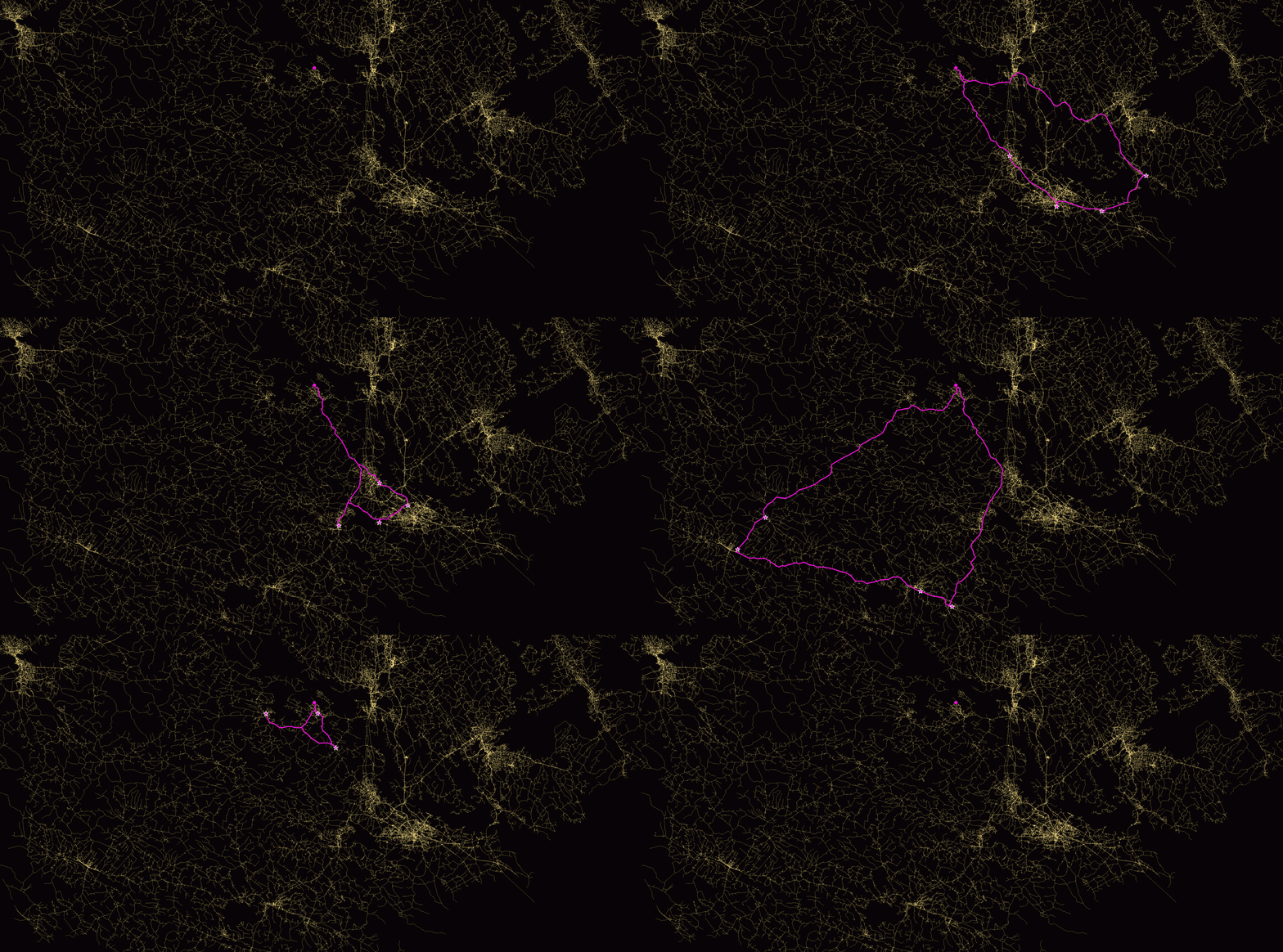
Image 3: GIF animation visualizing the optimal inspection routes of school inspector 4 for each work day. Animation produced by Gispo Ltd.
Conclusions
Note that the solution power of the developed model, and the tools for solving it, does not limit to this more or less hypothetical case study of inspecting the schools in the subarea of Finland. The same kind of solution can be produced anywhere in the world as long as we have access to the real road network of the study area (e.g. via OpenStreetMap) and we know the locations of the school inspectors and schools to be inspected.
Neither does the solution power limit only for cases where the length of a work day is 8 hours or it takes an hour to inspect a school. All of these things are parametrized and they can get any value necessary. Parameterization can be easily also extended (e.g. if we cannot say that each school inspector has 100 work days to use for school inspection but rather the number of work days available depends heavily on the school inspector).
To wrap up; theoretical models and algorithms may, in some cases, be just what we need in order to solve complex, real-world geospatial problems!
See it for yourself!
All the data used and codes produced in this project (programs for graph analysis, allocation of schools, writing of GAMS model and converting integer solution of the TWMD-VRP onto GIS format), along with the obtained results, can be found in the project’s open gitlab repository.
The team:
Pauliina Mäkinen (Gispo’s representative), Olli Tuhkanen, Jenni Leinonen, Katariina Rantanen and Marko M. Mäkelä (Professor, Applied mathematics)
Point cloud data is expensive to acquire. Lidar data is too often left aside as it is hard to analyze and you often need quite a bit of processing power to analyze it. Even if you get the data, you’ll still need to analyze it. Luckily, geospatial technologies are getting better. In this blog post, I’ll make a quick dive into a couple of use cases we could have for driving insights from point cloud data with open-source software.
As a dataset of interest, we’ll drive some insights from Lidar data from the National Land Survey of Finland (NLS Finland). NLS Finland published just last year some new highly accurate (5 points per m2) Lidar data, which I happen to have here for the analysis (you can download some of it as well).
Getting started with some postprocessing
For starters, you can drag and drop the point cloud data to QGIS. While it’s loading, you might want to visit WhiteboxTools’ website at https://www.whiteboxgeo.com/. WhiteboxTools (WBT) is the set of tools we’ll use to process the point cloud data. For this blog post I used a small and simple GUI for WBT, called WhiteboxTools Runner:
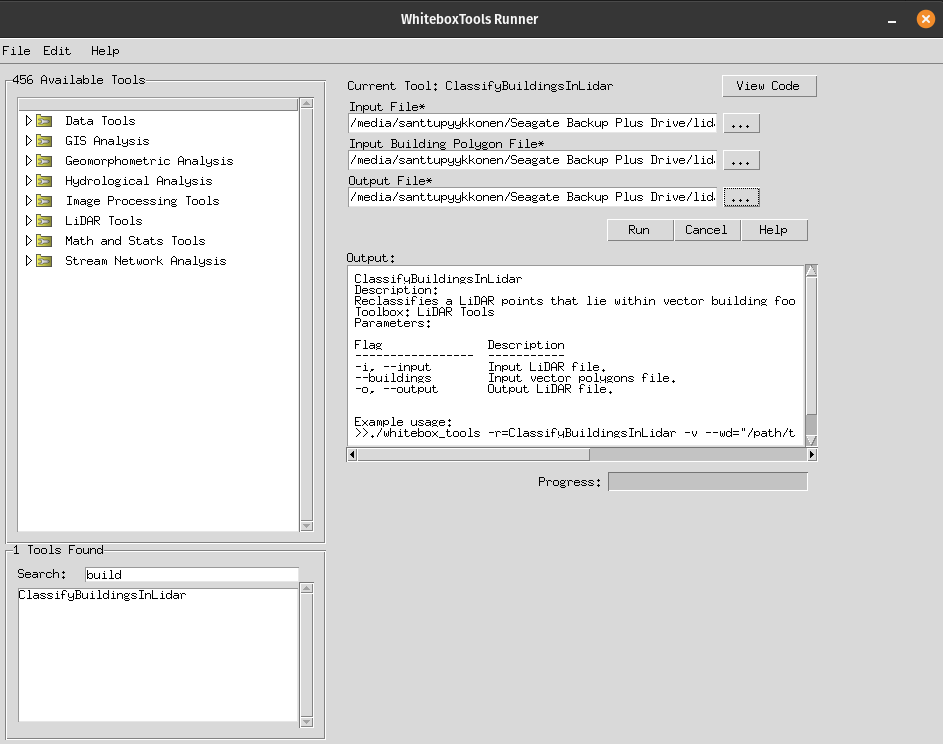
You can download WBT from here and see the broad user manual here. You can also install a QGIS plugin (from Alexander Bruy), which permits you to use the tools from within QGIS.
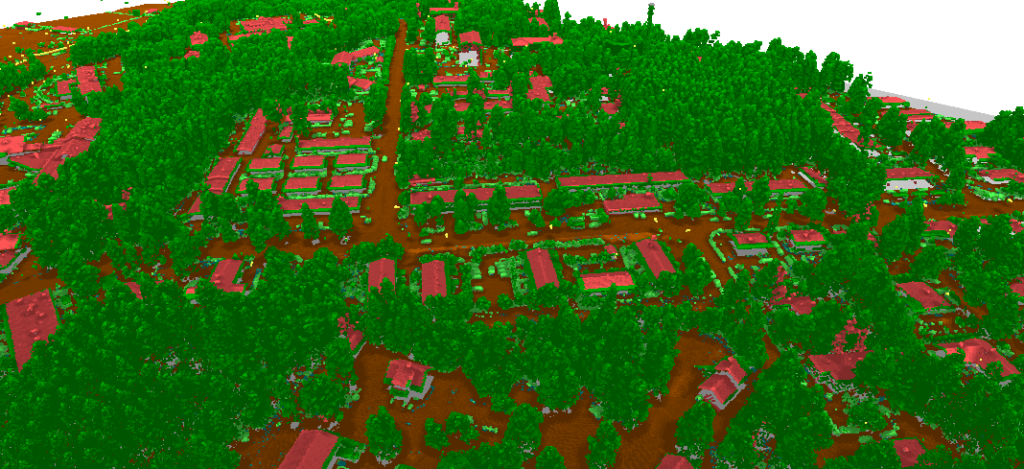
First, we want to classify the buildings since the original classification did not have the buildings classified. This is done with WBT’s ClassifyBuildingsInLidar. The tool ran very fast (~10 s.) having in mind that the point cloud dataset has more than 10 million points.
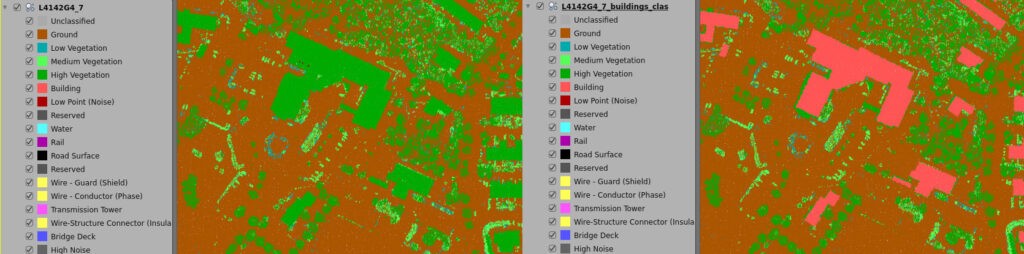
The image on the right is the result of classifying the buildings in the point cloud data. The algorithm needs polygon vector data on the buildings (footprints) which I had consumed from the NLS Finland (OGC API Features).
Detour on rooftop analysis with point cloud data
As we were already analyzing the buildings, we could make another analysis on the rooftops, on their slopes and aspects, e.g. for identifying where we could position our solar panels.
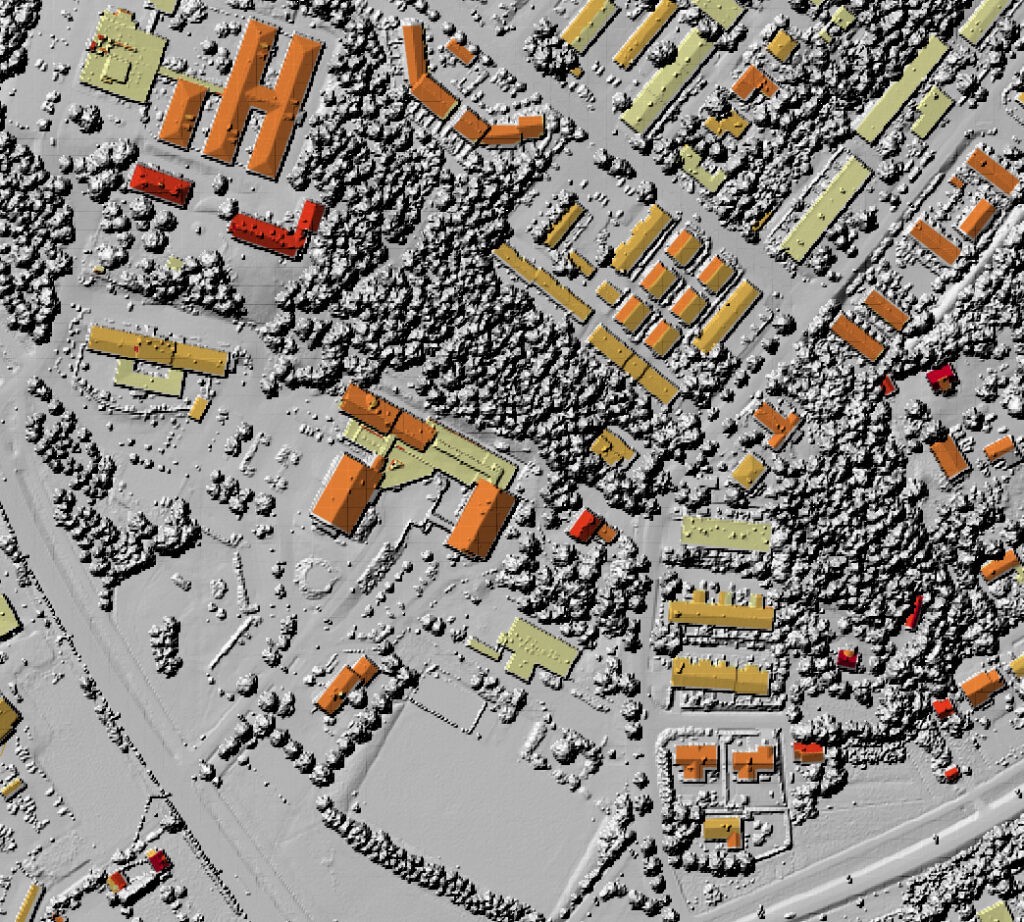
As a result, we’ll get a vector layer on the rooftops which holds information not only for the roofs as one but for the different sections of the roofs. The resulting vector layer holds tabular information on slope, aspect, and relevant numeric information.
This is hugely useful, and again the tool worked highly efficiently. Please note as well that the Digital Surface Model (DSM) that you see in the latter map, below the colored rooftops, was also created with WBT from the same point cloud dataset.
Excluding Lidar classes
We ought to remember that these datasets are huge by nature. Thus, we should exclude the Lidar classes that do not hold information of our interest. We can do this with the FilterLidarClasses algorithm. For this exercise, we’ll use another dataset from Turku, Finland. This just recently published, highly accurate (30 points per m2!) Lidar data fitted nicely for our purposes. I excluded the majority of classes, and end up with 35 % of the size that this specific Lidar tile dataset holds (~ 15 million points).
Result of excluding some Lidar classes (roads, ground, low vegetation…)
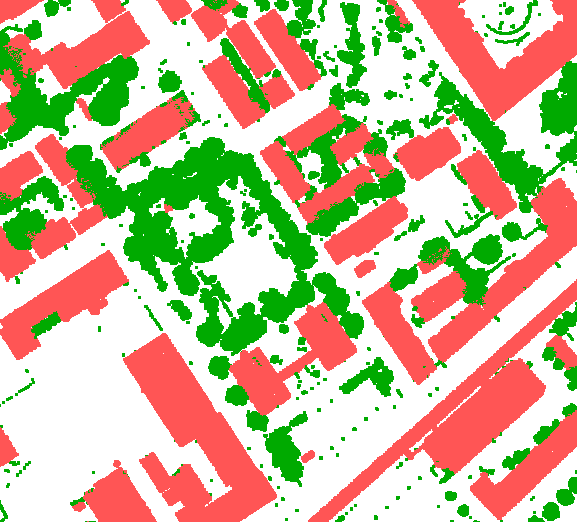
There’s another useful tool in WhiteboxTools caller LidarInfo which gives you all this informational data on your Lidar datasets.
On the left side, results from the raw data; On the right side, results from the processed data:
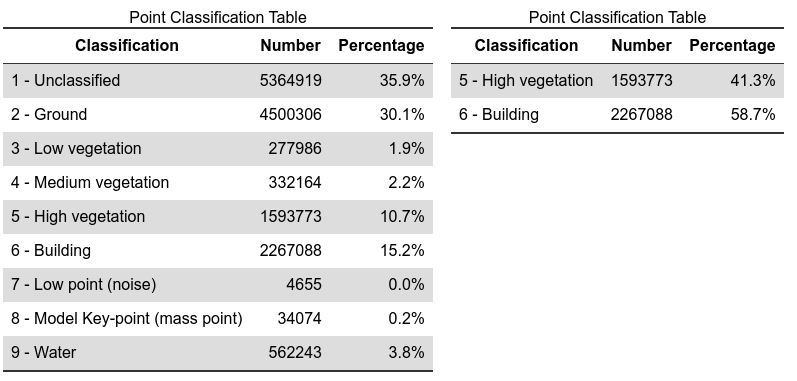
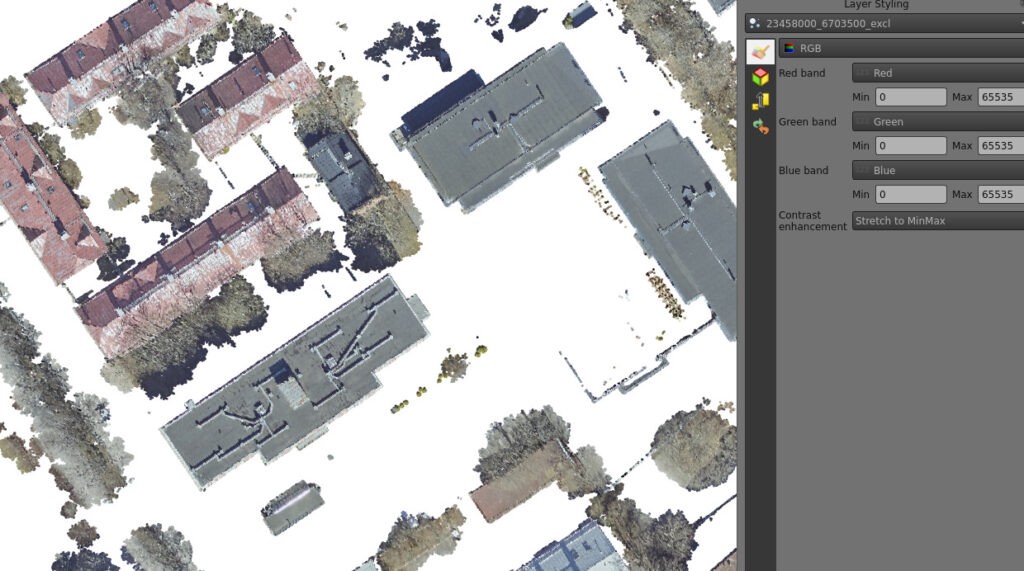
This is how we can filter only the classes we’re interested in. As the filtering was done, I’d drop the .laz file to QGIS and it rendered directly with the RGB values that were per default part of the data. QGIS visualizes the RGB values quite nicely as we can see below:
The filtered data visualized in QGIS (see the RGB config in the QGIS styling panel)
From manual processes to automated batch processing
As you remember, these datasets are huge and you do not want to process and analyze the datasets in a desktop environment, you want to take the datasets on server-side and batch process the data in a meaningful way to save time and processing power. WhiteboxTools offers a broad and flexible set of scripting environments for you to automate your workflows:

As an example, see the following results from a Python script that integrates 4 processing algorithms from WhiteboxTools, and saves the user (me!) all the trouble of manually going through the processes. And it worked great! This is how you get value out of Lidar data. You can explore the script on WhiteboxTools’s website.
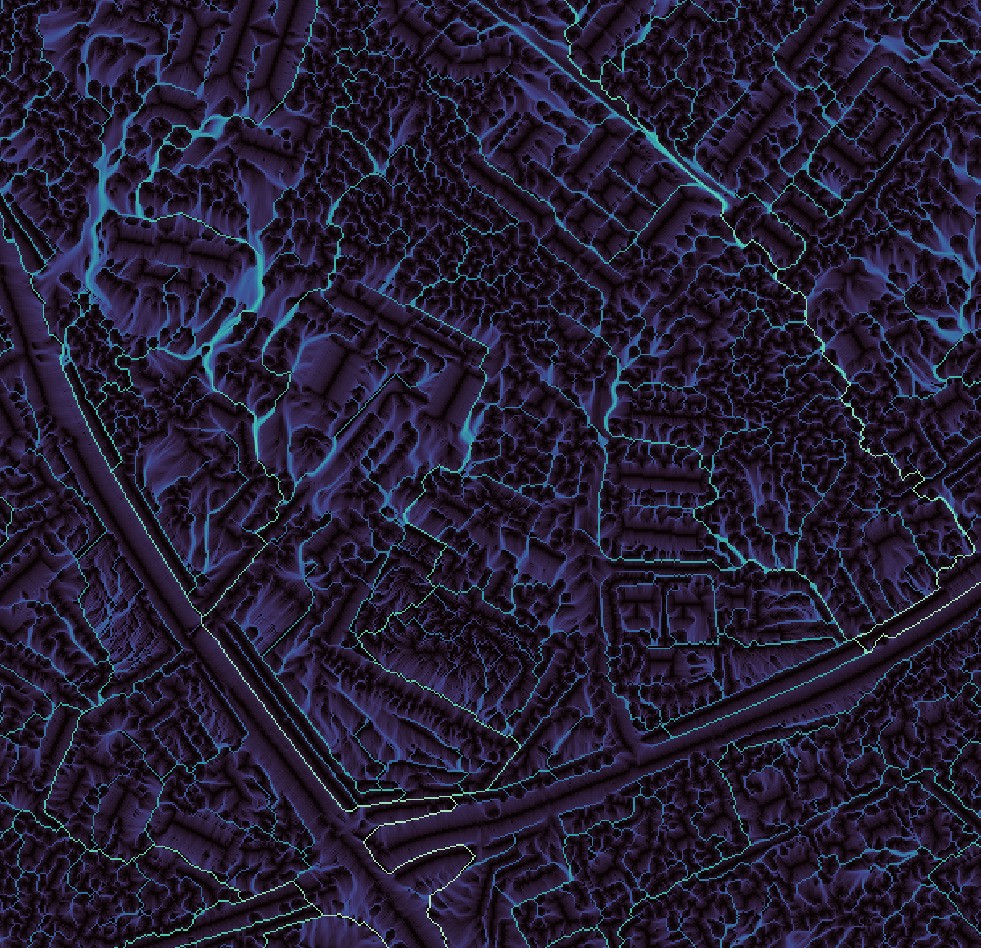
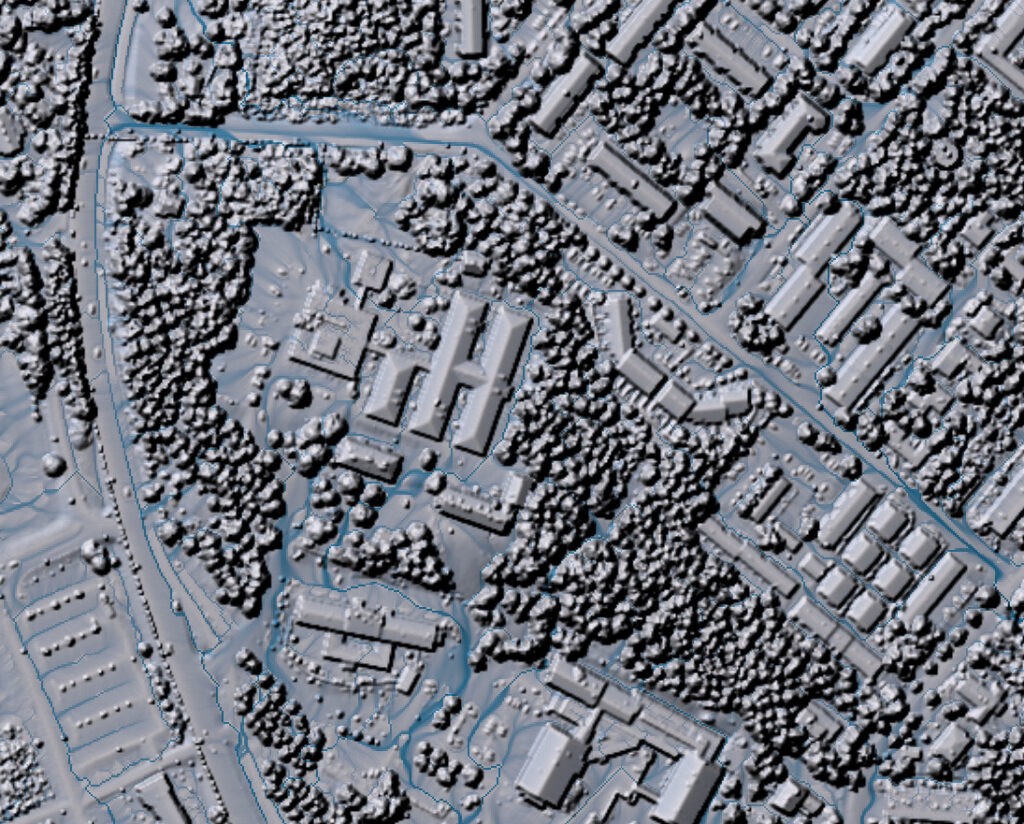
The flow accumulation analysis used the same point cloud dataset as the sole input for the analysis.
Conclusions
WhiteboxTools is well worthy of your attention. In conclusion, Whiteboxtools works quite seamlessly and is a great set of tools for analyzing point cloud data as well for many other types of data. It also works neatly together with QGIS as a GIS environment for visualizing and analyzing Lidar together with other data types.
As the amount of point cloud data increases, analytical opportunities rise for those who are willing to explore innovative ways to analyze point clouds in a wider context with other geospatial data. Nowadays the data is not acquired just by planes, drones, and laser scanners, but also by phones (check out Polycam and SiteScape). As an organization or an analyst interested in driving insights out of point cloud data, you should prepare yourself with solid know-how and proper tooling.
Hope you’ve enjoyed this brief intro to the world of point cloud data, WhiteboxTools, and once again the all-mighty QGIS! If you’re interested in taking a deeper look into the opportunities there are for processing and analyzing point clouds, and you’re looking for a partner for the ride, consider reaching out (santtu@gispo.fi). Thank you for your interest!
It’s the last day of November and so #30DaymapChallenge comes to its end. The last day of the challenge is Metamapping day and for that theme we take a look at the maps we created here in Gispo.
This year we participated as a group with each one of us contributing one or more maps. The challenge has been fun and interesting, but most of all a chance to learn by doing and a chance to learn by seeing the maps others have been sharing. This years’ maps have been inspiring and wonderful – thanks to all of you who participated!
We created and shared 29 maps in total, but what were the statistics behind the maps? For 29 maps we used 29 different databases in total. Most commonly used databases were Natural Earth (9), Maanmittauslaitos – National land survey of Finland (5) and OpenStreetmap (4). Our favourite program for making maps was QGIS. In total 20 maps were made with QGIS, out of which 8 were made using only QGIS and no additional programs or plugins. Other tools included Python (4), PostGIS (3) and various plugins such as qgis2web, pensilicish QML style, and geogrid. And even though the maps might look simple on the surface, we used 4 hours on average per map. That includes coming up with the idea, searching for the right datasets and tools, coding, scraping, working out the composition, trial, error, starting again… and finally exporting the map.
But now, here are the maps! From the three most liked maps we also have comments from their respective creators.
Topi:
“I’ve been blown away by the submissions to 30DayMapChallenge also this year. The quality of the maps has taken a leap forward and it’s great to see also new mapmakers and organizations to take part. If you are interested, you can see a collection of the most successful maps here.
For my own Twitter account I made around 20 maps and for the Gispo account I did a few. The monochrome map with the ships was a quick draft with the fascinating World Bank shipping dataset and for the first day with points I reused an old design of mine with population data.”
Salla:
“Map without computer” was by far the funniest theme in my opinion and I hurried to book it for myself right away. I first made one version by hand and with watercolors, but it was boring. Wet felting as a technique is pretty hard to master, so I didn’t plan to make any very detailed map. The altitude ranges seemed to be sufficiently concise. I had many different colored wools already in the closet, but I ended up with the typical green-brown scale. The finished Finland was very strangely shaped and fluffy at the edges, so I cut the borders neater with scissors.
Eemil:
Making maps is always great fun, but this map was peculiar in a sense that I thought about the subject for the map much more than the making of it. As a theme map choropleth map is very common so I started thinking is there something that hasn’t been “choropleth mapped” before. While I was searching for data Wikipedia popped into my mind: data is information, and if people need information, Wikipedia is usually the first place where they go. The same applies with maps. I haven’t participated in 30DayMapChallenge before, but it was really cool to see the maps others made. I was surprised how much there was to see for every day of the challenge!
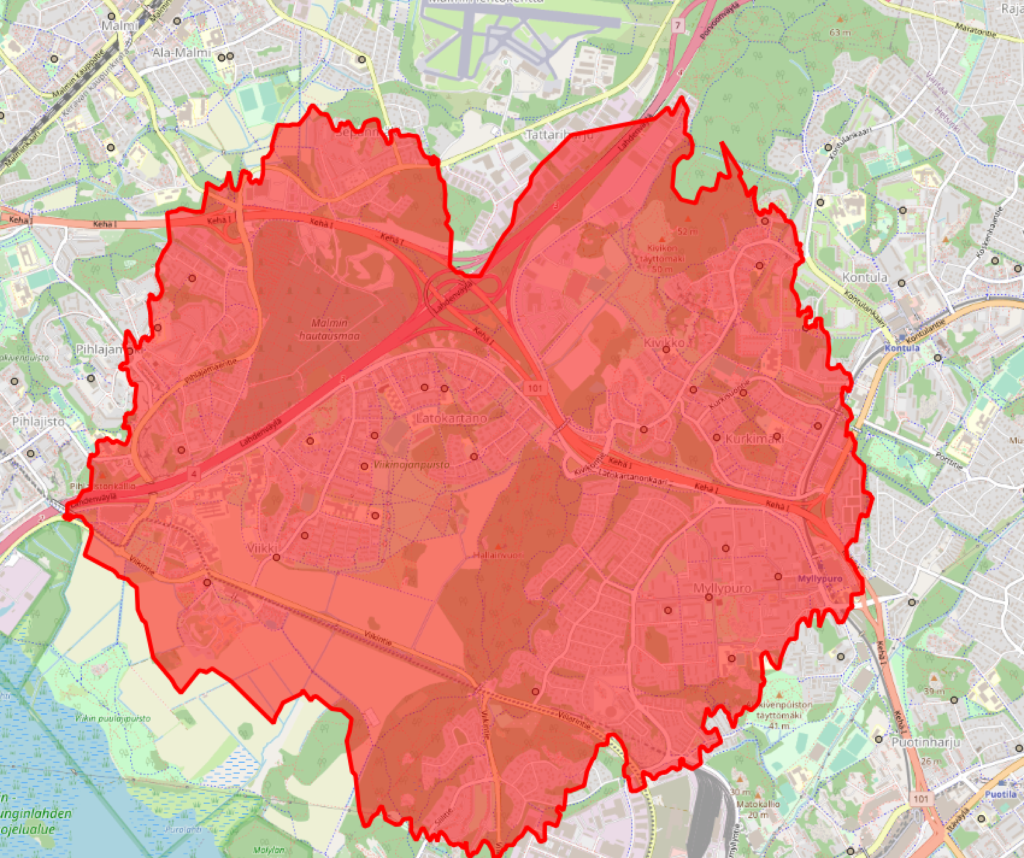
Improving access to education is one of the major challenges faced by educational planners and managers worldwide. Placement and distribution of schools across various neighborhoods and cities may vary greatly within a single metropolitan area, in rural areas as well as nationwide. To improve the methods available to local governments in analyzing school placement and accessibility, Gispo worked together with Unesco IIEP to develop a simple methodology that would allow educational planners to use a QGIS plugin to fetch, visualize, and analyse the catchment areas of schools based on OpenStreetMap road network access.
What is it about, exactly?
Polygons around a point that show the distance travelled from the point in given time interval are called isochrones, i.e. polygons of constant time. There are various different ways of constructing isochrones for points, depending on the amount of data available on the surroundings.
Ideally, we might want to have a complete 3D view of the landscape surrounding all points. That would allow us to completely model factors such as terrain, possible paths or possibilities to roam across the terrain and take shortcuts, and even factor in the evenness or hilliness of the terrain to the travel time of an individual to reach a certain point. Still, even this data would not tell us if we are wandering through a mine field, ancestry land, private property or perhaps a particularly large bloat of hippopotamus.
Also, in practice no such datasets exist for all areas of the world. While height maps and even terrain or land cover data might exist, such data does not tell us whether the terrain is actually locally traversable by foot. In most cases, even pedestrian access will take place on roads and pre-existing paths. Here, we are in luck, because OpenStreetMap forms the largest known global database of human-traversable paths. Also, using Openstreetmap data, we may consider other forms of transport, such as cycling, as we may have information on the type of path and its suitability for e.g. cycling or car access.
“The purpose of the methodology is not to find any possible way to travel to school,” says Amelie Gagnon, Development Lead at IIEP-UNESCO, “but rather to investigate the safest paths for learners to go to school, and eventually mobilise these same travel routes for other purposes (e.g. inspection circuits, delivery of textbooks, mobile libraries, school meals, etc.)”
When limiting our datasets to a network of paths, the problem also becomes more easily solved for a large number of points relatively quickly. Multiple algorithms exist for calculating the shortest path in a graph from point A to B; in this case, we want to find the shortest path to all points in the network surrounding a certain point, up to a given distance. This is called the shortest-path tree of a given point.
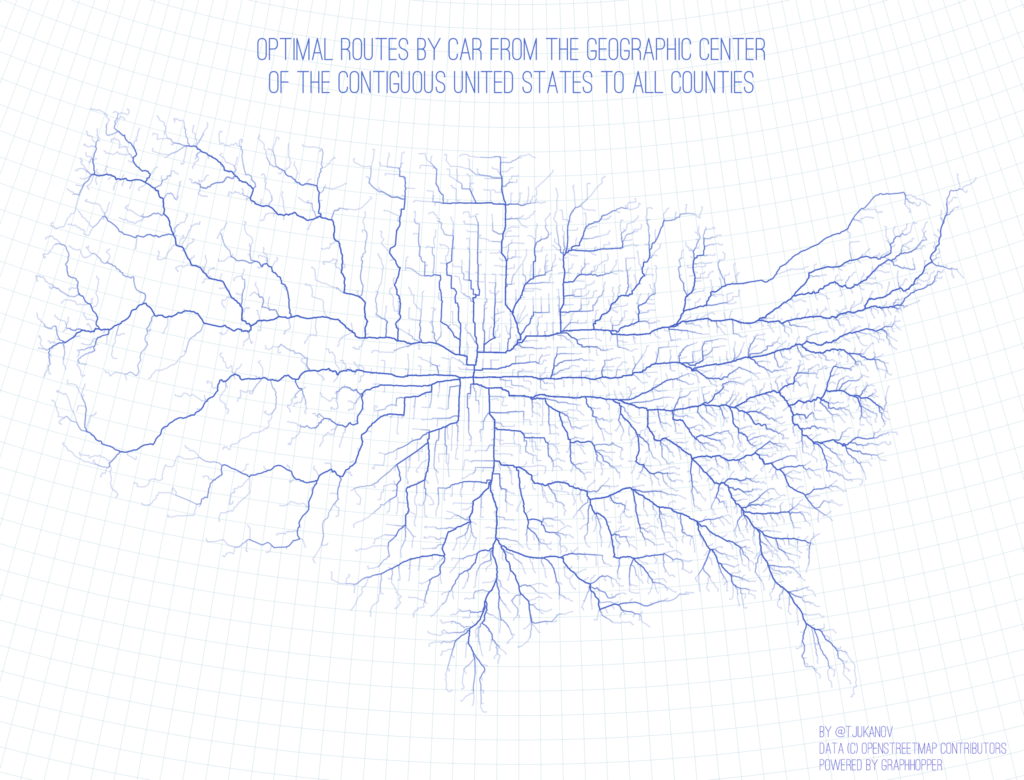
Luckily, even this needs not be implemented from scratch, as there are a variety of optimized open-source routing software components that also allow calculating shortest-path trees for points. We can pick and choose the one most suitable for the needs of educational planning, since their performance for this specific task varies greatly. A review of various open-source solutions, most of which support calculating isochrones, can be found here. Just add traveling time to the tree above, and you will have the tree up to a desired distance (e.g. 5 minutes by foot, 8 hours by car, or anything in between). Our dear colleague Topi’s website contains an animation by distance of the graph above.
With a dataset as huge as OpenStreetMap paths, and the desire to calculate travel times also over long distances (up to 60 minutes by foot or even car), the performance of the algorithm in a huge graph becomes the most important factor in our selection. Due to its performance in large networks, our pick is GraphHopper. It employs a method called contraction hierarchies, which preprocesses the graph so that important long-range nodes are saved separately from the entire network. This allows fast routing over long distances with a small amount of nodes, while retaining also the small-scale network for short-distance routing.
The plugin
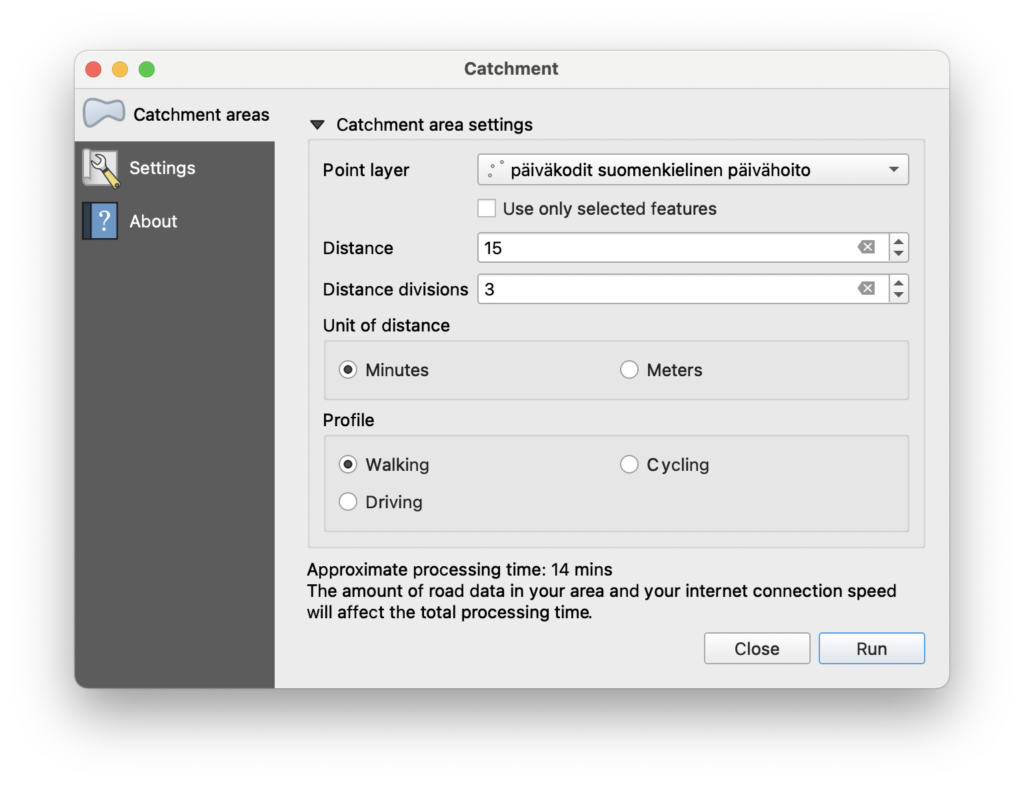
So, the proposed solution is twofold: 1) a QGIS plugin that allows the user to select the parameters for calculation, such as the points (or a whole point layer) we want to calculate the trees for, along with desired travel mode (walking, cycling, driving) and travel distance, and 2) a GraphHopper backend that contains all the OpenStreetMap data for the desired countries and which will process the QGIS plugin request.
Here, we must note a few things. Since the OSM network is indeed huge, processing the data to get a routable graph containing all walkable paths requires memory. Lots of it. Having the single GraphHopper instance process the graph(s) for the entire planet is sadly not feasible with current memory prices and availability limitations. We have to limit the instance to the country or countries we are interested in. Another limitation, obviously, is processing time. While trees for up to two hours of walking can be constructed relatively fast for a number of points, cycling or indeed driving for two hours would make the graph so huge that it becomes prohibitively slow to calculate. Therefore, we had to add a rough estimate of the processing time so the user knows if they are initiating a particularly slow query (or, indeed, a query that would take hours or days to calculate).
So what are the results?
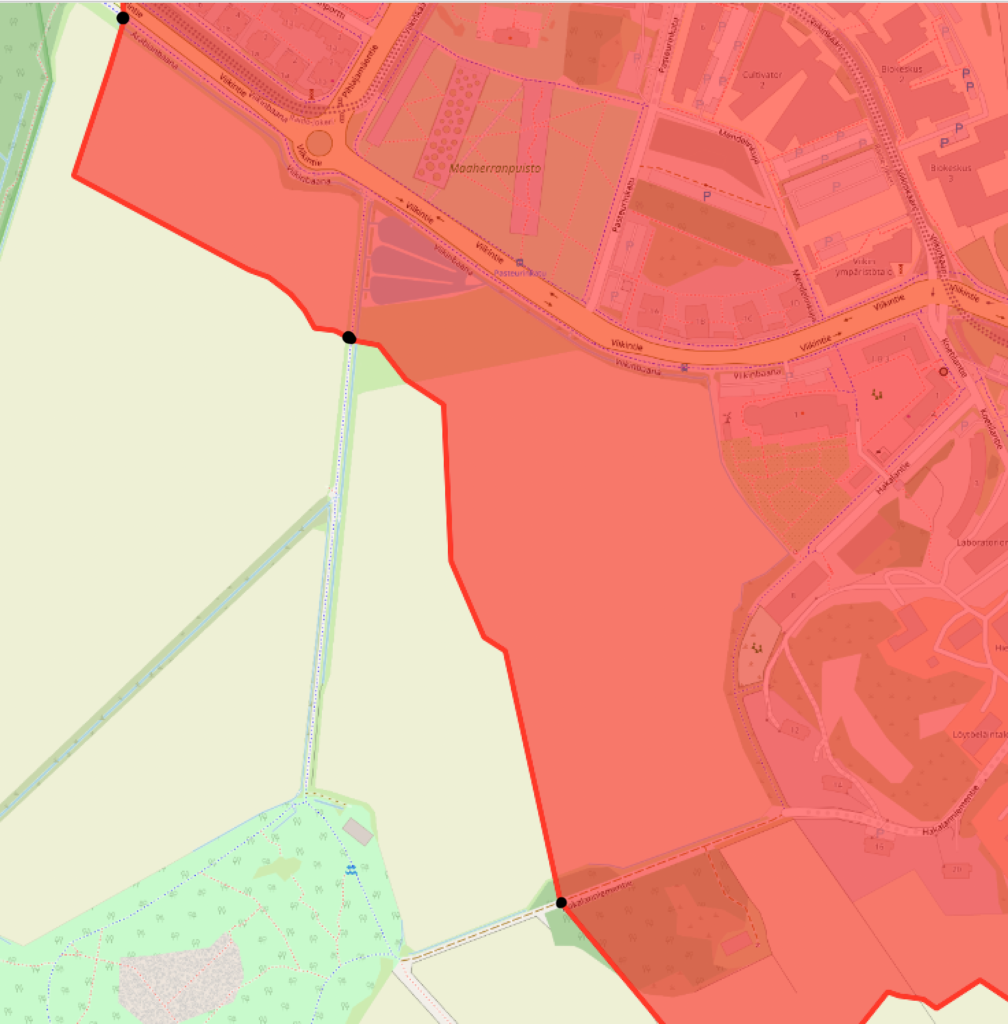
Then, on to the nitty-gritty. We haven’t discussed how we actually get the catchment area from the shortest-path tree. What GraphHopper actually calculates is just a tree, i.e. points in the road network we can reach in the given time. In the picture above, our GraphHopper result in this part of the boundary consists of three points. How does GraphHopper calculate the whole boundary out of these points?
We must keep in mind that at the moment, we have no terrain data. GraphHopper doesn’t know if there is water, woods, fields or unknown roads between the roads in the OpenStreetMap graph. If we use the road network alone, we have to guess the shape of the boundary based on it. What GraphHopper does is snap all points in the area to the closest road, whether outside or inside the catchment area, and assumes access to the area is always by the closest road. Further, this snapping distance to roads cannot currently be adjusted in GraphHopper parameters. Therefore, we are left with some guesswork.
In cases with comprehensive path networks available in Openstreetmap, like the picture above, there are so many paths that the polygon between the roads will be rather sensible. This means also that the area of the catchment polygon is close to the actual catchment area of the school.
A complete road network comprehensively mapped on OSM provides optimum results, and can reflect very well the situation on the ground. One such example is Jamaica, where a very detailed road network is available on OSM, so an isochrone analysis shows the actual accessibility of students to schools when walking.
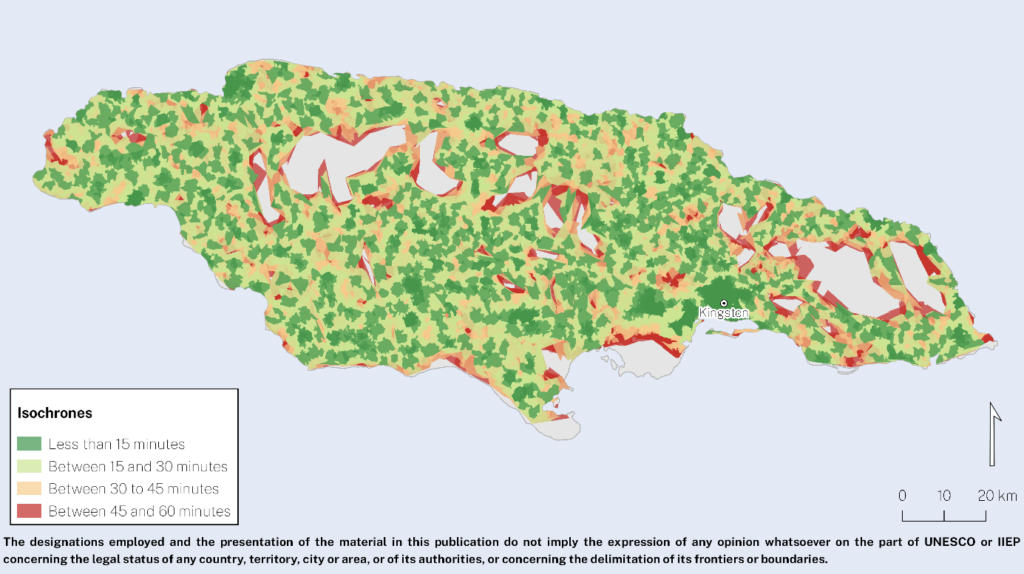
“Working together with the Jamaican Ministry of Education, Youth, and Information, we could test the plugin, examine the results and start discussing interesting insights for future policy responses,” says Amelie Gagnon. The figure above shows the isochrones mapped around primary education schools in the country. Isochrones could be drawn for all schools but two, which will be investigated further. What can be calculated, though, is that about half of the Jamaican primary school-age population can walk to school in less than 30 minutes, across the country, and 81% of the primary school-age population can get to school by walking for less than 60 minutes.
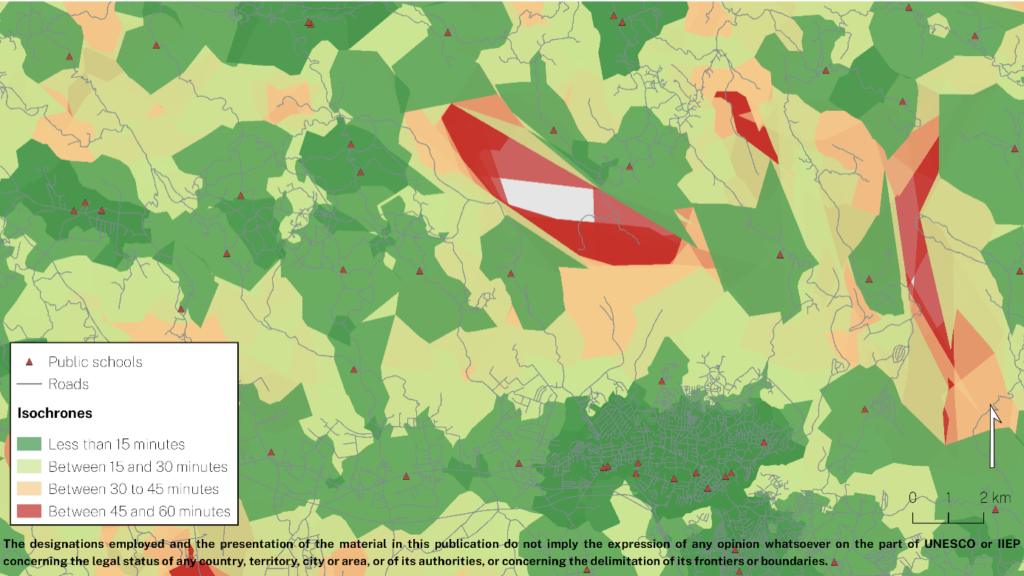
“Providing suitable conditions for learning start when students leave their home, not when arriving to school: a child walking 120 minutes to school will learn very differently than another who walks 20. For Ministries engaged in micro-planning, this tool is extremely useful to distinguish actual access from illusory access”
– Amelie A. Gagnon, Senior Programme Specialist leading the Development Cluster at IIEP-UNESCO in Paris.
Limitations
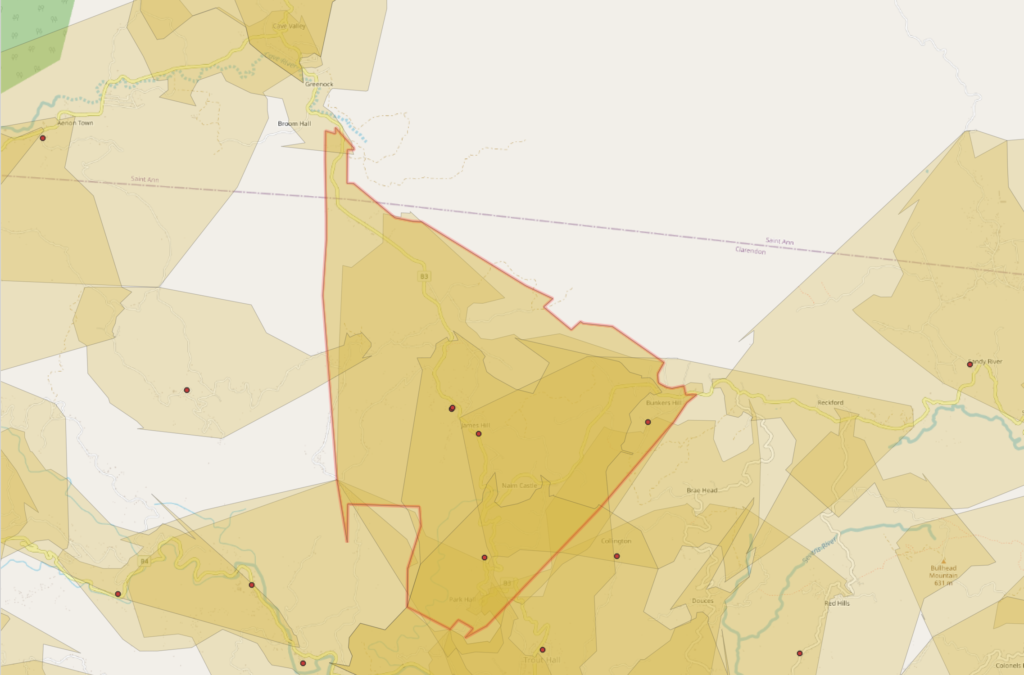
When road data is more sparse, the situation gets more difficult. In addition, missing pieces of roads in the data will result in roads that are not considered in the analysis at all, since they are not correctly connected in the network in the data. The end result will be isochrones that are deduced only from very few points of local roads, with lots of roads in the area missing or not connected, as below. Also, the shapes of the roads in the absence of crossings are simplified, so that GraphHopper only uses the end point of the 60 minute travel and does not take into account the wriggling of a single road on the way to the 60 minute point, as seen in the image below.
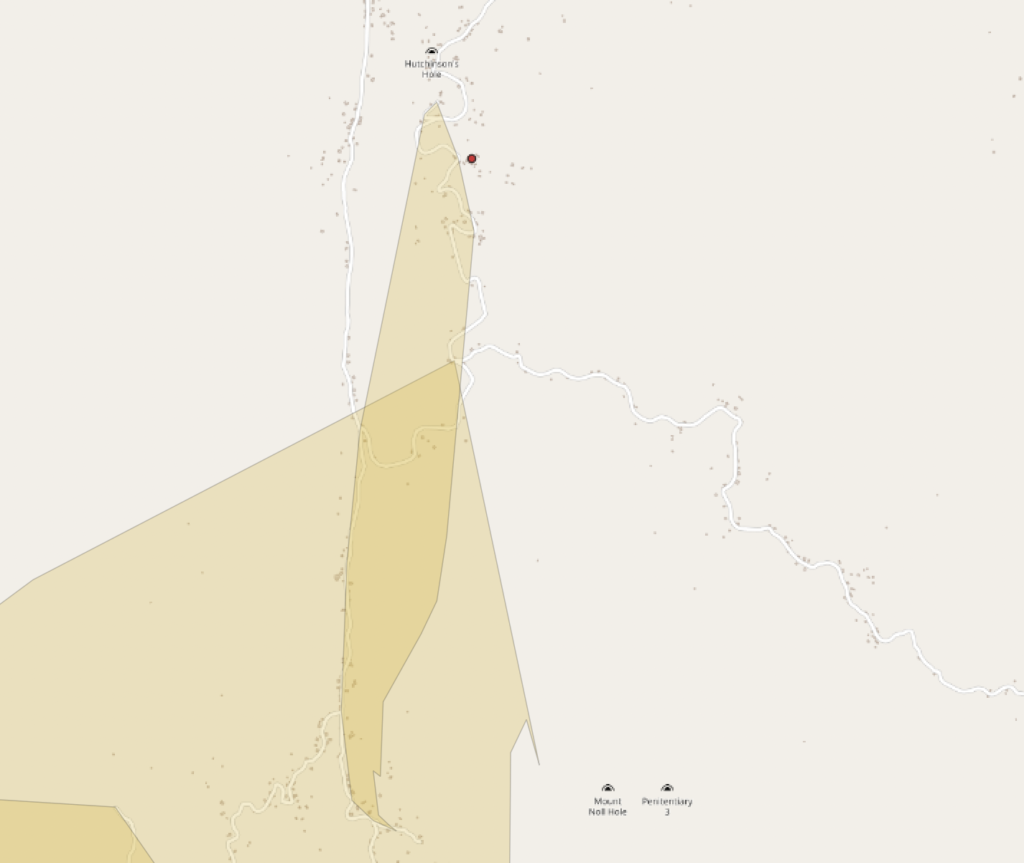
If only few roads are present, the shape of the polygon is pure guesswork. Errors in road data further decrease the size of the resulting polygon. In some cases, only very slender and simplified polygons along a single main road are produced. If areas are closer to a side road that is not connected to the main road, GraphHopper assumes such areas are not accessible from the main road. Depending on the wriggles of the road network, and on how much Graphhopper has simplified the shape of the roads, rough artefacts in polygon shapes are produced, depending on which road happens to be closest to each point in between the roads.
Such areas cannot be reliably used to estimate the number of people living within the catchment area of a school, for example, because of their arbitrary shape. Lots of people who actually have access to the school will be considered as not having access, because road data is not present in the area.
Therefore, some work is still ahead if the method is to be used for estimating accessibility in all rural settings. An obvious solution is local mapping of the roads. Another way to improve the situation would be to improve the GraphHopper code. While simplifying the road bends is crucial in doing fast calculations, the end result polygons could be constructed in a different manner. GraphHopper already has a registered issue concerning the shape of isochrones in a sparse network.
This means that instead of just taking the end points of the calculation and making simple polygons from those, Graphhopper would retain the whole network traversed up to the point and consider some buffer along the travelled roads (wriggles and all) to be included in the catchment area. Similarly, area exceedingly far from a road should not be snapped to a road. Currently, it is assumed that the travel time to the closest road is zero, while obviously travel time to the road should be taken into account.
In the most sophisticated analysis, travel time across terrain to the road would be calculated in addition to the travel along the road. However, this would result in problems in deciding which terrain is traversable. If we consider all terrain and roads to be equally traversable, we end up with perfect circles where the roads once again have no effect on the travel time.
Therefore, the calculation of catchment areas could be done in two steps. The first step would be to buffer the travelled roads with a user-configurable buffer zone. That would mean that all areas within a given distance to a road would be accessible directly from the road, even if there were a side road in the area that has no access to the main road.
This, obviously, also brings in some issues. Therefore, as a second step, such a buffer zone would be used only in the absence of other roads in the buffer zone. If a regular road network is present, the buffer would have no effect, but in a sparse network it would serve as a sensible first guess of how far a single road is accessible. In addition, travel time across terrain within the buffer zone could somehow be estimated, if we assume that traveling to a road is significantly slower than traveling on a road.
Summary
This work is yet another illustration that education does not operate in a void, and the overall quality of the data related to public infrastructure (formal roads and ways) and public behaviour (trails, lanes, etc.) is just as important as educational infrastructure.
– Amelie A. Gagnon, Senior Programme Specialist leading the Development Cluster at IIEP-UNESCO in Paris.
After the plugin development, the method was tested by educational planners in 10 countries across the globe to assess local school accessibility. While some problems were encountered due to the lack of OSM data near schools, especially in countries such as Bangladesh and Maldives which rely on water transport, the overall reception of our plugin was very positive and the early results were promising.
Therefore, our method and QGIS plugin are already in use across the globe! For a software developer, that is perhaps the best feedback there is: to know that despite missing data, a piece of software can still make a difference and improve school conditions worldwide.
You may read more on the testing and reception of the plugin in the IIEP-UNESCO blog. In the future, the method, as well as OSM data, will be improved to assess the limitations reported here, and to make it possible to reliably calculate catchment areas in a larger variety of school surroundings across the globe.
To sum it all up:
Our method of analysing school catchment areas works very well in all urban areas, because they have a dense road network and lots of users keeping the road network data in OpenStreetMap up to date. Therefore, if the majority of the population under study lives in urban or well-mapped areas, we can very well use the Catchment plugin to accurately estimate access to local education.
In rural areas, the quality of the road network data will directly determine whether the isochrones we create are close to the actual school catchment areas, and whether they will result in good or poor predictions of school accessibility. Efforts can be made with local OSM communities to connect all schools to the main road networks.
The full UNESCO-IIEP and GISPO paper will be available later in 2021, connect with development@iiep.unesco.org for more information. The QGIS plugin source code can be found on Github and the plugin itself is available in the QGIS plugins repository.
Urban walkability can be understood and measured in many different ways. Because of this, the term is difficult to define. To say a place is walkable could for example mean that the network of streets is dense or that a wide selection of services is accessible on foot. Other urban elements such as green space, air quality or the amount of traffic affect walkability too.
In this blog post I will analyze urban walkability with two network-based approaches. First, I will focus on the structure of a street network by simply calculating intersection densities. Then, with a bit more complex approach, I will run a city-wide routing analysis to find out how different urban features can be accessed on foot within a city. The analyses showcased here are a part of a larger client project that focused on evaluating the quality of urban space based on multiple criteria and data sources.
All the analyses in this blog post are done with open tools and data. The street network and urban features are from OpenStreetMap (OSM), and the analyses are performed using the OSMnx, Pandana and GeoPandas python libraries. Visualizations are a mix of Matplotlib and Seaborn.
While in this post I analyze the walkability in Warsaw, Poland, the workflow is directly transferable across any city with sufficient OSM data. The complete workflow and code can be found in this GitHub repository.
1. Intersection density as an indicator of walkability
Theoretical basis
Intersection density tells us how dense and connected a street network is. These indicators are directly linked with how walkable a place is. An area with a dense network has fewer inaccessible spots in it, and a high connectivity makes for more diverse and efficient route possibilities. Scientific literature backs this up: a positive correlation between intersection density and walking as a transport method has been consistently demonstrated (for example see Ewing & Cervero 2010).
OSMnx and graphs
From OSMnx’s documentation:
OSMnx is a Python package that lets you download geospatial data from OpenStreetMap and model, project, visualize, and analyze real-world street networks and any other geospatial geometries.
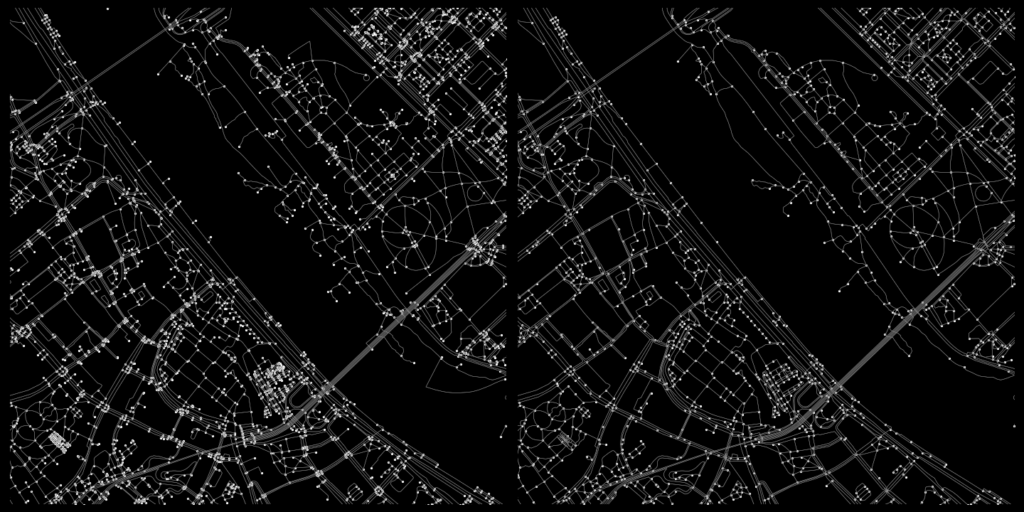
In the first half of the analysis I used OSMnx to download the walkable street network of the analysis area and to construct a graph from that network. A graph consists of edges (walkable paths in this case) and nodes (points in which the edges intersect).

The resulting graph is very dense and has a ton of nodes. This can be problematic. For example, if two paths merge with a third path at just slightly different points, one real-life intersecion can turn into 2 nodes. In this analysis my aim was to model actual intersections only, which is why I chose to simplify the graph a bit. I dissolved all nodes within five meters of each other into single nodes and excluded all dead-ends. The result is not perfect, but I think it represents the “real-life” intersections better than the original graph.
Visualizing intersection density
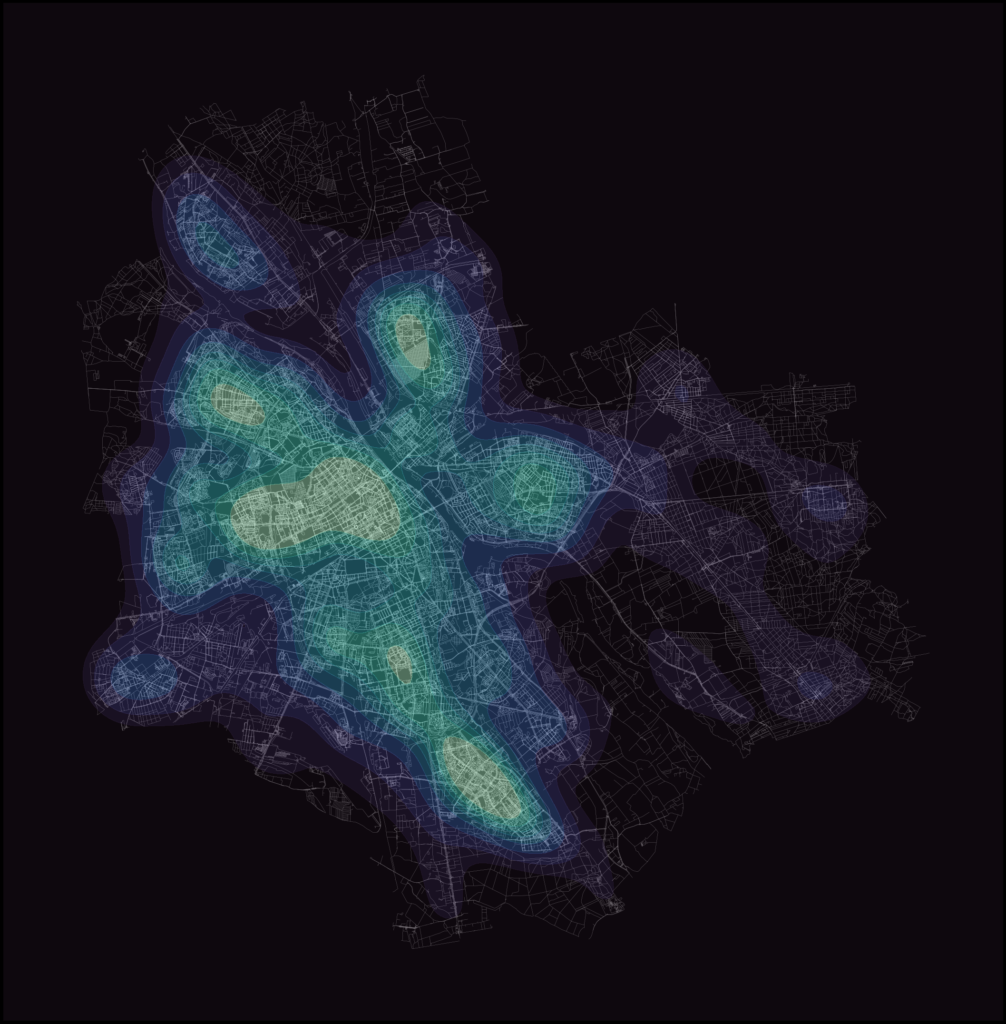
The simplification nearly halved the intersection count: from 177 207 to 96 414. Still, a plain cluster of nodes isn’t exactly an informative display of the data. To better visualize the spatial variance in the intersection density I first used Matplotlib’s hexbin functionality and then experimented a bit with Seaborn’s kernel density estimate (KDE) plots.

2. Walkability measured with access to sociable places
Alternative indicators for walkable urban space
The first part of the analysis relied on the assumption that a dense urban fabric indicates a walkable place. While the physical structure of the street network definitely plays a part, there’s much more to urban space than intersection counts. So, to get a different insight into urban walkability, I took a slightly more qualitative approach.
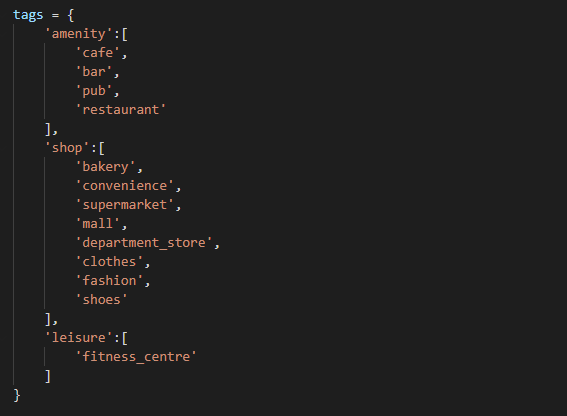
Novack et al. (2018) discuss in their article how different urban features affect the pleasantness of urban space. This article was helpful as the study was done using OSM data, and the authors even provide lists of different features that make urban space pleasant. For my analysis I used their list of OSM features that indicate sociable places, or so called “third places“:
Routing analysis
With this list of OSM tags I downloaded the corresponding points of interest (POIs) from OSM using OSMnx. Then, with a combination of OSMnx and Pandana, I created a routable network to which I set the locations of the POIs. For this part of the analysis I used the complete, unsimplified graph. The routing analysis uses both the nodes and the edges of the graph, so keeping the precise geometry leads to more accurate travel time calculations.
After the network was constructed, I ran the routing analysis with Pandana. The analysis calculates the travel time from every network node to a specified number of nearest POIs. I specified that 10 nearest POIs should be routed to which means that in the result every network node has a maximum of 10 different travel time values: time to to 1st, 2nd, 3rd, … 10th nearest POI. The travel times are based on the assumption that the average walking speed is 4.5 km/h. Additionally I limited the analysis to only calculate travel times to POIs that are within a 15-minute walk.
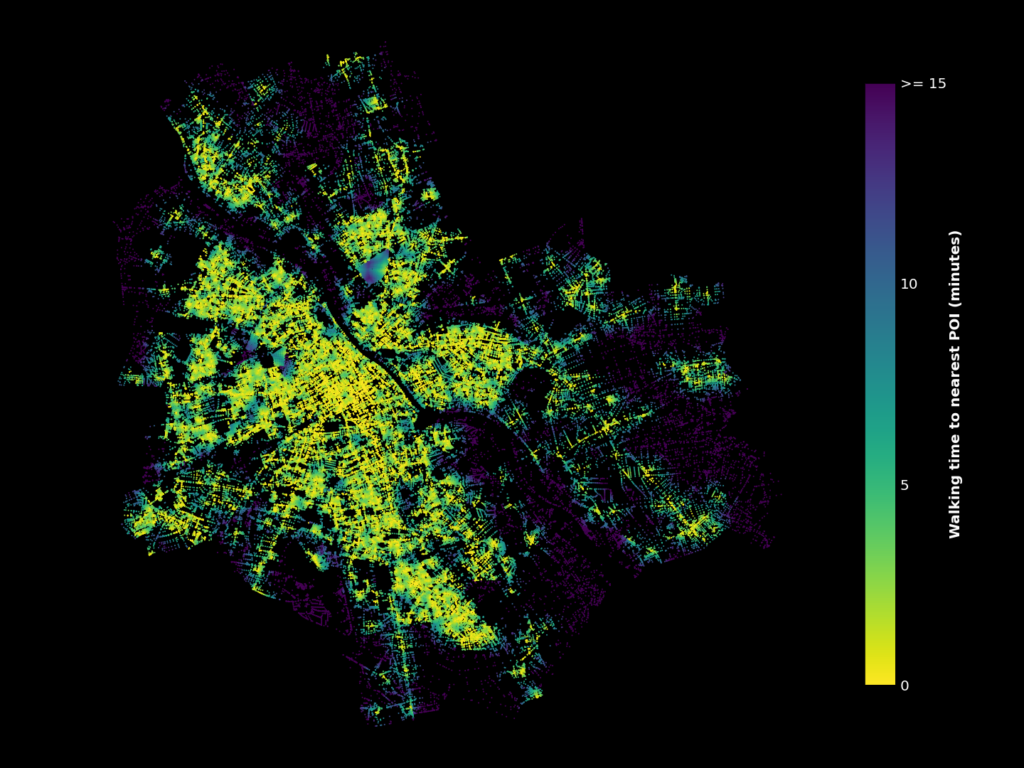
The resulting visualization is a bit cluttered. To get a clearer overview of the data, I once again used Matplotlib’s hexbins. Instead of amounts of points, I calculated the average travel times for every hexagon this time.
Another thing to note is that visualizing travel times only to the nearest POI probably isn’t the ideal approach. For example, if place A had a single cafe and place B had a tight cluster of multiple restaurants and shops, both places would look nearly identical on the map. Plotting the travel times to, for example, the 5th nearest POI would fix this, as singular features wouldn’t affect the map as much. Below is a comparison of how the visualization changes when the selection of walking time is changed between nearest, 5th nearest and 10th nearest POI.
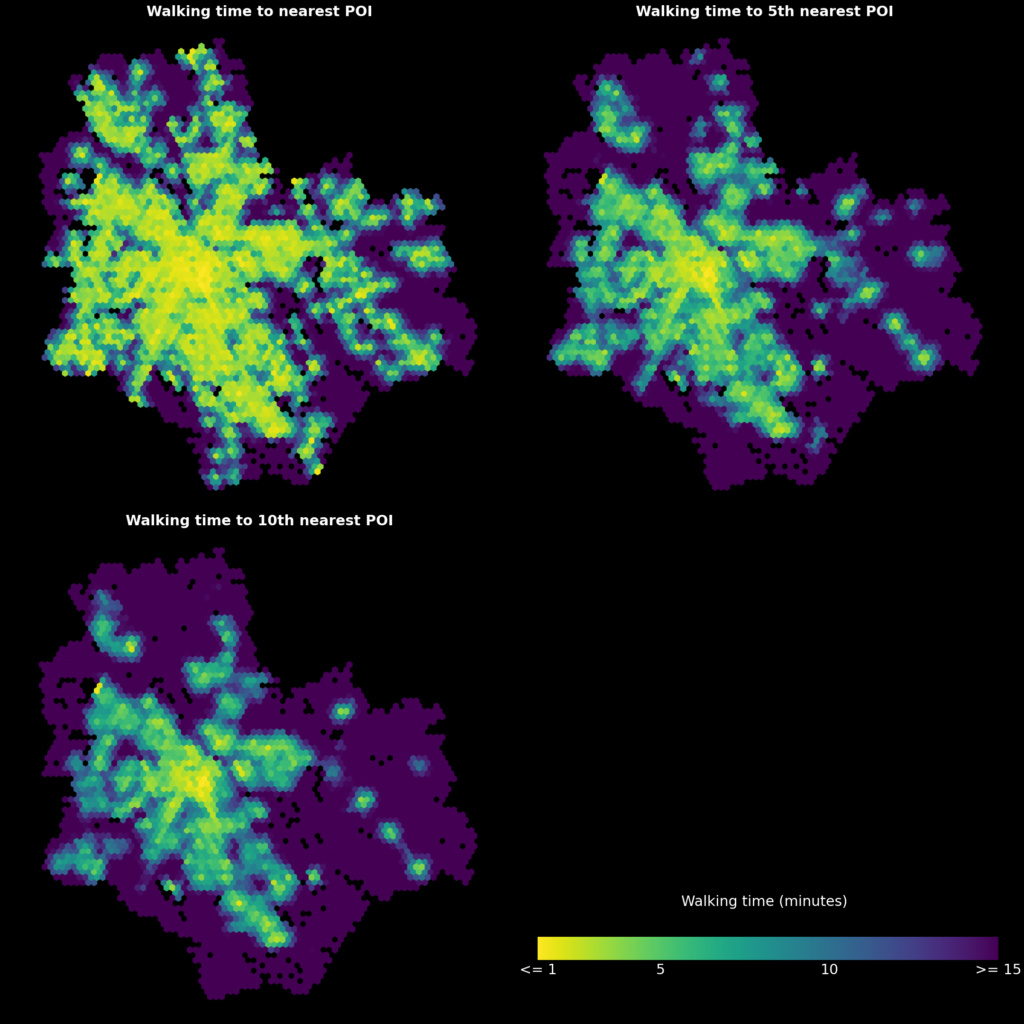
This visualization is much better, and it clearly shows areas where sociable urban places can and cannot be accessed on foot. Some correlation can be found between these maps and the intersection density, but there are also areas that are noticeably more or less “walkable” depending on the method.
3. Conclusion
This blog post showcased two network-based methods of analyzing walkability. Focusing on network density alone is a very quantifiable and objective approach, but it completely ignores other qualities of the urban space being analyzed. Approaching walkability as a measure of how certain urban features can be accessed by walking is one possible way to combine the qualitative aspect of walkability with network analysis. Of course, the results of this approach are completely dependent on the types of features selected. This could be an interesting topic for further research: the analysis could, for example, reveal areas that are more or less walkable to certain groups of people by selecting features that are important to them specifically.
4. Some useful resources
A great overview of some key concepts:
Ewing, R., & Cervero, R. (2010). Travel and the built environment: A meta-analysis. Journal of the American planning association, 76(3), 265-294. https://doi.org/10.1080/01944361003766766
More about OSMnx:
– Boeing, G. 2017. OSMnx: New Methods for Acquiring, Constructing, Analyzing, and Visualizing Complex Street Networks. Computers, Environment and Urban Systems 65, 126-139. https://doi.org/10.1016/j.compenvurbsys.2017.05.004
– Boeing’s excellent and openly available Advanced Urban Analytics course was also a major inspiration, especially to the routing analysis portion of this post.
Article that deals with OSM features as predictors of urban space quality:
– Novack, T., Wang, Z., & Zipf, A. (2018). A system for generating customized pleasant pedestrian routes based on OpenStreetMap data. *Sensors, 18*(11), 3794. https://doi.org/10.3390/s18113794
Documentation of the libraries used:
– Links in the introduction