From 52 seconds to a third of a second: faster QGIS saves to PostGIS with pipeline mode
At Gispo we work with PostGIS databases that run in the cloud, for example in AWS. Saving data from QGIS to those databases felt slow, and I wanted to know why. Was it the database? The network? QGIS itself?
Most of the time it turned out to be waiting. When QGIS adds new features to a PostGIS table, it sends them one at a time. After each one it waits for the database to answer before it sends the next. A database in the cloud is far away in network terms, so with 1000 features QGIS waits 1000 times.
Think of sending 1000 text messages and waiting for a reply to each one before you send the next. Most of the time is spent on waiting, not on typing. If you send all the messages first and then read the replies as they come, the other person has the same amount of work, but you don’t wait between messages. PostgreSQL has a feature for exactly this, called pipeline mode.
I tried this in a proof of concept that uses pipeline mode when QGIS adds new features to PostgreSQL. In my test setup, with a network latency of 50 milliseconds, saving 1000 new points went from 52 seconds to a third of a second. That is about 150 times faster.
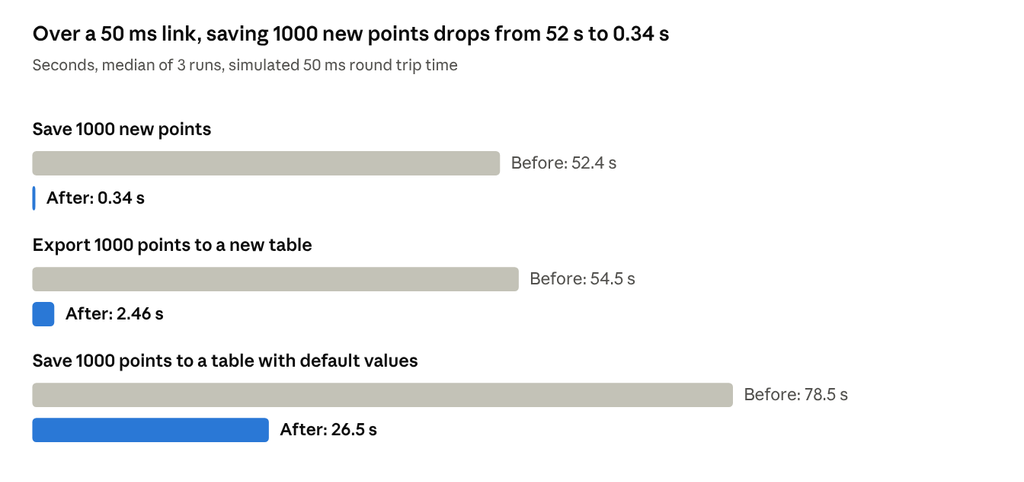
addFeatures benchmark, 2026-10-08 · 1000 points, +50 ms round trip time
Tables with default values gain less, because QGIS still asks the server for each default value separately. More about that below.
The gain depends on how many features you add. Adding ten features gets about half a second faster, which you would hardly notice. Pasting thousands of features, importing a layer or writing Processing results to the database is where it matters: with 10,000 features the save went from over eight minutes to under two seconds.
For now this only covers adding new features. Changing or deleting existing features still works one at a time, as before.
The numbers come from a test setup on my laptop with a simulated network delay, not from a real cloud database. And this is a proof of concept, not part of any QGIS release. The rest of the post is more technical: why it was slow, what I changed, and what should happen next.
Where the time goes: one round trip per feature
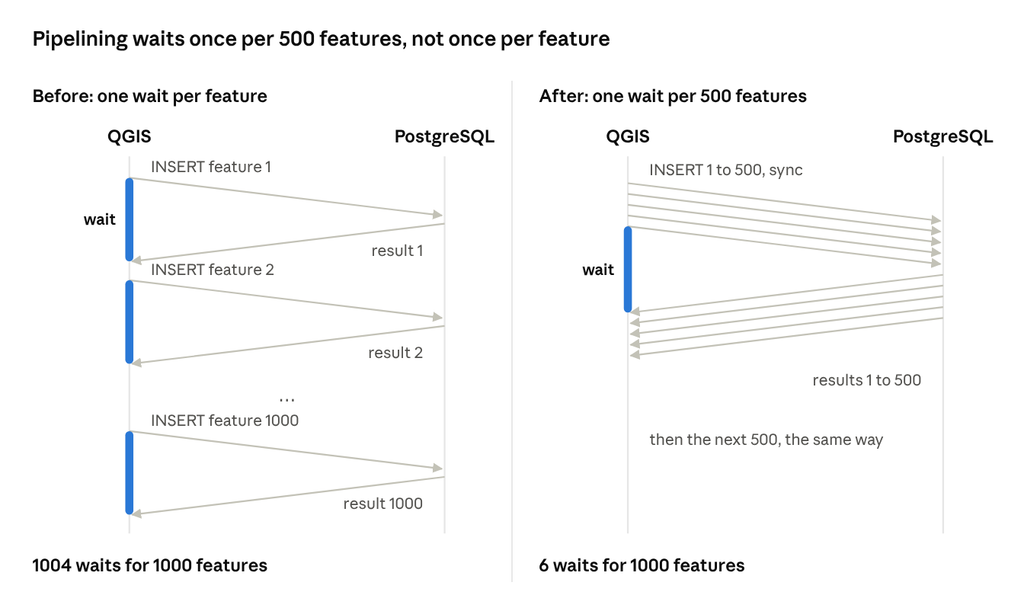
Each arrow is a message on its way, and the blue bars are the time QGIS spends waiting. Before, QGIS waits for every answer. After, it sends 500 statements, waits once, and reads the answers in order.
Why saving to PostGIS from QGIS is slow
When I looked at how the PostgreSQL provider adds features, the answer was simple. QgsPostgresProvider::addFeatures() prepares one INSERT statement and then executes it once per feature with a blocking PQexecPrepared() call. Each call waits for the server’s answer before the next one goes out.
So adding N features costs N + 4 round trips: BEGIN, PREPARE, one EXECUTE per feature, DEALLOCATE and COMMIT. With 1000 features and a 50 ms round trip time, that is 1004 × 50 ms = 50.2 seconds of waiting. The benchmark measured 52.4 seconds, so about 96 % of the time went to waiting for the network.
The same loop is used everywhere new features are written: saving an edit session, Export to PostgreSQL, Processing outputs, with or without the FastInsert flag. In the benchmark they all took the same time.
Why not COPY or one big INSERT?
These were the first options I looked at. Why not send all features in one multi-row INSERT ... VALUES? Why not use COPY, the fastest way to load data into PostgreSQL? Or just use FastInsert?
- Multi-row INSERT. QGIS needs the new primary keys back, so it can give each new feature its id. With one INSERT per feature, the
RETURNINGrow clearly belongs to that feature. With a multi-row INSERT, PostgreSQL doesn’t guarantee that theRETURNINGrows come back in the same order as the input rows. Matching the ids to the features got complicated, and I dropped the idea. - COPY returns no ids at all. It would only work for
FastInsert, where QGIS doesn’t need the ids back. - FastInsert only skips reading the ids. It still makes one round trip per feature, and saving an edit session never uses it.
Pipeline mode keeps everything else as it is: one INSERT per feature, one result per feature, in the same order. Only the waiting between them goes away. That made it the smallest change.
How pipeline mode works in the QGIS PostgreSQL provider
libpq, the PostgreSQL client library QGIS uses, has had pipeline mode since version 14. The client queues many statements, sends them with one sync point, and reads the results afterwards in the same order. It is a client-side feature that works with any server supporting the extended query protocol, so it only needs libpq 14 or newer on the client.
The proof of concept changes two places:
- A new method,
QgsPostgresConn::PQexecPreparedBatch(), runs a prepared statement for a list of parameter sets. It enters pipeline mode, queues each statement, syncs once, reads all results in order and leaves pipeline mode. QgsPostgresProvider::addFeatures()now works in chunks of 500 features or 16 million characters of parameters, whichever comes first. For each chunk it first builds all the parameters, then sends the chunk as one batch, then handles the results with the same code as before.
In libpq calls, one chunk looks like this:
PQenterPipelineMode(conn)
for each feature in the chunk:
    PQsendQueryPrepared(conn, "addfeatures", params)
PQpipelineSync(conn)
for each feature in the chunk:
    result = PQgetResult(conn)   -- the RETURNING row, or the error
    PQgetResult(conn)            -- NULL that ends this result
PQgetResult(conn)                -- PGRES_PIPELINE_SYNC
PQexitPipelineMode(conn)
The loop itself is short. Most of the thinking went into the details around it:
- Parameters are built before entering the pipeline. For a NULL in a column with a default, QGIS runs
SELECT <default>to find the value. In transaction mode that runs on the same connection, and no other query is allowed while the connection is in pipeline mode. - Pipeline mode is always left. A scope guard reads any remaining results and exits pipeline mode on every path, also when an exception is thrown. Otherwise the next query fails, and QGIS’s retry logic resets the connection. In transaction mode, that would silently drop the user’s open transaction.
- The first error stops the batch. After an error, the server skips the rest of the pipeline and the client gets an “aborted” result for each skipped statement. QGIS throws the first error into the existing rollback code, so a failed save behaves as before.
- The chunk size has a cap. Geometries are held as hex WKB strings, four times the size of the binary geometry. Without the 16 million character cap, a chunk of large polygons could hold hundreds of megabytes in memory.
- There is an off switch. Some connection poolers, proxies and PostgreSQL-compatible databases may not handle pipelining well. A hidden setting,
PostgreSQL/disablePipelining, sends the statements one at a time as before. QGIS builds with an older libpq keep the old path too.
C++ and Python tests cover both the pipelined and the sequential path, including an error in the middle of a batch and transaction mode.
Benchmark results at 50 ms latency
The point scenarios went from 1004 round trips to 6, and from 52 seconds to a third of a second at +50 ms. To measure this, I put a small TCP proxy between QGIS and the database. It delays all traffic so each round trip takes 10 or 50 ms longer, which is typical for a cloud database, and it counts how many times QGIS waits for an answer.
Each scenario ran three times with 1000 features (the polygon case with 64), and the table shows the median at +50 ms:
| Scenario | Before | After | Faster | Round trips |
|---|---|---|---|---|
| Add 1000 points, new ids returned | 52.4 s | 0.33 s | 157× | 1004 → 6 |
| Same with FastInsert | 52.4 s | 0.34 s | 157× | 1004 → 6 |
| Save an edit session with 1000 new points | 52.4 s | 0.34 s | 155× | 1004 → 6 |
| Export a 1000-point layer to a new table | 54.5 s | 2.46 s | 22× | 1044 → 46 |
| Add 1000 points, column with a default, NULL in every other feature | 78.5 s | 26.5 s | 3.0× | 1504 → 506 |
| Add 64 polygons of 10,000 vertices | 5.18 s | 2.05 s | 2.5× | 68 → 7 |
At +50 ms, 6 round trips are 0.30 s of the 0.33 s, so the insert is now close to what the network allows. The export keeps about 40 round trips for creating the table. Without any added delay, against the database on my laptop, adding 1000 points went from 0.21 s to 0.02 s. With pipelining turned off through the setting, the numbers match the old code.
More features, bigger difference
The speedup isn’t a fixed number. Before, every feature costs a round trip. After, every 500 features cost one, plus the same four fixed statements. So the more features you add, the bigger the difference:
| Features added | Before | After | Faster | Round trips |
|---|---|---|---|---|
| 10 | 0.72 s | 0.26 s | 2.7× | 14 → 5 |
| 100 | 5.36 s | 0.26 s | 20× | 104 → 5 |
| 1000 | 52.4 s | 0.33 s | 157× | 1004 → 6 |
| 10,000 | 8 min 35 s | 1.43 s | 361× | 10,004 → 24 |
With very many features the gain levels off. Each chunk of 500 still costs one wait plus the local work, which by my estimate puts the limit a little over 400× at 50 ms. The 10, 100 and 10,000 rows were measured a week later, on the same code. “Before” there is the old one-at-a-time path through the off switch, and the 10,000-feature “before” ran once, because it takes over eight minutes.
Limits: default values, connection poolers, real cloud databases
The biggest remaining cost is default values. When a feature has NULL in a column with a default, QGIS asks the server for the default with a separate SELECT, one round trip per value. Pipelining doesn’t touch this, so that scenario is only three times faster: 500 round trips and 26.5 s at +50 ms remain. That is the next thing to fix.
The limits of this test:
- The numbers come from a latency proxy, not a real cloud database. The proxy adds delay only, not bandwidth limits, packet loss or other effects of a real network.
- It was a Debug build of QGIS, with PostgreSQL 11.8 and PostGIS 2.5.4 in Docker on WSL2. A release build does less local work, but the round trips are the same.
- Connection poolers such as PgBouncer, proxies and PostgreSQL-compatible databases haven’t been tested with pipelining. That is what the off switch is for.
- Large polygons against the local database were about 6 % slower (1.76 s → 1.86 s). It is probably the cost of holding a whole chunk of large parameters in memory before sending.
- Only adding features is covered. Changing attributes or geometries and deleting features still go one at a time, but the same batch method could be used for them too.
How this was made
The plan, the code, the tests and the benchmark were made with Claude Code, an AI coding tool. I asked the questions, chose the approach and checked the results. That was a quick way to find out whether the idea is worth anything.
It also means this code is not meant for QGIS. It isn’t merge-ready, and the QGIS AI tool policy (QEP 408) doesn’t allow AI-assisted code contributions. The real implementation should be written by developers, and this PoC is only there to show what is possible and to give the numbers.
Next steps: a QEP, developers and funding
The PostgreSQL provider is one of the most central parts of QGIS. A change like this should start with a QEP and be implemented by developers who know the provider well. Gispo would like to make that happen.
We’re looking for partners: QGIS developers and companies who want to work on it, and organisations who’d benefit from faster saving to remote databases and could help fund it.
I’ll also start a discussion on the qgis-developers mailing list. If you’d like to work on this or help fund it, or you have a cloud database or a PgBouncer setup where you could try the branch, contact me at lauri.kajan@gispo.fi.
Links
- The proof-of-concept branch
- The benchmark: method, scripts and results
- Pipeline mode in the libpq documentation
- QEP 408: AI tool use policy